
Cross-technology and Cross-platform Readiness
Nowadays, engineers shouldn’t be limited which OS they use. By definition, frameworks should be completely generic, and they shouldn’t restrict their users. Which means that they should be completely cross-platform, supporting Windows, Linux and MacOS.
For example, our test automation framework BELLATRIX is entirely written on .NET Core and .NET Standard. Through cross-platform templates, we distribute it on each OS using only the native CLI. After that, you can use your favourite IDE- Visual Studio (Windows or Mac) or Visual Studio Code. Using the same editor makes the development and discussing possible problems more comfortable.
By cross-technology readiness, I mean to be able to write tests for different technologies such as Web, Mobile, Desktop and API. For me, this also includes a similar API. In BELLATRIX, we strive the API for different modules to be as identical as possible. Find bellow a few examples.
BELLATRIX Web
[Browser(BrowserType.Firefox, BrowserBehavior.ReuseIfStarted)]
[ExecutionTimeUnder(2)]
public class BellatrixBrowserBehaviourTests : WebTest
{

    [Browser(BrowserType.Chrome, BrowserBehavior.RestartOnFail)]
    public void BlogPageOpened_When_PromotionsButtonClicked()
    {
        App.NavigationService.Navigate("http://demos.bellatrix.solutions/");
        var blogLink = App.ElementCreateService.CreateByLinkText<Anchor>("Blog");
        blogLink.EnsureIsVisible();
        blogLink.Click();
    }
}BELLATRIX Desktop
[App(Constants.WpfAppPath, AppBehavior.RestartEveryTime)]
[ExecutionTimeUnder(2)]
public class ControlAppTests : DesktopTest
{

    public void MessageChanged_When_ButtonHovered_Wpf()
    {
        var button = App.ElementCreateService.CreateByName<Button>("LoginButton");
        button.Hover();
        var label = App.ElementCreateService.CreateByName<Button>("successLabel");
        label.EnsureInnerTextIs("Sucess");
    }
}BELLATRIX API
[ExecutionTimeUnder(2)]
public class CreateSimpleRequestTests : APITest
{

    public void GetAlbumById()
    {
        var request = new RestRequest("api/Albums/10");
        var client = App.GetApiClientService();
        var response = client.Get<Albums>(request);
        response.AssertContentContains("Audioslave");
    }
}Cloud Readiness
In BELLATRIX, we make that possible through the usage of a single attribute. Our implementation is based on the observer design pattern.
[SauceLabs(BrowserType.Chrome, "62", "Windows", BrowserBehavior.ReuseIfStarted, recordScreenshots: true, recordVideo: true)]
public class SauceLabsTests : WebTest
{

    public void PromotionsPageOpened_When_PromotionsButtonClicked()
    {
        App.NavigationService.Navigate("http://demos.bellatrix.solutions/");
        var promotionsLink = App.ElementCreateService.CreateByLinkText<Anchor>("Promotions");
        promotionsLink.Click();
    }
}
You have similar attributes for BrowserStack and CrossBrowserTesting.
[BrowserStack(BrowserType.Chrome,
"62",
"Windows",
"10",
BrowserBehavior.ReuseIfStarted,
captureNetworkLogs: true,
captureVideo: true,
consoleLogType: BrowserStackConsoleLogType.Verbose,
debug: true,
build: "myUniqueBuildName")]Easy Knowledge Transfer
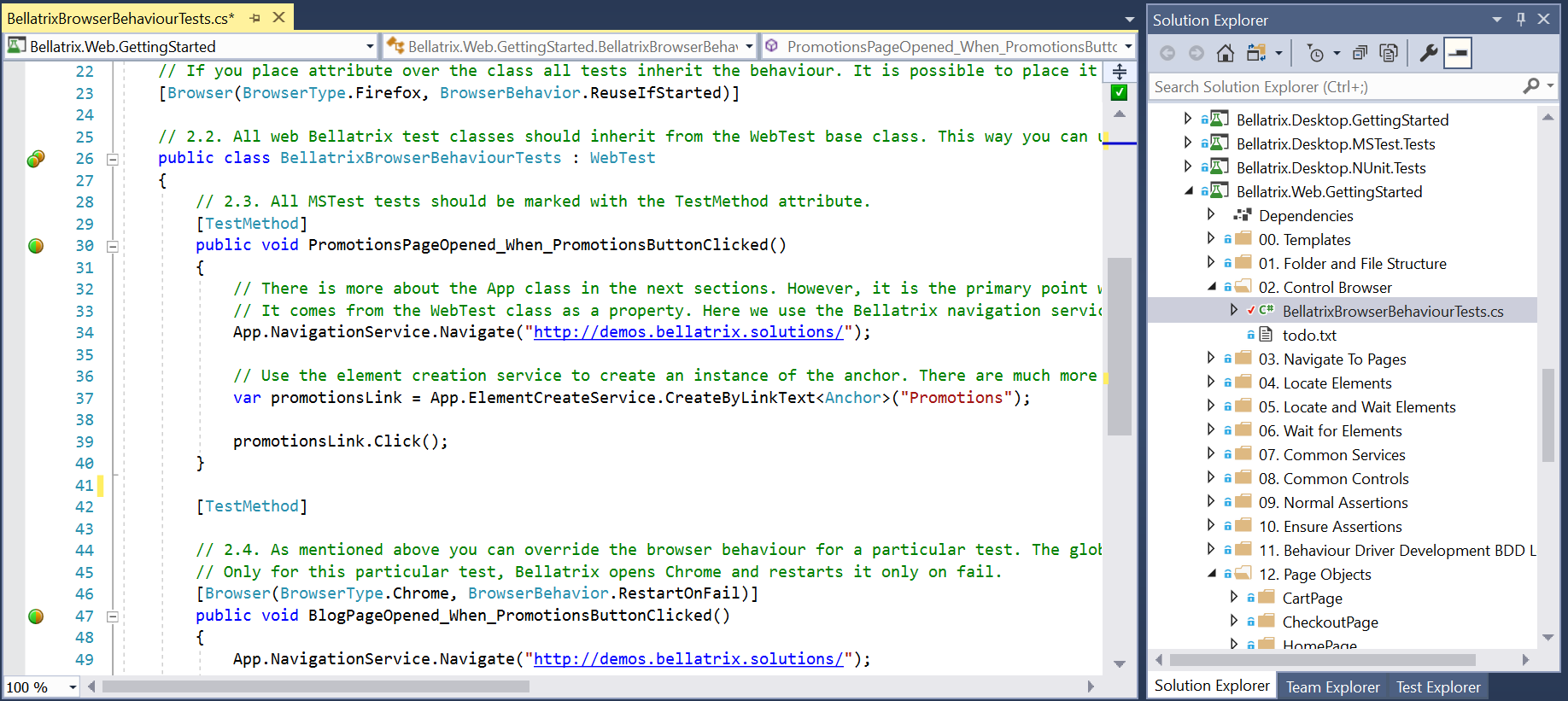
Documentation is not enough. I bet that most of you that have more than few years of experience in the field of automated testing and have a custom framework spent countless hours teaching new colleagues how to write “proper” tests using the team’s framework. I believe that there should be a more automated process allowing people to learn by themselves. I think one way to do it is to utilize the so-called getting started solutions or starter kits. Projects that have examples with explanations on how to write tests and why we use a particular method or not.
For each test technology, we created a similar starter kit for BELLATRIX. Each of them explains the features of the framework with detailed real-world examples. Moreover, contains detailed comments for each part. Something that makes it ideal for self-learning is that after each chapter it offers exercises that people can do themselves.
[ScreenshotOnFail(true)]
[Browser(BrowserType.Chrome, BrowserBehavior.ReuseIfStarted)]
public class FullPageScreenshotsOnFailTests : WebTest
{

    public void PromotionsPageOpened_When_PromotionsButtonClicked()
    {
        App.NavigationService.Navigate("http://demos.bellatrix.solutions/");
        var promotionsLink = App.ElementCreateService.CreateByLinkText<Anchor>("Promotions");
        promotionsLink.Click();
    }
}
Different features are grouped in separate folders, and at the end of each chapter, there is a TODO file containing the exercises.
Troubleshooting Easiness
With the increasing tests count and complexity, it will be even more critical the tests be more maintainable. A significant part of this effort is the easier troubleshooting and better support for locating errors.
A big part of maintainability is troubleshooting existing tests. Most in-house solutions or open-source ones don’t provide lots of features to make your life easier. This can be one of the most time-consuming tasks. Having 100 failing tests and find out whether there is a problem with the test or a bug in the application. If you use plugins or complicated design patterns the debugging of the tests will be much harder, requiring lots of resources and expertise.
Two of the ways BELLATRIX as full-stack test automation framework handles these problems are through full-page screenshots and video recording on test fail. Again, following the paradigm of similar API- we use these features through attributes.
BELLATRIX Full-page Screenshots
If you want to read how it works internally, you can read the article- Capture Full Page Screenshots Using WebDriver with HTML2Canvas.js
BELLATRIX Video Recording
[VideoRecording(VideoRecordingMode.OnlyFail)]
[Browser(BrowserType.Chrome, BrowserBehavior.ReuseIfStarted)]
public class VideoRecordingTests : WebTest
{

    public void PromotionsPageOpened_When_PromotionsButtonClicked()
    {
        App.NavigationService.Navigate("http://demos.bellatrix.solutions/");
        var promotionsLink = App.ElementCreateService.CreateByLinkText<Anchor>("Promotions");
        promotionsLink.Click();
    }
}
The video recording works on all OS. We use FFmpeg video recorder internally. In some of my next articles, I will describe in details how to implement it yourself. It works similarly to the video recording on tests fail that I wrote about in the past.
Library Customization
One of the hardest things to develop is to allow these generic frameworks to be extendable and customizable. The whole point of creating a shared library is to be used by multiple teams across the company. However, the different teams work in a different context. They may have to test a little bit different things. So, the library code as is may not be working out of the box for them. Thus, the engineers should be able to customize some parts to fit their needs.
Bellow, you can find a couple of examples of how this is possible with BELLATRIX. In the next articles, I will show you how it works if you wish to implement it in your framework.
Override Actions Globally
[Browser(BrowserType.Firefox, BrowserBehavior.RestartEveryTime)]
public class OverrideGloballyElementActionsTests : WebTest
{
    public override void TestsArrange()
    {
        Button.OverrideClickGlobally = (e) =>
        {
            e.ToExists().ToBeClickable().WaitToBe();
            App.JavaScriptService.Execute("arguments[0].click();", e);
        };
        Anchor.OverrideFocusGlobally = CustomFocus;
    }
    private void CustomFocus(Anchor anchor)
    {
        App.JavaScriptService.Execute("window.focus();");
        App.JavaScriptService.Execute("arguments[0].focus();", anchor);
    }

    public void PurchaseRocketWithGloballyOverridenMethods()
    {
        App.NavigationService.Navigate("http://demos.bellatrix.solutions/");
        Select sortDropDown = App.ElementCreateService.CreateByNameEndingWith<Select>("orderby");
        Anchor addToCartFalcon9 =
        App.ElementCreateService.CreateByAttributesContaining<Anchor>("data-product_id", "28").ToBeClickable();
        Span totalSpan = App.ElementCreateService.CreateByXpath<Span>("//*[@class='order-total']//span");
        sortDropDown.SelectByText("Sort by price: low to high");
        addToCartFalcon9.Focus();
        addToCartFalcon9.Click();
        totalSpan.EnsureInnerTextIs("95.00€", 15000);
    }
}
Another possible customisation is through local override which means that the behaviour will be changed only for the currently executing test.
Here through OverrideClickGlobally delegate, we change the default behaviour of all buttons in the framework without recompiling the library. In the example, instead of using the default WebDriver implementation we change the Click method to use JavaScript instead. Usually, we execute this once for all tests, so the right place to call the override is in the AssemlyInitialize method of MSTest that is performed once per assembly.
Override Actions Locally
Button.OverrideClickLocally = (e) =>
{
    e.ToExists().ToBeClickable().WaitToBe();
    App.JavaScriptService.Execute("arguments[0].click();", e);
};Extensibility through Events
public class DebugLoggingButtonEventHandlers : ButtonEventHandlers
{
    protected override void ClickingEventHandler(object sender, ElementActionEventArgs arg)
    {
        DebugLogger.LogInfo($"Before clicking button. Coordinates: X={arg.Element.WrappedElement.Location.X} Y={arg.Element.WrappedElement.Location.Y}");
    }
    protected override void HoveringEventHandler(object sender, ElementActionEventArgs arg)
    {
        DebugLogger.LogInfo($"Before hovering button. Coordinates: X={arg.Element.WrappedElement.Location.X} Y={arg.Element.WrappedElement.Location.Y}");
    }
}

[Browser(BrowserType.Chrome, BrowserBehavior.RestartEveryTime)]
public class ElementActionHooksTests : WebTest
{
    public override void TestsArrange()
    {
        App.AddElementEventHandler<DebugLoggingButtonEventHandlers>();
    }

    public void PurchaseRocketWithGloballyOverridenMethods()
    {
        // some test logic
    }
}
Another way to extend BELLATRIX is to use the controls hooks. This is how the BDD logging and highlighting are implemented. For each method of the control, there are two hooks- one that is called before the action and one after.
The available hooks for the button are:
-
Clicking
An event executed before button click
-
Clicked
An event executed after the button is clicked
-
Hovering
An event executed before button hover
-
Hovered
An event executed after the button is hovered
-
Focusing
An event executed before button focus
-
Focused
An event executed after the button is focused
You need to implement the event handlers for these events and subscribe them. BELLATRIX gives you again a shortcut- you need to create a class and inherit the {ControlName}EventHandlers. In the example, DebugLogger is called for each button event printing to Debug window the coordinates of the button. You can call external logging provider, making screenshots before or after each action, the possibilities are limitless.
There are many more ways how you can enable extensibility and customization of your full-stack test automation framework. You can check how we do it in the Extensibility section of BELLATRIX documentation. There will be a whole new series about this feature. There, I will show you how it works internally and how to do it yourself if you want.
Summary
Full-stack test automation frameworks have many features that can enable you to work in the new emerging complex contexts. In the first article about these features, we talked about how necessary is the tooling to be cross-platform and cross-technology ready. These tools should make easy for you to execute your tests in the cloud so that you can test your applications on multiple devices and OS. Major must-have for such frameworks is to give you ways to find why your tests failed- such as screenshots and videos. Last but not least since they are used across a wide range of teams’ contexts should provide ways for customisation and extensibility.
