

I had just upgraded My Tested ASP.NET to be compatible with version 2.2 of ASP.NET Core, when the server-side technology upgraded to version 3.0. I had to re-do everything. And then some – Microsoft had changed their public classes to internal. Taking a look at the ASP.NET Repository, we can see an announcement about it:
https://github.com/aspnet/Announcements/issues/326
Why did this bother me? I had been using these classes in my project, I needed them. And I had to find a solution.
My name is Ivaylo Kenov, and I am a guest writer at Automate the Planet. I am currently working as a CTO in a large software development team, and I am a huge fan of high-quality software development and clean code. For this reason, I created My Tested ASP.NET – a collection of open-source fluent testing libraries for ASP.NET. Throughout the process of developing these, I have been learning programming paradigms, concepts, and techniques that help me evolve professionally by the day. My passion for both quality-code and open-source urges me to share my knowledge with the .NET world.
The Problem
If you opened the announcement in the link above and happened to wonder what pubinternal means – these are classes, declared as public, but put in an internal namespace. For example, the class, responsible for creating the Controllers and the class, responsible for invoking your Actions, were pubinternal classes. These classes used to be public, and I was using them. The main focus of my tool is to replicate the exact ASP.NET Core behavior in the test, the way it would be in the application. For this reason, I was using classes that were internal but in a public namespace, or classes that were not supposed to be used in a normal web application.
Alike me, many library creators were utilizing classes that Microsoft used to expose. I guess many programmers have had to find a workaround for this breaking change – you may read the numerous disappointed comments under the above-cited announcement. On the other hand, it’s easy to understand Microsoft’s decision – they’re constantly changing their internal classes to make the ASP.NET technology better. And having to consider whether a version-change is a breaking change poses a huge difficulty for the guys there – following all their classes is close to impossible. They decided to make it easier for themselves, and that’s completely fine.
So, now I had to find a way to use their internal classes. Here’s an example of a class I was using https://github.com/dotnet/aspnetcore/blob/master/src/Hosting/Hosting/src/Internal/StartupLoader.cs
It is internal now but used to be public. This class has a single static method called LoadMethods. The StartupLoader class, as its name suggests, loads the entire logic of the Startup class of a web application. Since I design my framework to have a TestStartup class, where my user replaces services with mocks, and the classes describe the mocked services, I had to load the TestStartup class the same way Microsoft load it. Copy-pasting the logic behind the loading would be painful – in case they changed something, I’d have to find, analyze, and change it, too. So, instead of copy-pasting, I decided to use these classes directly in my code. This allowed me to do something of the sort of:
| var startupMethods = StartupLoad.LoadMethods(); |
Using Reflection Library to Solve the Problem
var assembly = Assembly.Load(new AssemblyName("Microsoft.AspNetCore.Hosting"));
var startUpLoader = assembly.GetType("Microsoft.AspNetCore.Hosting.StartupLoader");
var loadMethodsMethod = startUpLoader.GetMethod("LoadMethods", BindingFlags.NonPublic | BindingFlags.Static);
loadMethodsMethod.Invoke(null, new object[] {
serviceCollection.BuildServiceProviderFromFactory(),
StartupType,
TestWebServer.Environment.EnvironmentName});
First, I get the Assembly, the StartupLoader type, the method which is now in an internal class and is static – hence, the BindingFlags. Then I invoke the method with null, which describes that there is no instance – the class or the method call is static. And finally, I pass an array of arguments.
Looking at this code, the only way I can describe it is as ugly. And I tried to find something which is – okay, at least to my view – less ugly. In my 5 years of experience with C#, I wasn’t aware of the technique I found to be the solution before I came across this problem. Here’s why I decided to share it with you.
Before we start, I need to say that I do realize what I showed above is not a common scenario. A developer needs to be in quite a strange place to have to call something which is not private. Hopefully, you’ll find this technique to be valuable knowledge.
My final solution is this:
var startupLoader = WebFramework.Internals.StartupLoader.Exposed();
startupMethods = startupLoader.LoadMethods(
serviceCollection.BuildServiceProviderFromFactory(),
StartupType,
TestWebServer.Environment.EnvironmentName);
Using Dynamic Objects to Solve the Problem
First Version
It turned out I can call LoadMethods directly, and pass the arguments – no Invoke, no null, no magic LoadMethods string. All looks like standard C# code – again, at least to me, it looks great. But how did I do it? I used the Dynamic Object. I know – dynamic objects are not among the best practices either. But, since Microsoft included them in the language, they must consider them useful. And they are.
The Dynamic Object can be used with data that is not structured. For example, if you have JSON, which does not follow any specific schema, one way to parse it is by converting each property to a magic string. The other way to do it is by using Dynamic Objects, and the code looks better – just as you saw above. Moreover, the use of Dynamic Objects brought no disadvantages – my code is of equally good performance. Well, I can use neither IntelliSense, nor Code Completion, but I couldn’t use them with Reflection either. In fact, I lost nothing by using dynamic, and my small win is the way my code looks.
How did I make the LoadMethods callable by the dynamic type? It turned out – I didn’t know before – that we can create our Dynamic Objects, as well as define their behavior. Small research showed me that we could use Dynamic Objects to access the internals of an object. Here’s the link to the article that helped me with it: http://igoro.com/ .
There are some ready-to-use solutions to this problem, but they are quite huge, while I only needed to call internal methods and properties to get my library back on track. That’s why I decided to implement my version. Now, I’m going to show you how to do it. I’ll do it in a separate project to make things clearer.
Imagine the following scenario – you have a Class Library that you’ve been using for a long time. For example, AutoMapper – a great library, that many among us, C# developers, have been using for years. And, let’s say we wanted to customize something in it directly in the configuration code. Then, for some reason, the author of AutoMapper decided to change one of the classes to internal, along with all its methods. We’d have no choice if we wanted to keep using the library – we’d either need to use Reflection or the technique I’m about to show you.
Okay, create a Class Library and an internal static class. Create a method, too that cannot be used outside the Assembly. By now, your code should look something like this:
using System;
namespace CoolLibrary
{
    internal static class SomeCoolClass
    {
        public static void CoolMethod()
        {
            Console.WriteLine(42);
        }
    }
}
If you reference the CoolLibrary in your main Console project, you won’t be able to use the SomeCoolClass, because it’s internal. Let’s first solve this with Reflection.
We need to get the Assembly where the internal type is. Remember using System.Reflection, before you get started:
static void Main(string[] args)
{
    var assembly = Assembly.Load(new AssemblyName("CoolLibrary"));
}
Then, we need to find the type we’re looking for – in this case, SomeCoolClass:
static void Main(string[] args)
{
    var assembly = Assembly.Load(new AssemblyName("CoolLibrary"));
    var type = assembly.GetType("CoolLibrary.SomeCoolClass");
    var method = type.GetMethod("CoolMethod");
}
Unless we specify the class’s full name – the namespace dot the name of the class – the value of the variable, called type, will be null. As written here, the type is loaded. Then, we need to use it to get the method:
tatic void Main(string[] args)
{
    var assembly = Assembly.Load(new AssemblyName("CoolLibrary"));
    var type = assembly.GetType("CoolLibrary.SomeCoolClass");
    var method = type.GetMethod("CoolMethod");
}
Just a quick reminder – what we’re doing here is still entirely Reflection, nothing dynamic, yet.
Now, if we try to call and get it like that, we’ll see that it works:
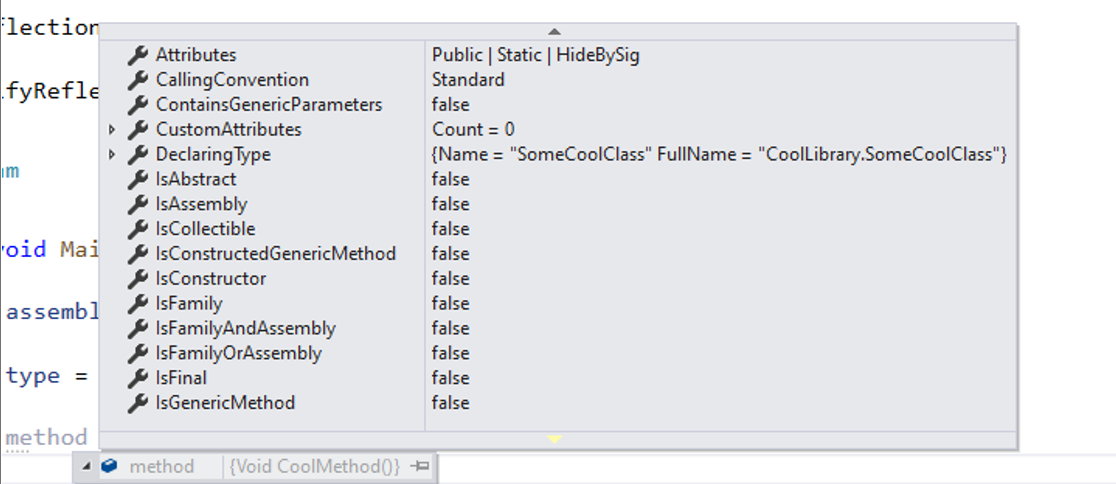
But, in case CoolMethod is marked as internal, we won’t get it:
internal static class SomeCoolClass
{
    internal static void CoolMethod()
    {
        Console.WriteLine(42);
    }
}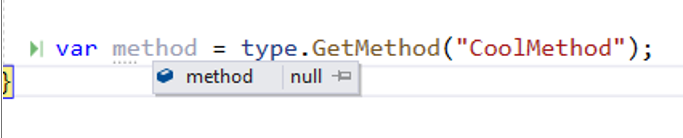
By default, Reflection gets only the public members, and if we want to get anything not public, we need to specify it explicitly with the BindingFlags enum:
private readonly BindingFlags flags = BindingFlags.NonPublic | BindingFlags.Static;
var method = type.GetMethod("CoolMethod", flags);
Okay, now, if we want to invoke the method, we need to provide the object from which the method is invoked. But ours is a static method, and we’ll provide null:
method.Invoke(null, new object[0]);The new object[0] shows that we want to invoke the method without parameters since CoolMethod here is parameterless.
If we run the code, we’ll get 42:
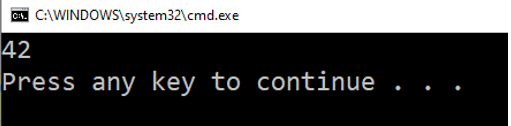
All cool – but it’s ugly. And, the moment our method expects parameters, the code gets even uglier – we need to provide these parameters as an array of objects:
internal static void CoolMethod(string text, int number)
{
    Console.WriteLine(text + number);
}
method.Invoke(null, new object[] { "some text", 42 });
Not cool at all. I’ll further modify the method to return a string:
internal static string CoolMethod(string text, int number)
{
    Console.WriteLine(text);
    Console.WriteLine(number);
    return text + " " + number;
}
We want to get the result now, and we need to cast the method. Reflection has no idea what type of data it returns, so we need to specify it explicitly:
var result = (string)method.Invoke(null, new object[] { "some text", 42 });If we print the result, we should get this:
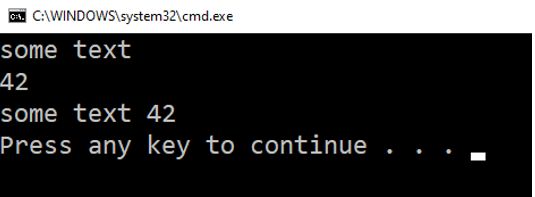
Working cool – looking ugly.
Second Version
Now, let’s use Dynamic Objects, and make things look better. Add a new class. I call it ExposedObject, because that’s in fact what we’re doing here – exposing internal objects:
namespace BeautifyReflectionCode
{
    public class ExposedObject
    {
    }
}
C# allows me to create a custom dynamic type, and define its behavior. For example, if you create a dynamic someDynamic = 42, C# allows you to make whatever dynamic you like:
dynamic someDynamic = 42;
someDynamic.WhateverILike();
You can call this method, and it will be resolved at run-time. If it existed and had the same signature, it would be invoked. But WhateverILike() does not exist, and the message is so clear that even an average student of mine understands it.

But we can make it work. Let’s go to the newly-created ExposedObject and inherit the DynamicObject. It’s in System.Dynamic:
using System.Dynamic;
namespace BeautifyReflectionCode
{
    public class ExposedObject : DynamicObject
    {
    }
}
DynamicObject is a special class which allows the default dynamic behavior be overridden. Among the coolest things we can do with the DynamicObject, is that we can make a JavaScript-like object. I don’t know where you’ll use that in a C# code, but the thing is that you can do it. You can make an object like this:
dynamic myBlackHole = new object();And you can do this, for example:
myBlackHole.Name = "MyTested";
myBlackHole.LastName = "ASP.NET";
Console.WriteLine(myBlackHole.FirstName);
Hey, I’m just kidding around. This is not going to work with the default implementation – it will be throwing exceptions, just like it did with the nonexistent WhateverILike method. The MyBlackHole dynamic variable does not contain definitions for either FirstName or LastName.
Yet again – this is just the default implementation. You can override the default behavior and attach properties and/or methods to your dynamic at any given time.
Before I show you how I feel, it’s important to emphasize – we only use dynamic when we have a good reason. You already saw one good reason – when you need to access internal members. Another is parsing unstructured data. That kind of data will be full of magic strings if you want to parse it, but with the dynamic object, you can do it – and in a few lines of code.
Alright, back to overriding the default dynamic behavior. Analyze the DynamicObject to see its methods:
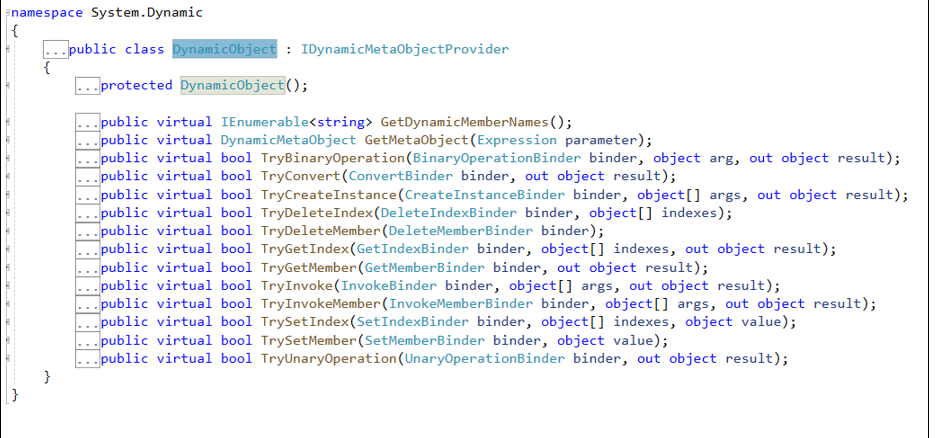
The TryInvokeMember is the method that overrides the behavior when you’re invoking a dynamic method. So, when you want to invoke WhateverILike(), you can override the TryInvokeMember() and define the way WhateverILike() will be working. Here’s the code:
using System.Dynamic;
namespace BeautifyReflectionCode
{
    public class ExposedObject : DynamicObject
    {
        public override bool TryInvokeMember(InvokeMemberBinder binder, object[] args, out object result)
        {
            return base.TryInvokeMember(binder, args, out result);
        }
    }
}
For the moment, we’ll be returning the base, which is the default implementation. And as we saw, the default implementation throws an Exception, in case the method does not exist. Now, let’s do something like this:
static void Main(string[] args)
{
    dynamic someDynamic = new ExposedObject();
    someDynamic.WhateverILike();
}
Place a Breakpoint against the return baseline within the TryInvokeMember method that we’ll be overriding in a second, and debug. Do this to make sure that the method is invoked, and that you sure can override it. You can write logic, which describes how any dynamic method would be invoked.
All virtual methods in the DynamicObject class have some sort of Binder. Binder is a class which provides information about what exactly the user is trying to do. Check it in debug mode:
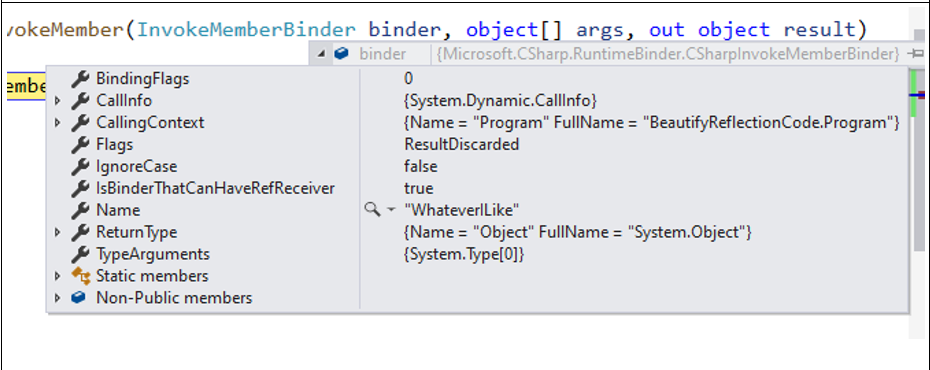
Here we can see that we’re trying to call the WhateverILike method. We can see the return type – System.Object. We can see who called the method – here’s it’s the Program class. Great – we receive the binder with information about the dynamic call, we receive the arguments that were called in the dynamic method – if any at all. This means that if we did something like this someDynamic.WhateverILike(42, “some text”), the arguments would be the contents of the object array args. When we set the result variable – as you can see, it is an out variable – we will provide the result from the WhateverILike method. Put simply, in case we save the result from the method in a variable, var dynamicResult = someDynamic.WhateverILike(42, “some text”), the out object result will provide the value of dynamicResult. Here’s some code:
public override bool TryInvokeMember(InvokeMemberBinder binder, object[] args, out object result)
{
    Console.WriteLine(binder.Name);
    for (int i = 0; i < args.Length; i++)
    {
        Console.WriteLine(" " + args);
    }
    result = "MyCoolResult";
    return true;
}
The method does the following: it prints the name of the method we’re calling, go through each of the method’s arguments, prints it, and assigns a value to the out object result variable that it will pass to the variable in the Main method. Returning true or false informs the C# run-time whether the dynamic invocation was successful.
Here’s what we’ll get, when we run the code:
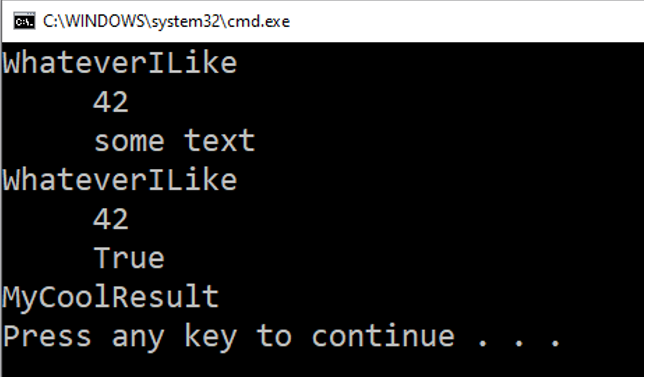
The thing is that we can make the ExposedObject work the way we like. We can override any part of its behavior. Go back to the DynamicObject analysis and find the TryGetMember. It is the method invoked when the user tries to access a property. TrySetMember – when the user attempts to set a value to a property. From there, you can quickly get the notion of each DynamicObject method that you can override.
But wait, what was this all about? Here again is what made me dig deeper into dynamics – my Reflection code:
var assembly = Assembly.Load(new AssemblyName("CoolLibrary"));
var type = assembly.GetType("CoolLibrary.SomeCoolClass");
var method = type.GetMethod("CoolMethod", BindingFlags.NonPublic | BindingFlags.Static);
var result = (string)method.Invoke(null, new object[] { "some text", 42 });
The private readonly type is the type that I’m trying to access with Reflection – the internal type. With TryInvokeMember(), I search this member within the type I get. The binder.Name is the name of the dynamic method being called. And I provide the BindingFlags that I am using in the Reflection var method = type.GetMethod(“CoolMethod”, BindingFlags.NonPublic | BindingFlags.Static). Then, if the method does not exist, I leave it to the default implementation. Otherwise, I’ll invoke it, just like I do with Reflection. I assign the result to the out object result, so the result of the internal method is directly passed to the result from the dynamic invocation. Finally, I return true.
You can see this here https://github.com/ivaylokenov/MyTested.AspNetCore.Mvc/blob/version-3.0/src/MyTested.AspNetCore.Mvc.Abstractions/Utilities/ExposedObject.cs
Now, I can remove the ugly Reflection code, create a dynamic which will be of type DynamicObject. Then, I can call the internal method, which I’m trying to access. Here’s the code:
Third Version
Now, I can remove the ugly Reflection code, create a dynamic that will be of type DynamicObject. Then, I can call the internal method, which I’m trying to access. Here’s the code:
static void Main(string[] args)
{
    var assembly = Assembly.Load(new AssemblyName("CoolLibrary"));
    var type = assembly.GetType("CoolLibrary.SomeCoolClass");
    dynamic someCoolClass = new ExposedObject(type);
    someCoolClass.CoolMethod("Something cool", 42);
}
Run it to see if it works. If it does, you’ll see something like this:
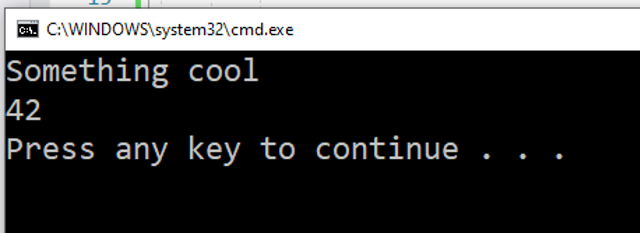
It works, yet the Reflection code works, too. The only difference is the DynamicObject code’s got the looks – it looks like regular C# code.
You can use the result of the type directly because Dynamic Objects can be cast. If you know it’s a string, you can say:
string result = someCoolClass.CoolMethod("Something cool", 42);
Console.WriteLine(result);
It will work. So, what happens – we’re calling an internal method from an internal class. Of course, we haven’t implemented the properties. If we do this:
internal static class SomeCoolClass
{
    internal static string Name { get; set; }
    internal static string CoolMethod(string text, int number)
    {
        return text + " " + number;
    }
}
static void Main(string[] args)
{
    var assembly = Assembly.Load(new AssemblyName("CoolLibrary"));
    var type = assembly.GetType("CoolLibrary.SomeCoolClass");
    dynamic someCoolClass = new ExposedObject(type);
    someCoolClass.Name = "My Tested ASP.NET";
}
We’re only overriding TryInvokeMember, and if we run the above code, we’ll get this:

Within the ExposedObject we need to override the TrySetMember method:
private readonly BindingFlags flags = BindingFlags.NonPublic | BindingFlags.Static;
public override bool TrySetMember(SetMemberBinder binder, object value)
{
    var property = this.type.GetProperty(binder.Name, flags);
    if (property == null)
    {
        return base.TrySetMember(binder, value);
    }
    property.SetValue(null, value);
    return true;
}
Just like with the method – we’re trying to get the property. The default behavior will throw an Exception if the property does not exist. If it does, we’ll set a value to it. It’s a static property, so we provide null for an object and value, received as an argument. And we return true.
Now our dynamic has a property. We’ll be getting no more Exceptions about it.
static void Main(string[] args)
{
    var assembly = Assembly.Load(new AssemblyName("CoolLibrary"));
    var type = assembly.GetType("CoolLibrary.SomeCoolClass");
    dynamic someCoolClass = new ExposedObject(type);
    string result = someCoolClass.CoolMethod("Something cool", 42);
    string name = someCoolClass.Name = "My Tested ASP.NET";
    Console.WriteLine(name);
}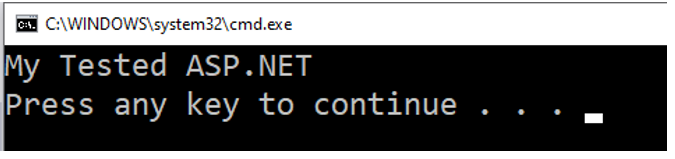
Things work. But we assigned the property and its value to a string variable. If we try to print it directly, we’ll still get an Exception. Also, try to debug someCoolClass, and you’ll find it is not not debuggable. Since we overrode only the TrySetMember(), we have no direct reference to the internal SomeCoolClass.
We need to implement the TryGetMember logic to be able to access a property:
public override bool TryGetMember(GetMemberBinder binder, out object result)
{
    var property = this.type.GetProperty(binder.Name, flags);
    if (property == null)
    {
        return base.TryGetMember(binder, out result);
    }
    result = property.GetValue(null);
    return true;
}
Now we do have access to the internal static class’s internal static property.
Summary
If it’s not with Reflection, there’s no way to get the Assembly and Type, so the first two lines of code in the Main method are inevitable. And the rest looks quite cool. As I already said, this is my only gain here. Both Reflection and Dynamic are slow, but in my situation I had to decide, whether I wanted to use an internal class, or if I wanted performance. I suffer no significant sacrifice either. In My Tested ASP.NET I’m using this internal class only once, when the test assembly is loaded – I don’t have a Hot Path calling this Dynamic Object. Afterwards, all the tests are executed fast, and I can afford two lines of Reflection code.
Just like with expression Trees I showed in another article, this same technique is used by ASP.NET Core. When you create Controllers, the platform finds them with the help of Reflection. Finding them is slow. But once it’s found them, ASP.NET Core caches them, then things work fast.
And, this was it. A bonus to this article – a bonus for me, if you don’t mind – is an epiphany. When we know what we’re doing with our technologies, we can break the rules and use what a generally considered bad practice to our advantage is.
I’ll keep covering advanced topics, so be on the watch. Make sure you check out My Tested ASP.NET’s YouTube channel, where you’ll find more. Happy hacking!
