

Microsoft launched its latest version of the C# language – C# 8.0 – in September 2019. It came with many new features or improvements like readonly struct members, default interface members static local functions, and async streams, among others. But the focus of this article, as its title suggests, is a breaking change – the Non-Nullable Reference Types.
My name is Ivaylo Kenov, and I am a guest writer at Automate the Planet. I am currently working as a CTO in a large software development team, and I am a huge fan of high-quality software development and clean code. For this reason, I created My Tested ASP.NET – a collection of open-source fluent testing libraries for ASP.NET. Throughout the process of developing these, I have been learning programming paradigms, concepts, and techniques that help me evolve professionally by the day. My passion for both quality-code and open-source urges me to share my knowledge with the .NET world.
The Problem
Before we get on to Non-Nullables, let’s go quickly through what is possible and whatnot, in terms of null values, in the C# versions before 8.0:
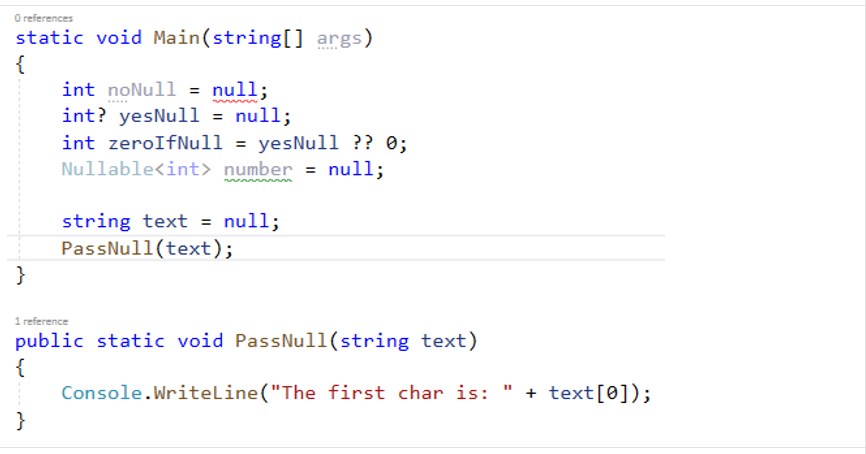
Primitive data types before C# 8 can only accept null values with several syntactic devices. As you see, the compiler is worried only about the integer null, which cannot bear a null value. It shows no worries whatsoever about the PassNull method. Let’s run this code:

Yes, the compiler is friendly, but we pay dearly for it, as we see. We’ve passed a variable with a null value to our method, and we’re punished at run-time. This is among the reasons Microsoft made this huge change within the reference types.
How to Turn On Non-Nullable Reference Types Feature?
What’s with the Non-Nullable Reference Types in C# 8, why do you need to embrace them? For one thing, be prepared to react to tons of warnings. The feature is disabled by default, and you need to manually turn it on. Open your project file to see how you do it:

Your C# version should be at least 8.0, so you need to set it to the latest. You need to enable the global reference types to be Nullable. I personally have set Treat Warnings As Errors to true, since this provides more visual information about what goes on in the code. Now, see why this change is called breaking:
Non-Nullable Reference Types Feature Examples
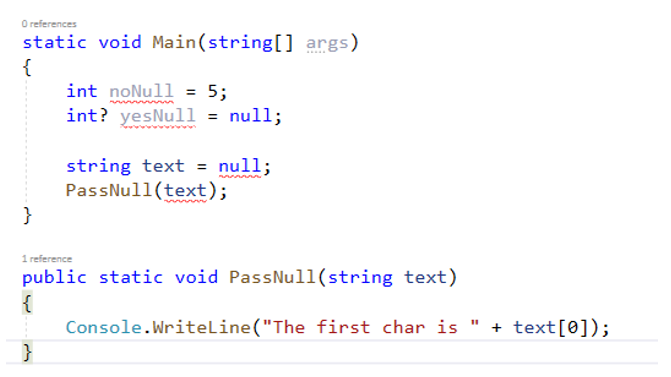
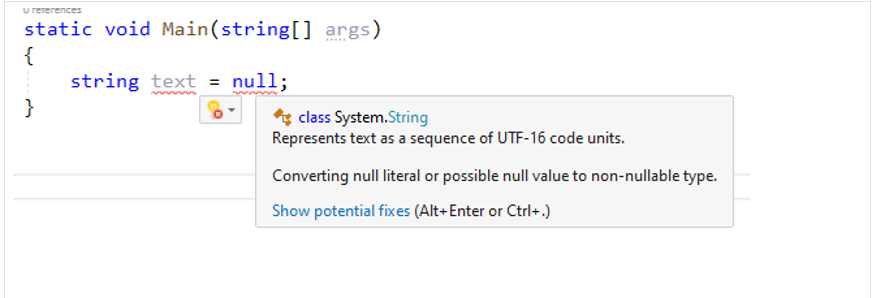
Now the compiler is concerned a lot more – hugely to our benefit. Let’s first have a look a the error message that goes with the null value string:
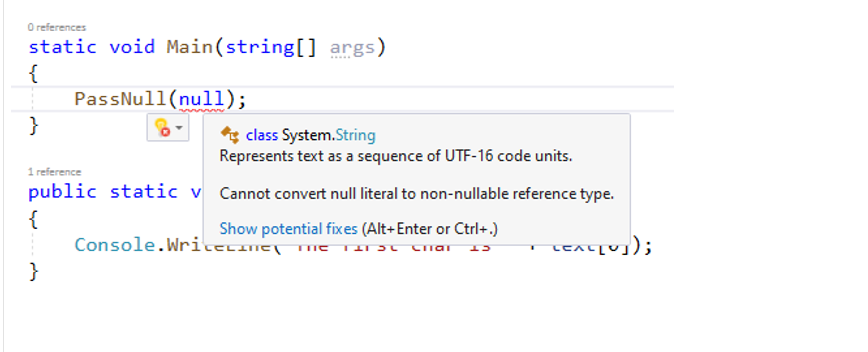
Now to the PassNull method – you may have noticed that the compiler does not warn you at the definition of the method, but does not allow you to pass a null value when you invoke it. Here’s what it has to say:
If you try to solve this by adding the Null-Conditional Operator to the reference-type parameter at the method definition, the compiler warns you about something else:
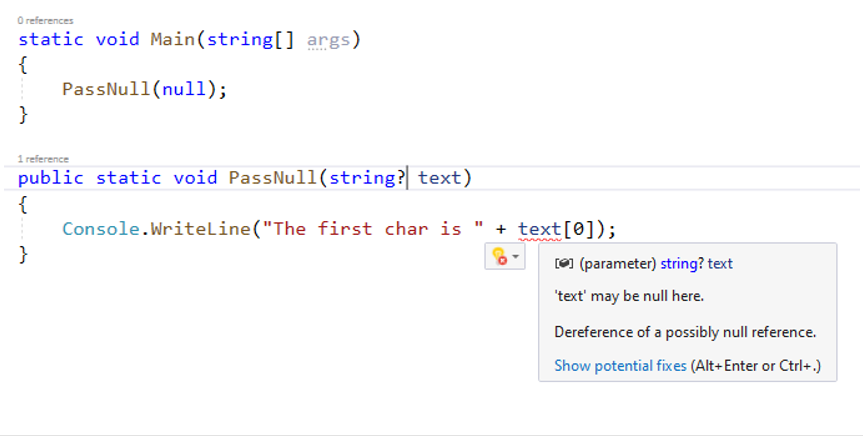
Of course, all this does not mean you can’t use a reference type variable as a Nullable anymore. Look at this:
static void Main(string[] args)
{
    PassNull(null);
}
public static void PassNull(string? text)
{
    Console.WriteLine("The first char is " + text?[0]);
}
You do have the Null-Conditional Operator and you have several more techniques. Let’s modify our PassNull method, so that it’s no longer void, but returns an integer value:

Hover your cursor over the red underlining you’ll read Cannot convert null literal to a non-nullable reference type. How fix it? Add the Elvis operator after each variable:
static void Main(string[] args)
{
    PassNull(null);
}
public static int? PassNull(string? text)
{
    return text?.Length;
}
Non-Nullables in Classes
Let’s use the Cat class.
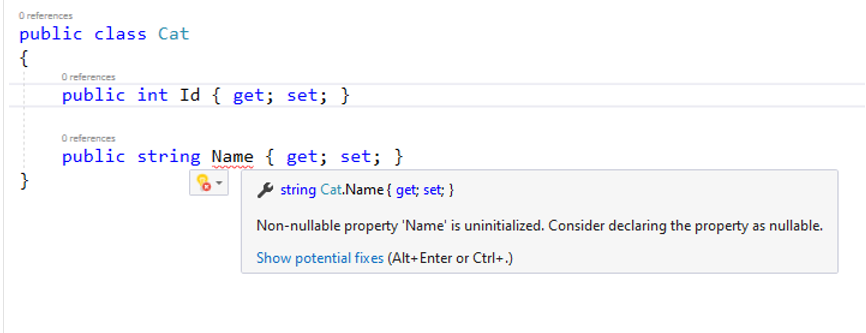
public class Cat
{
    public int Id { get; set; }
    public string? Name { get; set; }
}
When instantiating a cat, you cannot pass null to the constructor. You need to provide value and guarantee that the property will never be null. The compiler actually helps you with this feature.
Help It Help You
But sometimes the compiler is not sure – it can’t help you. So, you may help it. What do I mean by that:
public static string PassNull(bool returnNullIfTrue)
{
    return returnNullIfTrue ? "Not null" : null;
}
This doesn’t work – Possible null reference return, as the compiler puts it. Just put the Null-Conditional Operator after the return type in the method’s signature:
public static string? PassNull(bool returnNullIfTrue)
{
    return returnNullIfTrue ? "Not null" : null;
}
Okay, but what happens when you try to do something like this:
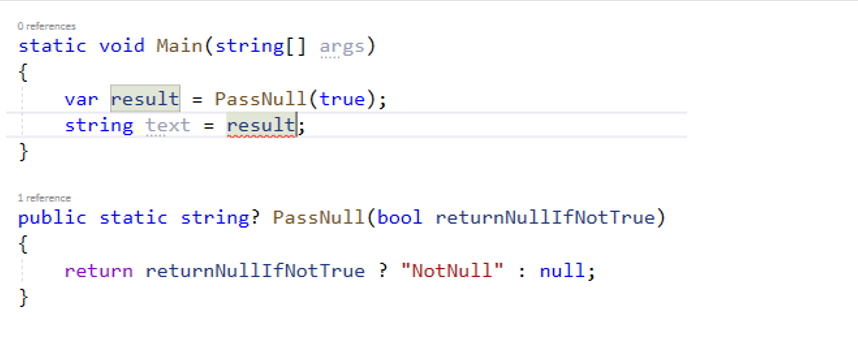
You know the logic in the PassNull() and are entirely sure the method will never return null – you’re giving it true as an argument. But try to save the value result in a non-nullable variable: A compile-time error is what you’ll get. The compiler is not smart enough to know that there is no way the result variable may be null. You can help it like this:
static void Main(string[] args)
{
    var result = PassNull(true);
    string test = result!;
}
The exclamation mark at the end of the expression is equal to claiming you know the method may return null, but you’re sure it’s safe. You’re asking the compiler to allow you to use the returned variable. You can achieve the same by placing the exclamation mark after the method:
static void Main(string[] args)
{
    var result = PassNull(true)!;
    string test = result;
}
You can even provide the operator like this:
static void Main(string[] args)
{
    var result = PassNull(true);
    string test = null!;
}
With this, you claim again that you know what you’re doing – that the variable is not nullable, but you want to force it. As already said, this feature makes compile-time checks. Regardless of the fact, your code may throw an exception at run-time, the compiler allows you to force and disable the nulls.
Enable Disable within Code
Another way you may disable the null checking is this:
#nullable disable
static void Main(string[] args)
{
    var result = PassNull(true);
    string test = null;
}
#nullable restore
This way, you’re telling the compiler that you don’t care about non-nullable reference types in this part of your code. So, it won’t throw any errors here. Of course, just as you can say #nullable disable, you can also say #nullable enable, at the places you want to do precisely this.
Another way to help the compiler is through attributes. Before you start, make sure you’re using System.Diagnostics.CodeAnalysis – that’s where attributes are:
static void Main(string[] args)
{
    PassNull(null);
}
public static void PassNull( string text)
{
    Console.WriteLine(text);
}
With AllowNull you’re telling the compiler that this string may be of non-nullable reference type, but you want to allow nulls. You can also DisallowNull:
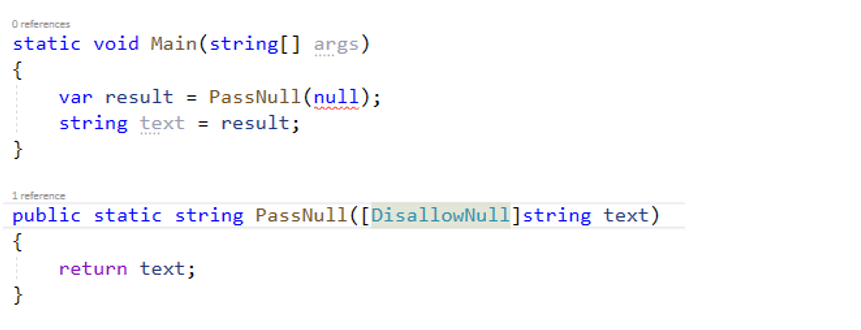
You have more options, like specifying the following:
[return: NotNullIfNotNull("parameter")]
public static string PassNull(string text)
{
    return text ?? "Test";
}
You specify that if the parameter is not null, the method does not return null. The compiler will recognize the attribute and will use it as a help to know whether it should show an error or not. Now, if you try to do this, you will receive an error:

The compiler gives you a Red Card because you’re trying a convert a null literal to a non-nullable type. If you pass a hard-coded value, the compiler is fine:
static void Main(string[] args)
{
    string test = PassNull("Test");
}
The compiler is fine because it sees the attribute in the method, and that you’re not returning null from it – so, no error.
Non-Nullables in Generics
If you have a generic method or class with some generic parameter, there’s a new generic constraint that prevents the Tkey generic parameter from being nullable.
public static void GenericMethod<TKey>()
where TKey : notnull
{
}
This means that you would only able to call the method with a non-nullable parameter – for example, like this:
static void Main(string[] args)
{
    GenericMethod<int>();
}
Summary
I hope you like this new feature. I personally haven’t had the chance to try it in a big project. I might give it a try, though, in an existing project, containing quite some code – My Tested ASP. NET. But I guess it’ll be a tough job to convert the entire library not to allow nullable reference types. On the other hand, as you saw, there are a lot of attributes to help. You need to bear in mind that if you’re using a library that does not work with this feature, this same library will still throw Null Reference errors.
Anyway, we’d better get our heads around the non-nullables – they’ll be the new normal in just a year or two. I personally believe this feature is up for a brighter future. It will eliminate some of the most stupid mistakes we, programmers make.
Here’s a cool blog post on the topic, which explains the attributes and various situations in good detail.
Thank you for reading this, and make sure to leave a comment with the topics that you’d like me to cover for you.
Make sure you check out My Tested ASP.NET’s YouTube channel ,where you’ll find more. Happy hacking!
