
In this article part of the Design & Architecture Series, we will talk about handling environments’ test data in automated tests. We will discuss why hard-coding data in tests is considered a bad practice, leading to flaky tests. The solution will be to use configuration files based on the build configuration. Moreover, we will look into ways how you can parameterize your tests and run them a couple of times based on rows in a CSV file.
Hard-Coding Test Data
Let’s start with discussing why hard-coding test data in the tests is a bad practice. Here is an example from automated tests automating the shopping process in eBay that I developed to explain the Template Method Design Pattern and its usage in automated tests.
public partial class ItemPage : WebPage
{
    public ItemPage(IWebDriver driver)
    : base(driver)
    {
    }
    protected override string Url => "http://www.ebay.com/itm/";
    public void ClickBuyNowButton()
    {
        BuyNowButton.Click();
    }
    public double GetPrice() => double.Parse(Price.Text);
}
In the above code, the URL of the page is directly listed in the code. However, 99% of the time, we need to run our tests against different test environments where we use different URLs and data. It is not very practical to copy-paste the page object and just change the URL right?
public class ClientInfoDefaultValues
{
    public const string EMAIL = "angelov@yahoo.com";
    public const string FIRST_NAME = "Francoa";
    public const string LAST_NAME = "Sonchifolia";
    public const string COMPANY = "Moon AG";
    public const string COUNTRY = "France";
    public const string CITY = "Paris";
    public const string ADDRESS1 = "9 Rue Mandar";
    public const string PHONE = "+33186954328";
    public const string ZIP = "75002";
}
Another common practice is to place such data in a class which is full with constants.
We have a similar problem with this piece of code because the accounts and the data can vary on the test environments.
The above approaches lead to flaky tests in a couple of ways. I saw many tests where the data is copy-paste for each of them. Another bad thing that can happen as mentioned is to duplicate some of the core logic, such as page objects. All of these copy-pasting increases the time for maintenance. Moreover, if a part of the test data has to change at some point, you may miss to replace it if it is not in a central place.
Using Test Data from Configuration Files
Here I will show you how we can utilize the .NET Core native support of JSON configuration files to solve the problem.
The techniques that I will present to you are based on the code of our test automation framework BELLATRIX. There we use a similar approach for handling test environments data.
Project Configuration
First, you need to install the following NuGet packages.
-
Microsoft.Extensions.Configuration.Json
-
Microsoft.Extensions.Configuration
-
Microsoft.Extensions.Configuration.Binder
Creating Configuration Infrastructure
Next, we need to create the JSON config file where we will store the test data. I want to be able to configure three different aspects of the automated tests- WebDriver timeouts, URL settings, and billing default values. For each of them, I will create a separate section in the JSON file. Create a new JSON file named testFrameworkSettings.json
{
  "webSettings": {
    "elementWaitTimeout": "30",
    "chrome": {
      "pageLoadTimeout": "120",
      "scriptTimeout": "5",
      "artificialDelayBeforeAction": "0"
    },
    "fireFox": {
      "pageLoadTimeout": "30",
      "scriptTimeout": "1",
      "artificialDelayBeforeAction": "0"
    },
    "edge": {
      "pageLoadTimeout": "30",
      "scriptTimeout": "1",
      "artificialDelayBeforeAction": "0"
    },
    "internetExplorer": {
      "pageLoadTimeout": "30",
      "scriptTimeout": "1",
      "artificialDelayBeforeAction": "0"
    },
    "opera": {
      "pageLoadTimeout": "30",
      "scriptTimeout": "1",
      "artificialDelayBeforeAction": "0"
    },
    "safari": {
      "pageLoadTimeout": "30",
      "scriptTimeout": "1",
      "artificialDelayBeforeAction": "0"
    }
  },
  "urlSettings": {
    "ebayUrl": "http://www.ebay.com/",
    "amazonUrl": "https://www.amazon.com/",
    "kindleUrl": "https://read.amazon.com"
  },
  "billingInfoDefaultValues": {
    "email": "angelov@yahoo.com",
    "company": "Moon AG",
    "country": "France",
    "firstName": "Francoa",
    "lastName": "Sonchifolia",
    "phone": "+33186954328",
    "zip": "75002",
    "city": "Paris",
    "address1": "9 Rue Mandar"
  }
}
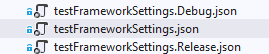
For each test environment we will have a separate copy of this file where you can change the data. For example, the initial testFrameworkSettings.json can hold the data for our DEV environment. The testFrameworkSettings.Debug.json for the LOCAL dev environment and so on. The structure of the files is based on the build configurations of your solution. So, for each test environment you will have a separate build configuration. When we change the build configuration the correct file will be copied to the bin folder and read by the code.
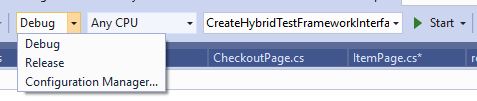
Next, we need to edit the MSBuild of the project by double clicking on it (VS 2019). You need to add the following piece.
<ItemGroup>
<   None Update="testFrameworkSettings.$(Configuration).json">
    <CopyToOutputDirectory>Always</CopyToOutputDirectory>
    </None>
</ItemGroup>
Next part is to create a class that allows us to access the values in the right config file.
Based on the configuration, the right JSON file will be copied to the output directory.
public sealed class ConfigurationService
{
    private static ConfigurationService _instance;
    public ConfigurationService() => Root = InitializeConfiguration();
    public static ConfigurationService Instance
    {
        get
        {
            if (_instance == null)
            {
                _instance = new ConfigurationService();
            }
            return _instance;
        }
    }
    public IConfigurationRoot Root { get; }
    public BillingInfoDefaultValues GetBillingInfoDefaultValues()
    {
        var result = ConfigurationService.Instance.Root.GetSection("billingInfoDefaultValues").Get<BillingInfoDefaultValues>();
        if (result == null)
        {
            throw new ConfigurationNotFoundException(typeof(BillingInfoDefaultValues).ToString());
        }
        return result;
    }
    public UrlSettings GetUrlSettings()
    {
        var result = ConfigurationService.Instance.Root.GetSection("urlSettings").Get<UrlSettings>();
        if (result == null)
        {
            throw new ConfigurationNotFoundException(typeof(UrlSettings).ToString());
        }
        return result;
    }
    public WebSettings GetWebSettings()
    => ConfigurationService.Instance.Root.GetSection("webSettings").Get<WebSettings>();
    private IConfigurationRoot InitializeConfiguration()
    {
        var filesInExecutionDir = Directory.GetFiles(Path.GetDirectoryName(Assembly.GetExecutingAssembly().Location));
        var settingsFile =
        filesInExecutionDir.FirstOrDefault(x => x.Contains("testFrameworkSettings") && x.EndsWith(".json"));
        var builder = new ConfigurationBuilder();
        if (settingsFile != null)
        {
            builder.AddJsonFile(settingsFile, optional: true, reloadOnChange: true);
        }
        return builder.Build();
    }
}
There are a couple of important notes about it. First, it is implemented as a singleton class, which means that you can access the values without creating a new instance each time. Next, the first-time initialization and loading of the file are happening in the InitializeConfiguration method where we get the first file matching the criteria. This is why it is crucial to copy the correct JSON file. Next, we add the JSON file to the builder. For each section of the config, we have a separate DTO class, which is the C# representation of the data. We have a distinct method for each section.
Here is how looks the class that represents the billingInfoDefaultValues section.
public sealed class BillingInfoDefaultValues
{
    public string FirstName { get; set; }
    public string LastName { get; set; }
    public string Country { get; set; }
    public string Address1 { get; set; }
    public string City { get; set; }
    public string Phone { get; set; }
    public string Zip { get; set; }
    public string Email { get; set; }
}
Configuring WebDriver Timeouts from Configuration File
For more detailed overview and usage of many more design patterns and best practices in automated testing, check my book “Design Patterns for High-Quality Automated Tests, C# Edition, High-Quality Tests Attributes, and Best Practices”. You can read part of three of the chapters:
Defining High-Quality Test Attributes for Automated Tests
Benchmarking for Assessing Automated Test Components Performance
Generic Repository Design Pattern- Test Data Preparation
Here is an example how we can use the ConfigurationService to set the right WebDriver timeouts based on the test environment.
public void SetupTest()
{
    _driver = new ChromeDriver(Path.GetDirectoryName(Assembly.GetExecutingAssembly().Location));
    _driver.Manage().Timeouts().PageLoad =
    TimeSpan.FromSeconds(ConfigurationService.Instance.GetWebSettings().Chrome.PageLoadTimeout);
    _driver.Manage().Timeouts().AsynchronousJavaScript =
    TimeSpan.FromSeconds(ConfigurationService.Instance.GetWebSettings().Chrome.ScriptTimeout);
    _shoppingCartFactory = new ShoppingCartFactory(_driver);
}
Handling Multiple URLs
Most of the time, we have to verify more than one website or web service through our frameworks. This is why it is crucial to have more than one base URL. As you saw in the config, we have multiple values in the urlSettings section. I created one more utility class that can generate the URL based on the config and partial URLs. Since it is a utility class it is OK everything to be static and it is simple enough.
public static class UrlDeterminer
{
    public static string GetEbayUrl(string urlPart)
    {
        return Url.Combine(ConfigurationService.Instance.GetUrlSettings().EbayUrl, urlPart).ToString();
    }
    public static string GetAmazonUrl(string urlPart)
    {
        return Url.Combine(ConfigurationService.Instance.GetUrlSettings().AmazonUrl, urlPart).ToString();
    }
    public static string GetKindleUrl(string urlPart)
    {
        return Url.Combine(ConfigurationService.Instance.GetUrlSettings().KindleUrl, urlPart).ToString();
    }
}
Here is how we use it in the same page object from the beginning.
public partial class ItemPage : WebPage
{
    public ItemPage(IWebDriver driver)
    : base(driver)
    {
    }
    ////protected override string Url => "http://www.ebay.com/itm/";
    protected override string Url => UrlDeterminer.GetEbayUrl("itm/");
    public void ClickBuyNowButton()
    {
        BuyNowButton.Click();
    }
    public double GetPrice() => double.Parse(Price.Text);
}
You only need to mention the partial URL.
Handling Default Values
The third section part of our JSON config file was the one that contains billing information default values. Below you can see how we use them a page object class.
public partial class ShippingAddressPage : WebPage
{
    private readonly WebDriverWait _driverWait;
    public ShippingAddressPage(IWebDriver driver)
    : base(driver)
    => _driverWait = new WebDriverWait(Driver, new System.TimeSpan(0, 0, 30));
    protected override string Url => string.Empty;
    public void ClickContinueButton()
    {
        ContinueButton.Click();
    }
    public void FillShippingInfo(ClientInfo clientInfo)
    {
        SwitchToShippingFrame();
        CountryDropDown.SelectByText(clientInfo.Country);
        FirstName.SendKeys(clientInfo.FirstName);
        LastName.SendKeys(clientInfo.LastName);
        Address1.SendKeys(clientInfo.Address1);
        City.SendKeys(clientInfo.City);
        Zip.SendKeys(clientInfo.Zip);
        Phone.SendKeys(clientInfo.Phone);
        Email.SendKeys(clientInfo.Email);
        Driver.SwitchTo().DefaultContent();
    }
    public double GetSubtotalAmount() => double.Parse(Subtotal.Text);
}
We use the ConfigurationService to assign default values of the ClientInfo class.
public class ClientInfo
{
    public string FirstName { get; set; } = ConfigurationService.Instance.GetBillingInfoDefaultValues().FirstName;
    public string LastName { get; set; } = ConfigurationService.Instance.GetBillingInfoDefaultValues().LastName;
    public string Country { get; set; } = ConfigurationService.Instance.GetBillingInfoDefaultValues().Country;
    public string Address1 { get; set; } = ConfigurationService.Instance.GetBillingInfoDefaultValues().Address1;
    public string City { get; set; } = ConfigurationService.Instance.GetBillingInfoDefaultValues().City;
    public string Phone { get; set; } = ConfigurationService.Instance.GetBillingInfoDefaultValues().Phone;
    public string Zip { get; set; } = ConfigurationService.Instance.GetBillingInfoDefaultValues().Zip;
    public string Email { get; set; } = ConfigurationService.Instance.GetBillingInfoDefaultValues().Email;
}
Creating Data-driven Tests Based on CSV Files
Here is an example for a regular test where we point the data implicitly.
public void Purchase_Book()
{
    _shoppingCart = _shoppingCartFactory.CreateOldShoppingCart();
    _shoppingCart.PurchaseItem("The Hitchhiker's Guide to the Galaxy", 22.2, new ClientInfo());
}
Sometimes we need to execute the test for a different set of data, but the whole test stays the same. Instead of copy-pasting the test and hard-coding the data, we can create a CSV file with it where each row contains data for one run of the test. Later, we can use the CSV in combination with the data-driven feature of MSTest or NUnit that can execute the test for each row of the CSV and get the correct info.
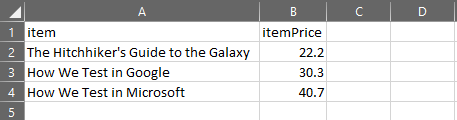
[DataSource("Microsoft.VisualStudio.TestTools.DataSource.CSV", "TestsData.csv", "TestsData#csv", DataAccessMethod.Sequential)]
public void Purchase_Book_DataDriven()
{
    string item = TestContext.DataRow["item"];
    int expectedPrice = int.Parse(this.TestContext.DataRow["itemPrice"]);
    _shoppingCart = _shoppingCartFactory.CreateOldShoppingCart();
    _shoppingCart.PurchaseItem(item, expectedPrice, new ClientInfo());
}
Note
.NET Core does not support the DataSource attribute. If you try to access test data in this way in a .NET Core or UWP unit test project, you’ll see an error similar to “‘TestContext’ does not contain a definition for ‘DataRow’ and no accessible extension method ‘DataRow’ accepting a first argument of type ‘TestContext’ could be found (are you missing a using directive or an assembly reference?)”.
More about the data-driven tests you can find in the following resources- Most Complete MSTest Unit Testing Framework Cheat Sheet and Most Complete NUnit Unit Testing Framework Cheat Sheet
