

In the evolving landscape of software testing, efficiency and coverage are paramount. JUnit 5 introduces enhanced parameterized testing capabilities, allowing developers to run the same test with various inputs, significantly reducing redundancy. This article delves into the advanced features of parameterized testing in JUnit 5.
Laying the Groundwork
Before exploring parameterized testing, it’s crucial to understand the foundations laid by traditional testing methods. The ToDoTests class begins with standard Selenium WebDriver setup, navigating through a web application and validating its behavior with straightforward assertions. This approach, while effective for specific scenarios, can lead to repetitive test cases when dealing with multiple inputs.
What are we going to test? The website is called TodoMVC and is implementing the same TODO app functionality using 30+ most popular web technologies. Everything is open-source and free.
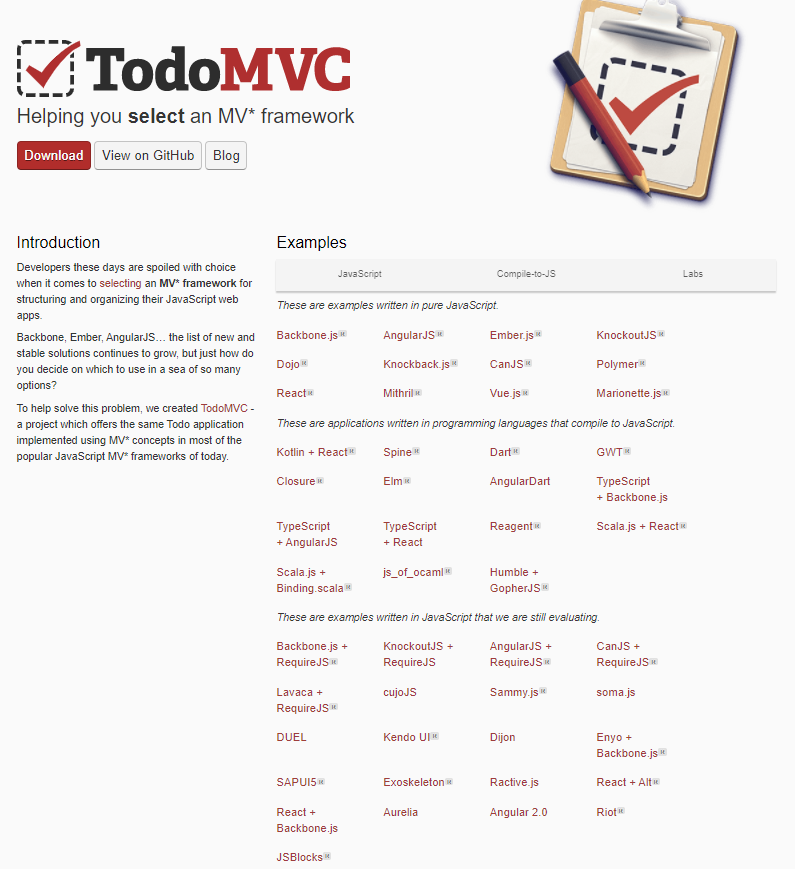
When you click on a particular technology, the corresponding app written on it opens.
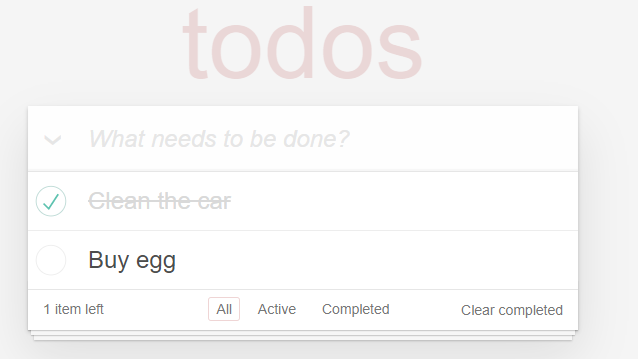
We will create a single data-driven test using NUnit, where we will open 20+ technologies. Then we will add a few TODO items, mark as complete the first one and verify the numbers of the items left.
The Selenium Test
The ToDoTests class begins with setting up the Selenium WebDriver environment:
@BeforeAll
public static void setUpClass() {
    WebDriverManager.chromedriver().setup();
}

@BeforeEach
public void setUp() {
    driver = new ChromeDriver();
    webDriverWait = new WebDriverWait(driver, Duration.ofSeconds(WAIT_FOR_ELEMENT_TIMEOUT));
    actions = new Actions(driver);
}

// tests

@AfterEach
public void tearDown() {
    if (driver != null) {
        driver.quit();
    }
}setUpClass(): this method is annotated with @BeforeAll, ensuring that it runs once before all tests in the class. It sets up the ChromeDriver using WebDriverManager, a utility that simplifies the management of driver binaries. setUp(): annotated with @BeforeEach, this method initializes the ChromeDriver, WebDriverWait, and Actions before each test. WebDriverWait is configured with a timeout, and Actions is used for more complex gestures like mouse movements or keyboard inputs.
The core of the ToDoTests class is the verifyToDoListCreatedSuccessfully test:
@Test
public void verifyToDoListCreatedSuccessfully() {
    // Navigate to the web application
    driver.navigate().to("https://todomvc.com/");
    // Open the specific technology app
    openTechnologyApp("Backbone.js");
    // Add new to-do items
    addNewToDoItem("Clean the car");
    addNewToDoItem("Clean the house");
    addNewToDoItem("Buy Ketchup");
    // Mark an item as completed
    getItemCheckbox("Buy Ketchup").click();
    // Assert the number of items left
    assertLeftItems(2);
}
The test starts by navigating to the “TodoMVC” web application. It then interacts with the application by selecting a specific technology (Backbone.js in this case) and adding new to-do items. The test marks one item as completed and asserts the expected number of items left using assertLeftItems(2). This assertion ensures that the application’s state reflects the user’s actions correctly.
The class includes several private helper methods:
private void assertLeftItems(int expectedCount){
    var resultSpan = waitAndFindElement(By.xpath("//footer/*/span | //footer/span"));
    if (expectedCount == 1){
        var expectedText = String.format("%d item left", expectedCount);
        validateInnerTextIs(resultSpan, expectedText);
    } else {
        var expectedText = String.format("%d items left", expectedCount);
        validateInnerTextIs(resultSpan, expectedText);
    }
}

private void validateInnerTextIs(WebElement resultElement, String expectedText){
    webDriverWait.until(ExpectedConditions.textToBePresentInElement(resultElement, expectedText));
}

private WebElement getItemCheckbox(String todoItem){
    var xpathLocator = String.format("//label[text()='%s']/preceding-sibling::input", todoItem);
    return waitAndFindElement(By.xpath(xpathLocator));
}

private void openTechnologyApp(String technologyName){
    var technologyLink = waitAndFindElement(By.linkText(technologyName));
    technologyLink.click();
}

private void addNewToDoItem(String todoItem){
    var todoInput = waitAndFindElement(By.xpath("//input[@placeholder='What needs to be done?']"));
    todoInput.sendKeys(todoItem);
    actions.click(todoInput).sendKeys(Keys.ENTER).perform();
}

private WebElement waitAndFindElement(By locator){
    return webDriverWait.until(ExpectedConditions.presenceOfElementLocated(locator));
}
assertLeftItems(int expectedCount): asserts the number of items left in the to-do list.
validateInnerTextIs(WebElement resultElement, String expectedText): waits until the text of a specific element matches the expected text.
getItemCheckbox(String todoItem): finds the checkbox element for a given to-do item.
openTechnologyApp(String technologyName): clicks on the link to open a specific technology’s to-do list application.
addNewToDoItem(String todoItem): adds a new item to the to-do list.
waitAndFindElement(By locator): waits until an element is present on the page and returns it.
Finally, the tearDown method annotated with @AfterEach ensures that the browser is closed after each test, preventing resource leaks.
Transitioning to Parameterized Testing
Parameterized tests mark a significant shift from traditional testing, offering a data-driven approach. They allow the execution of the same test logic across a range of inputs, enhancing test coverage and reducing code duplication.
The ToDoTests class can be significantly enhanced by introducing parameterized tests. Consider this upgraded test methods.
Basic Parameterized Tests with Value Sources
We start by replacing repetitive test methods with a single @ParameterizedTest using @ValueSource. This annotation supplies different technology names to test the TodoMVC application, ensuring broad functionality across various frameworks.
@ParameterizedTest(name = "{index}. verify todo list created successfully when technology = {0}")
@ValueSource(strings = {
        "Backbone.js",
        "AngularJS",
        "React",
        "Vue.js",
        "CanJS",
        "Ember.js",
        "KnockoutJS",
        "Marionette.js",
        "Polymer",
        "Angular 2.0",
        "Dart",
        "Elm",
        "Closure",
        "Vanilla JS",
        "jQuery",
        "cujoJS",
        "Spine",
        "Dojo",
        "Mithril",
        "Kotlin + React",
        "Firebase + AngularJS",
        "Vanilla ES6"
})
@NullAndEmptySource
public void verifyToDoListCreatedSuccessfully_withParams(String technology){
    driver.navigate().to("https://todomvc.com/");
    openTechnologyApp(technology);
    addNewToDoItem("Clean the car");
    addNewToDoItem("Clean the house");
    addNewToDoItem("Buy Ketchup");
    getItemCheckbox("Buy Ketchup").click();

    assertLeftItems(2);
}
The @ValueSource annotation supplies different technology names to the same test logic, verifying the to-do list functionality across various frameworks and libraries. The name = “{index}. verify todo list created successfully when technology = {0} in @ParameterizedTest dynamically names each test iteration, making test results more readable. The inclusion of @NullAndEmptySource ensures that the test logic is also executed with null and empty strings, covering edge cases that might be missed in traditional testing.
Enum Sources for Defined Data Sets
Next, the use of @EnumSource enables testing with enumerated types, providing a clear and manageable approach to handling predefined data sets, like different web technologies.
@ParameterizedTest
@EnumSource(WebTechnology.class)
public void verifyToDoListCreatedSuccessfully_withEnum(WebTechnology technology){
    driver.navigate().to("https://todomvc.com/");
    openTechnologyApp(technology.getTechnologyName());
    addNewToDoItem("Clean the car");
    addNewToDoItem("Clean the house");
    addNewToDoItem("Buy Ketchup");
    getItemCheckbox("Buy Ketchup").click();

    assertLeftItems(2);
}

// Enum filter - data driven
@ParameterizedTest
@EnumSource(value = WebTechnology.class, names = {"BACKBONEJS", "ANGULARJS", "EMBERJS", "KNOCKOUTJS"})
public void verifyToDoListCreatedSuccessfully_withEnumFilter(WebTechnology technology){
    driver.navigate().to("https://todomvc.com/");
    openTechnologyApp(technology.getTechnologyName());
    addNewToDoItem("Clean the car");
    addNewToDoItem("Clean the house");
    addNewToDoItem("Buy Ketchup");
    getItemCheckbox("Buy Ketchup").click();

    assertLeftItems(2);
}

// Enum filter exclude - data driven
@ParameterizedTest
@EnumSource(value = WebTechnology.class, names = {"BACKBONEJS", "ANGULARJS", "EMBERJS", "KNOCKOUTJS"}, mode = EnumSource.Mode.EXCLUDE)
public void verifyToDoListCreatedSuccessfully_withEnumFilterExclude(WebTechnology technology){
    driver.navigate().to("https://todomvc.com/");
    openTechnologyApp(technology.getTechnologyName());
    addNewToDoItem("Clean the car");
    addNewToDoItem("Clean the house");
    addNewToDoItem("Buy Ketchup");
    getItemCheckbox("Buy Ketchup").click();

    assertLeftItems(2);
}

// Enum filter exclude - data driven
@ParameterizedTest
@EnumSource(value = WebTechnology.class, names = {".+JS"}, mode = EnumSource.Mode.EXCLUDE)
public void verifyToDoListCreatedSuccessfully_withEnumFilterExcludeRegex(WebTechnology technology){
    driver.navigate().to("https://todomvc.com/");
    openTechnologyApp(technology.getTechnologyName());
    addNewToDoItem("Clean the car");
    addNewToDoItem("Clean the house");
    addNewToDoItem("Buy Ketchup");
    getItemCheckbox("Buy Ketchup").click();

    assertLeftItems(2);
}
public enum WebTechnology {
BACKBONEJS("Backbone.js"),
ANGULARJS("AngularJS"),
REACT("React"),
VUEJS("Vue.js"),
CANJS("CanJS"),
EMBERJS("Ember.js"),
KNOCKOUTJS("KnockoutJS"),
MARIONETTEJS("Marionette.js"),
POLYMER("Polymer"),
ANGULAR2("Angular 2.0"),
DART("Dart"),
ELM("Elm"),
CLOSURE("Closure"),
VANILLAJS("Vanilla JS"),
JQUERY("jQuery"),
CUJOJS("cujoJS"),
SPINE("Spine"),
DOJO("Dojo"),
MITHRIL("Mithril"),
KOTLIN_REACT("Kotlin + React"),
FIREBASE_ANGULARJS("Firebase + AngularJS"),
VANILLA_ES6("Vanilla ES6");
private String technologyName;
WebTechnology(String technologyName) {
this.technologyName = technologyName;
}
public String getTechnologyName() {
return technologyName;
}
}@EnumSource(WebTechnology.class) automatically provides each constant from the WebTechnology enum as a parameter to the test method. This approach is ideal for cases where the set of inputs is known and finite, like different technology stacks. Enum constants can be filtered based on a regular expression, providing a dynamic way to select test parameters.
Utilizing CSV Sources
Building upon the foundation of parameterized testing, the ToDoTests class introduces another powerful feature: @CsvSource. This annotation enables the use of comma-separated values (CSV) to provide parameters for the test, offering an easy way to include complex test data.
// CSV Source without file
@ParameterizedTest
@CsvSource(value = {
        "Backbone.js,Clean the car,Clean the house,Buy Ketchup,Buy Ketchup,2",
        "AngularJS,Clean the car,Clean the house,Clean the house,Clean the house,2",
        "React,Clean the car,Clean the house,Clean the car,Clean the car,2"},
        delimiter = ',')
public void verifyToDoListCreatedSuccessfully_withParamsCsvSourceWithoutFile(String technology, String item1, String item2, String item3, String itemToCheck, int expectedLeftItems){
    driver.navigate().to("https://todomvc.com/");
    openTechnologyApp(technology);
    addNewToDoItem(item1);
    addNewToDoItem(item2);
    addNewToDoItem(item3);
    getItemCheckbox(itemToCheck).click();

    assertLeftItems(expectedLeftItems);
}
@CsvSource allows specifying a list of values for each parameter of the test method. Each line represents a different test scenario. This approach tests the application with various technologies and task combinations, ensuring broad functionality coverage. The delimiter attribute is set to ’,’, which is standard for CSV data.
CSV File Source
In addition to inline CSV sources, JUnit 5’s parameterized tests can also leverage external CSV files for data-driven testing. This approach is exemplified in the ToDoTests class, offering a structured and scalable way to manage test data.
@ParameterizedTest
@CsvFileSource(resources = "/data.csv", numLinesToSkip = 1)
public void verifyToDoListCreatedSuccessfully_withParamsCsvSourceWithFile(String technology, String item1, String item2, String item3, String itemToCheck, int expectedLeftItems){
    driver.navigate().to("https://todomvc.com/");
    openTechnologyApp(technology);
    addNewToDoItem(item1);
    addNewToDoItem(item2);
    addNewToDoItem(item3);
    getItemCheckbox(itemToCheck).click();

    assertLeftItems(expectedLeftItems);
}
@CsvFileSource reads test data from an external CSV file, allowing for a clean separation of test logic and test data. This method is particularly useful when dealing with large datasets or when the data needs to be shared across multiple tests. The numLinesToSkip attribute is set to 1, useful for skipping header lines in the CSV file.
Advanced Parameterized Testing with @MethodSource
Building on the concepts of parameterized testing, JUnit 5’s @MethodSource offers a flexible and powerful way to supply complex parameters to tests. This is particularly useful when test parameters are not just simple values but need some computation or custom logic for generation.
@ParameterizedTest
@MethodSource("provideWebTechnologies")
public void verifyToDoListCreatedSuccessfully_withMethod(String technology){
    driver.navigate().to("https://todomvc.com/");
    openTechnologyApp(technology);
    addNewToDoItem("Clean the car");
    addNewToDoItem("Clean the house");
    addNewToDoItem("Buy Ketchup");
    getItemCheckbox("Buy Ketchup").click();

    assertLeftItems(2);
}

private static Stream<String> provideWebTechnologies() {
    return Stream.of("Backbone.js",
            "AngularJS",
            "React",
            "Vue.js",
            "CanJS",
            "Ember.js",
            "KnockoutJS",
            "Marionette.js",
            "Polymer",
            "Angular 2.0",
            "Dart",
            "Elm",
            "Closure",
            "Vanilla JS",
            "jQuery",
            "cujoJS",
            "Spine",
            "Dojo",
            "Mithril",
            "Kotlin + React",
            "Firebase + AngularJS",
            "Vanilla ES6");
}
@MethodSource(“provideWebTechnologies”) indicates that the parameters for the test will be supplied by the provideWebTechnologies method. The method provideWebTechnologies returns a stream of strings, each representing a different web technology, demonstrating how complex logic can be used to generate test parameters. This approach allows for dynamic generation of test data, which can include complex computations or conditional logic. The method providing the parameters can be reused across different tests, promoting code reuse and maintainability. As the complexity of test data grows, @MethodSource keeps tests clean and focused, with the data generation logic neatly separated.
Mastering Complex Parameterized Tests with @MethodSource and Multiple Parameters
The ToDoTests class showcases an advanced use of @MethodSource in JUnit 5, handling multiple parameters for comprehensive and dynamic testing scenarios.
@ParameterizedTest
@MethodSource("provideWebTechnologiesMultipleParams")
public void verifyToDoListCreatedSuccessfully_withMethod(String technology, List<String> itemsToAdd, List<String> itemsToCheck, int expectedLeftItems){
    driver.navigate().to("https://todomvc.com/");
    openTechnologyApp(technology);
    itemsToAdd.stream().forEach(itemToAdd -> addNewToDoItem(itemToAdd));
    itemsToCheck.stream().forEach(itemToCheck -> getItemCheckbox(itemToCheck).click());

    assertLeftItems(expectedLeftItems);
}

private Stream<Arguments> provideWebTechnologiesMultipleParams() {
    return Stream.of(
            Arguments.of("AngularJS", List.of("Buy Ketchup", "Buy House", "Buy Paper", "Buy Milk", "Buy Batteries"), List.of("Buy Ketchup", "Buy House"), 3),
            Arguments.of("React", List.of("Buy Ketchup", "Buy House", "Buy Paper", "Buy Milk", "Buy Batteries"), List.of("Buy Paper", "Buy Milk", "Buy Batteries"), 2),
            Arguments.of("Vue.js", List.of("Buy Ketchup", "Buy House", "Buy Paper", "Buy Milk", "Buy Batteries"), List.of("Buy Paper", "Buy Milk", "Buy Batteries"), 2),
            Arguments.of("Angular 2.0", List.of("Buy Ketchup", "Buy House", "Buy Paper", "Buy Milk", "Buy Batteries"), List.of(), 5)
    );
}
The test method verifyToDoListCreatedSuccessfully_withMethod accepts multiple parameters of different types, including String, List
Leveraging Custom Argument Providers
For more complex testing requirements, ToDoTests utilizes WebTechnologiesCustomArgumentsProvider, a custom argument provider that supplies diverse combinations of parameters. This approach is ideal for simulating real-world scenarios and testing the application’s response to various user actions.
@ParameterizedTest
@ArgumentsSource(WebTechnologiesCustomArgumentsProvider.class)
public void verifyToDoListCreatedSuccessfully_withArgumentSource(String technology, List<String> itemsToAdd, List<String> itemsToCheck, int expectedLeftItems){
    driver.navigate().to("https://todomvc.com/");
    openTechnologyApp(technology);
    itemsToAdd.stream().forEach(itemToAdd -> addNewToDoItem(itemToAdd));
    itemsToCheck.stream().forEach(itemToCheck -> getItemCheckbox(itemToCheck).click());

    assertLeftItems(expectedLeftItems);
}

@ParameterizedTest
@ArgumentsSource(WebTechnologiesCustomArgumentsProvider.class)
public void verifyToDoListCreatedSuccessfully_withArgumentSourceWithSingleArgument(@AggregateWith(ToDoListAggregator.class) ToDoList toDoList){
    driver.navigate().to("https://todomvc.com/");
    openTechnologyApp(toDoList.getTechnology());
    toDoList.getItemsToAdd().stream().forEach(itemToAdd -> addNewToDoItem(itemToAdd));
    toDoList.getItemsToCheck().stream().forEach(itemToCheck -> getItemCheckbox(itemToCheck).click());

    assertLeftItems(toDoList.getExpectedItemsLeft());
}
WebTechnologiesCustomArgumentsProvider is a custom class that implements the ArgumentsProvider interface. It’s responsible for providing a stream of arguments to the test. The provided arguments can be complex and tailored for specific testing needs, as seen with multiple parameters like technology names, lists of items, and expected results.
public class WebTechnologiesCustomArgumentsProvider implements ArgumentsProvider {
    @Override
    public Stream<? extends Arguments> provideArguments(ExtensionContext extensionContext) throws Exception {
        return Stream.of(
                Arguments.of("AngularJS", List.of("Buy Ketchup", "Buy House", "Buy Paper", "Buy Milk", "Buy Batteries"), List.of("Buy Ketchup", "Buy House"), 3),
                Arguments.of("React", List.of("Buy Ketchup", "Buy House", "Buy Paper", "Buy Milk", "Buy Batteries"), List.of("Buy Paper", "Buy Milk", "Buy Batteries"), 2),
                Arguments.of("Vue.js", List.of("Buy Ketchup", "Buy House", "Buy Paper", "Buy Milk", "Buy Batteries"), List.of("Buy Paper", "Buy Milk", "Buy Batteries"), 2),
                Arguments.of("Angular 2.0", List.of("Buy Ketchup", "Buy House", "Buy Paper", "Buy Milk", "Buy Batteries"), List.of(), 5)
        );
    }
}
Using WebTechnologiesCustomArgumentsProvider, the ToDoTests class can efficiently handle various testing scenarios, each representing real-world usage of the application with different technologies and user actions. This approach significantly increases the test coverage and robustness of the application.
Advanced Techniques: Method Sources and Custom Converters
For scenarios where parameters require complex logic or conversion, @MethodSource and custom converters come into play. @MethodSource provides a method to dynamically generate a stream of arguments, while custom converters like DashDateConverter transform provided data into the required format, such as converting strings to LocalDate objects.
@ParameterizedTest
@CsvSource({"2021-11-21,2021",
        "2022-01-12,2022"})
public void verifyYear_whenCustomConverter(@ConvertWith(DashDateConverter.class) LocalDate date, int expected){
    Assertions.assertEquals(expected, date.getYear());
}
The custom converter DashDateConverter is designed to convert date strings into LocalDate objects. It parses a string formatted as “yyyy-MM-dd” and converts it into a LocalDate object. The converter includes error handling to deal with invalid input formats, throwing an IllegalArgumentException if the conversion fails.
public class DashDateConverter implements ArgumentConverter {
    @Override
    public Object convert(Object o, ParameterContext parameterContext) throws ArgumentConversionException {
        if (!(o instanceof String)) {
            throw new IllegalArgumentException("The argument should be a string: " + o);
        }
        try {
            String[] parts = ((String) o).split("-");
            int year = Integer.parseInt(parts[0]);
            int month = Integer.parseInt(parts[1]);
            int day = Integer.parseInt(parts[2]);

            return LocalDate.of(year, month, day);
        } catch (Exception e) {
            throw new IllegalArgumentException("Failed to convert", e);
        }
    }
}
The @ConvertWith(DashDateConverter.class) annotation indicates that the provided string arguments should be converted to LocalDate objects using the DashDateConverter. This test method verifies that the year part of the LocalDate object matches the expected year, illustrating how custom converters can be used to facilitate testing of date-related logic.
Custom converters allow test data to be provided in a convenient format (like strings in a CSV file) and then converted into more complex types needed for testing. By encapsulating the conversion logic in a separate class, it can be reused across multiple tests, enhancing the maintainability of the test suite.
To learn even more about the topic check this video:
Conclusion
Parameterized testing in JUnit 5, especially when combined with Selenium WebDriver, offers a powerful toolset for creating concise yet comprehensive tests. It ensures thorough testing coverage with minimal code redundancy, proving indispensable in modern software development. By understanding and implementing these techniques, developers and testers can ensure robust and efficient testing across various scenarios.
