

In the series “Design Patterns in Automated Testing“, you can read about the most useful techniques for structuring the automation tests’ code. The next two articles are inspired by an email from a reader who asked me how to change proxies in combinations with his tests so that he can stay anonymous all the time, e.g., using a new proxy each time. In this publication, we will look at the easiest but not so optimal approach of using a new proxy for each test but restarting the browser. There will be code for downloading a list of proxies from internet and after that checking whether they are active or not. For the initialization, we will look into a new design pattern that is frequently used in software development called Simple Factory design pattern.
Note
All pieces of code/content are for experiment/research purposes. Please do not use it for anything illegal or not ethical.
The Problem
There are certain functionalities in our websites which to be tested we need to stay anonymous. This is a bit easier to do manually than with automated tests since the tests usually get quite fragile. We want each time we start a WebDriver instance to initialize it with a new proxy IP. We can have a predefined list of proxies or download such a list from online. The tricky part with the later is that we need to check whether the proxy is still active since often most of the proxies are not working. If you use such a proxy, your test will fail for sure.
Simple Factory Design Pattern
Definition
Factory Pattern is “A factory is an object for creating other objects“.
Simple Factory Pattern is a Factory class in its simplest form (In comparison to Factory Method Pattern or Abstract Factory Pattern).
In another way, we can say: In simple factory pattern, we have a factory class which has a method that returns different types of object based on given input.
Simple Factory Design Pattern in C#
Let’s create a simple factory for creating new instances of WebDriver based on an enum holding different browser types. The method will contain logic for setting the proper timeouts reading them from the JSON configuration (you can read more about that in the article Handling Test Environments Data in Automated Tests). Also, it will set the proxy settings, which is one of our primary goals. Using this approach, we will reuse a lot of initialization code, and in case we need to change something we will do it in a single place.
public static class WebDriverFactory
{
    private static readonly string AssemblyFolder = Path.GetDirectoryName(Assembly.GetExecutingAssembly().Location);
    public static IWebDriver CreateDriver(Browser browser)
    {
        string proxyUrl = ProxyService.GetProxyIp();
        var proxy = new Proxy
        {
            HttpProxy = proxyUrl,
            SslProxy = proxyUrl,
            FtpProxy = proxyUrl,
        };
        IWebDriver webDriver;
        switch (browser)
        {
            case Browser.Chrome:
                var chromeOptions = new ChromeOptions
                {
                    Proxy = proxy
                };
                var chromeDriverService = ChromeDriverService.CreateDefaultService(AssemblyFolder);
                webDriver = new ChromeDriver(chromeDriverService, chromeOptions);
                webDriver.Manage().Timeouts().PageLoad =
                TimeSpan.FromSeconds(ConfigurationService.Instance.GetWebSettings().Chrome.PageLoadTimeout);
                webDriver.Manage().Timeouts().AsynchronousJavaScript =
                TimeSpan.FromSeconds(ConfigurationService.Instance.GetWebSettings().Chrome.ScriptTimeout);
                break;
            case Browser.Firefox:
                var firefoxOptions = new FirefoxOptions()
                {
                    Proxy = proxy
                };
                webDriver = new FirefoxDriver(Environment.CurrentDirectory, firefoxOptions);
                webDriver.Manage().Timeouts().PageLoad =
                TimeSpan.FromSeconds(ConfigurationService.Instance.GetWebSettings().Firefox.PageLoadTimeout);
                webDriver.Manage().Timeouts().AsynchronousJavaScript =
                TimeSpan.FromSeconds(ConfigurationService.Instance.GetWebSettings().Firefox.ScriptTimeout);
                break;
            case Browser.Edge:
                var edgeOptions = new EdgeOptions()
                {
                    Proxy = proxy
                };
                webDriver = new EdgeDriver(Environment.CurrentDirectory, edgeOptions);
                webDriver.Manage().Timeouts().PageLoad =
                TimeSpan.FromSeconds(ConfigurationService.Instance.GetWebSettings().Edge.PageLoadTimeout);
                webDriver.Manage().Timeouts().AsynchronousJavaScript =
                TimeSpan.FromSeconds(ConfigurationService.Instance.GetWebSettings().Edge.ScriptTimeout);
                break;
            case Browser.InternetExplorer:
                var ieOptions = new InternetExplorerOptions()
                {
                    Proxy = proxy
                };
                webDriver = new InternetExplorerDriver(Environment.CurrentDirectory, ieOptions);
                webDriver.Manage().Timeouts().PageLoad =
                TimeSpan.FromSeconds(ConfigurationService.Instance.GetWebSettings().InternetExplorer.PageLoadTimeout);
                webDriver.Manage().Timeouts().AsynchronousJavaScript =
                TimeSpan.FromSeconds(ConfigurationService.Instance.GetWebSettings().InternetExplorer.ScriptTimeout);
                break;
            default:
                throw new ArgumentOutOfRangeException(nameof(browser), browser, null);
        }
        return webDriver;
    }
}
The most interesting part is how we get the proxy for which we use the ProxyService class.
string proxyUrl = ProxyService.GetProxyIp();
var proxy = new Proxy
{
    HttpProxy = proxyUrl,
    SslProxy = proxyUrl,
    FtpProxy = proxyUrl,
};
var chromeOptions = new ChromeOptions
{
    Proxy = proxy
};
var chromeDriverService = ChromeDriverService.CreateDefaultService(AssemblyFolder);
webDriver = new ChromeDriver(chromeDriverService, chromeOptions);
When you have the proxy IP and port, you initialize a new Proxy instance and set it to the chosen browser Options object.
For more detailed overview and usage of many more design patterns and best practices in automated testing, check my book “Design Patterns for High-Quality Automated Tests, C# Edition, High-Quality Tests Attributes, and Best Practices”. You can read part of three of the chapters:
Defining High-Quality Test Attributes for Automated Tests
Benchmarking for Assessing Automated Test Components Performance
Generic Repository Design Pattern- Test Data Preparation
Getting a New Unique Proxy
Now let’s look into the magic behind the generation of a new active proxies list.
First, we need to download a list of HTTPS proxies. To do so, we will use WebDriver again. We will navigate to the proxy-list website and click on the ‘copy to clipboard’ button. All proxies will be copied to the clipboard. After that, we can transfer it to a string array and work with them in the code.
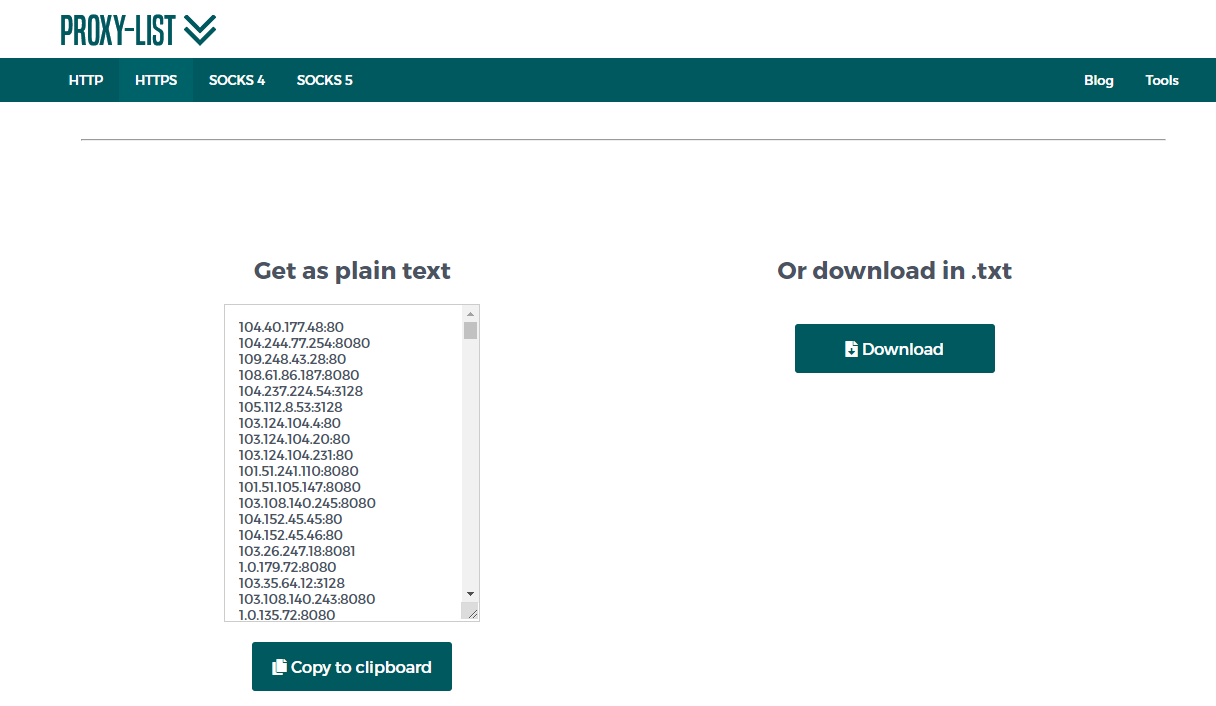
public static void GetListProxies()
{
    var options = new ChromeOptions();
    var chromeDriverService = ChromeDriverService.CreateDefaultService(Environment.CurrentDirectory);
    using (IWebDriver driver = new ChromeDriver(chromeDriverService, options))
    {
        driver.Navigate().GoToUrl("https://www.proxy-list.download/HTTPS");
        driver.FindElement(By.Id("btn3")).Click();
        _proxiesToCheck = new ConcurrentBag<string>(Clipboard.GetText().Split(Environment.NewLine).Where(x => !string.IsNullOrEmpty(x)).ToList());
    }
}
We add them to a ConcurrentBag collection because, in the next step, we will test whether they are active in multiple threads so that the process can happen much faster utilizing all CPU cores of the machines. If you use a regular list or array collection deadlocks will occur.
Here is the code which populates the _activeProxies collection with only the active proxies.
public static void CheckProxiesStatus()
{
    Parallel.ForEach(_proxiesToCheck,
    proxyToCheck =>
    {
        if (PingHost(proxyToCheck))
        {
            _activeProxies.Add(new TimeBoundProxy(proxyToCheck));
        }
    });
}
private static bool PingHost(string nameOrAddress)
{
    var ip = nameOrAddress.Split(':').First();
    var port = int.Parse(nameOrAddress.Split(':').Last());
    Debug.WriteLine($"Ping address {nameOrAddress}");
    bool isProxyActive;
    try
    {
        var client = new TcpClient(ip, port);
        isProxyActive = true;
    }
    catch (Exception)
    {
        isProxyActive = false;
    }
    return isProxyActive;
}
Through initializing a TcpClient with the proxy’s IP and port, we understand whether the proxy is active or not. If it is not an exception is thrown, and we return false. We iterate through all proxies to be checked in a Parallel.ForEach which utilize all CPU cores of your machines and starts multiple threads.
Through GetProxyIp method, we get a new proxy IP. We get a new IP based on the last usage of the proxy. All proxies are sorted. When we get the proxy, we set the LastlyUsed property to the current DateTime.Now.
public static string GetProxyIp()
{
    var newProxy = _activeProxies.ToList().OrderByDescending(x => x.LastlyUsed).First();
    newProxy.LastlyUsed = DateTime.Now;
    CurrentProxyIp = newProxy.ProxyIp;
    return newProxy.ProxyIp;
}
WebDriverFactory and ProxyService in Tests
Here is how we use WebDriverFactory and ProxyService in our tests. In the ClassInitialize method, once before all tests, we execute the GetListProxies and CheckProxiesStatus methods. We do that only once for performance reasons since it takes a while depending on how big the proxies list is. Before each test during the TestIntialize method we create a new WebDriver instance through the WebDriverFactory’s method CreateDriver, in this case, creating a new Chrome instance. Inside the ProxyService instance is called and each time a new proxy is passed to the ChromeOptions.
public class SimpleFactoryTests
{
    private IWebDriver _driver;

    public static void ClassInit(TestContext testContext)
    {
        ProxyService.GetListProxies();
        ProxyService.CheckProxiesStatus();
    }

    public void TestInit()
    {
        _driver = WebDriverFactory.CreateDriver(Browser.Chrome);
    }

    public void TestCleanup()
    {
        _driver?.Dispose();
    }

    public void CheckCurrentIpAddressEqualToSetProxyIp()
    {
        _driver.Navigate().GoToUrl("https://whatismyipaddress.com/");
        var element = _driver.FindElement(By.XPath("//*[@id='ipv4']/a"));
        Assert.AreEqual(ProxyService.CurrentProxyIp, element.Text);
    }
}
In the next article from the series, we will look at how we can extend the current solution to be even more optimized and reuse the browser instance, but at the same time, change the proxies. To accomplish this task, we will use a reverse proxy.
