
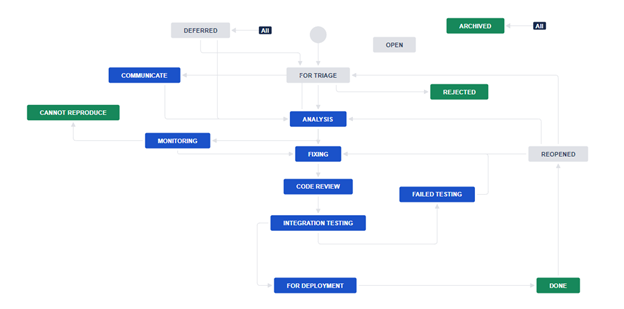
One of the essential tasks every QA engineer should master is how to log bug reports properly. Many people are confused about what information to include in such reports. This is why I decided to create an article discussing what the crucial fields of an issue report are. Moreover, we will look into bug statuses what an upgraded statuses workflow. I say ‘upgraded’ since it is a bit more complicated than usual, but I will explain why I added additional statuses. Also, you will find information about bug taxonomy fields which can help you to calculate later various quality metrics that can be used to improve the QA process in the future. I will write a dedicated article about quality metrics, how to calculate and visualize them.
As part of the professional services we provide at BELLATRIX, we consult companies and help them to improve their QA process and set up an automated testing infrastructure. After the initial review process and giving improvement recommendations for how to improve their QA process. Sometimes they include changes how the automated tests are executed or complete refactoring. However, there are times when before upgrading the test automation we need to improve the manual functional testing. Below you will read about the bug tracking strategy we proposed to the client of ours.
Bug statuses
-
For Triage
Once the bug is created it goes in this status. There is a meeting each day where a group of senior people (senior QA + senior dev) which goes through all bugs for triage and decide whether something is a bug or not. Next, if they agree that the problem is a bug, they choose what happens with it whether it will be analyzed immediately or whether it will be archived or deferred.
-
Analysis
Before the actual fixing, comes this analysis phase. A developer reads the issue description thoroughly and starts debugging or searching where the problem is. Here is the time when various issue fields are populated like what was the reason for the bug (root cause analysis) and other bug taxonomy grouping which we later use for various reporting measurements. If the problem is located depending on the time needed for the fix the bug can go in Fixing or Deferred status. If the problem cannot be reproduced, we move the issue to Cannot Reproduce status, and after that, we start to monitor it (moving it to Monitoring status).
-
Deferred
We set bugs in this status if they will be considered later to be fixed, e.g., they are not high priority to be fixed as soon as possible. If we plan to make a new development to certain feature before planning all the work, we can check all deferred bugs for it and see if we will fix some of them.
-
Archived
We agreed that the problem is a real bug, but we don’t set it to Deferred because we decided that no matter how many times, we return to it, it won’t be so important to be fixed. However, we keep track of all these bugs for logging purposes. They can help us to decrease the number of duplicate bugs.
-
Communicate
Some logged observed problems are problematic, but it is hard to decide whether they are a real issue or not. Most often there isn’t anything related to them in the documentation or requirements if we decide that the problem worth the time to investigate, we first need to ask a product owner what he thinks and how should the feature behave.
-
Cannot Reproduce
When the analyzation process often starts it is hard to reproduce some more complex issues even if they are perfectly described in the report. We set the status for reporting purposes only. Usually, such bugs have been firstly monitored for some time if we have agreed that we need to spend time for further analyzation.
-
Monitoring
If a bug cannot be reproduced during the analyzation process so that the root cause can be found, we can agree that we will spend some time to monitor whether the bug will be reproduced by someone. If for example 2 weeks pass and nobody can reproduce it we move it to Cannot Reproduce status.
-
Reopened
Before logging a bug, we need to check whether such bugs have not been already logged. Sometimes we will find that such bugs exist but are in Done status. After that instead of logging a new bug, we will move the bug in Reopened status which saves us time to populate all fields but more importantly gives us information for some quality measurements.
-
Fixing
We set an issue in this status once it is clear what is the root cause and we agreed that there is enough time to be spent for fixing it.
-
Code Review
Once the bug is fixed and tested locally by the dev, he makes a pull-request and asks a colleague to perform a code review.
-
Integration Testing
Once the bug passes the code review process, the bug is deployed on DEV environment where it can be retested/regression tested by the bug reporter in most cases QA.
-
Failed Testing
It is possible the retesting phase to observe that the bug was not fixed then it is not returned immediately to Fixing but instead set to the Failed Testing status which we use again to gather some quality metrics.
-
Integration Testing
Tested again on the TEST environment integrated with other stories under development.
-
For Deployment
Once we verify that the bug is fixed, we can deploy it LIVE.
Bug Workflow
Bug Fields
Main fields
-
Title
Meaningful short explanation what is the problem
-
Description
Fully describe what is the problem.
-
Actual Results
What are the observed results of the test.
-
Expected Results
What is the expected behavior of the tested functionality.
-
Steps to Reproduce
List all steps needed to reproduce the issue- login, click forecast button, etc.
-
Environment
On which environment was the problem observed. Give all relevant details about the setup if it is required.
-
Assignee
Who will be responsible for analyzing and fixing the issue.
-
Reporter
Who reported and logged the bug.
-
Attachments
Attach a screenshot if the problem is UI related. If the bug is related to complex workflow- record a video. You can add any relevant dumps or other files.
-
Priority
The level of (business) importance assigned to an item, e.g. defect. Urgency to fix.
Definition
Priority – the level of (business) importance assigned to an item, e.g. defect. Urgency to fix.
Priority Levels
In decreasing order of importance, the available priorities are:
-
Blocks development and/or testing work
Production could not run, causes crashes, loss of data, or a significant memory leak. Any problem that prevents the project from being built is automatically selected with priority
-
Major or important loss of function
Needs urgent action.
-
Low or less important loss of function
Do not need urgent action.
-
A small problem with no functionality impact
Definition
Severity– the degree of impact that a defect has on the development or operation of a component or system.
Severity Levels
| Severity | Why the QA should assign the status? | Example | What should be done by QA? | What should be done by DEV? |
|---|---|---|---|---|
| Blocking | QA cannot do manual testing/Smoke automation tests are failing | Functional/Configuration issues that lead to: Yellow screen, Missing module, etc. | Log a bug or send email + verbal notification | Resolve as soon as possible |
| Critical | Main part of feature is not working as expected | Core Functional/Unusable UI issues that lead to: Form is not submitting, Buy button not working, Form is not syncing data, etc. | Log a bug + notification | Give high attention |
| High | It is not recommended to release without this fixed | Functional/Broken UI - UI differences from design, Validations, etc. | Log a bug | Do this after all Blocking and Critical bugs |
| Medium | Good to be fixed if we have time | Minor Functional/Minor UI issues - Off the happy path scenario, Some responsive issues for specific resolutions/browsers, etc. | Log a bug | Do this if the story estimated time is not reached |
| Low | Documentation purpose | URL with . | Log a bug | Check this out |
Bug Taxonomy Fields
All fields below help us to categorize the bugs, providing meaningful statistics and metrics which can be later used to improve the overall quality/development processes.
-
Root Cause Analysis
After the initial analysis the developer who leads the fixing should describe here what he found- what is the actual reason for the observed behavior.
-
Root Cause Reason
-
Root Cause Type
-
Bug Appearance Phase
-
Bug Origin
-
Functional Area
Specify in which area of the product the bug appeared- ticket submission, order creation, invoice generation, etc.
When we have more data, we can use to see in which area most of the bugs appear. We can optimize this way the estimation process or propose certain refactoring of the code if this is the reason for the issues.
