

In the new Build Enterprise Automation Framework Series, we will look into detailed explanations on creating enterprise test automation frameworks. Many people starting a new position have this particular assignment, so I think it is crucial to understand how to follow all high-quality standards and practices properly. I am not a fan of reinventing the wheel, so I will encourage you to leverage other proven open-source solutions if they can be used and fit your needs instead of writing your own. Leverage the knowledge and expertise of proven experts in the field. If you follow this advice, this series will be highly useful to you again because you will understand how the test automation frameworks are designed, written, and maintained + how to work internally. The information about the subject will be invaluable to you choosing the right tool for your tests. The series can be even more useful to you if you decide to do everything from scratch.
Article by article, we will discuss different aspects and features of the enterprise test automation frameworks. At the end of the course, we will have a full-fledged enterprise test automation framework. The first article from the series will talk not so much about code but rather on how to define what we need (our requirements), how to do research properly- finding the right tools that we will base our framework, and lastly, creating a detailed list of desired characteristics for our solution grouping all of the various features that we will build in the next articles. In the course, I will use as a demo/example our open-source BELLATRIX test automation framework, which I believe is one of the most feature richest open-source frameworks out there.
In the first article from the series “Enterprise Test Automation Framework: Define Requirements and Characteristics”, we defined our future framework’s requirements and qualities/characteristics. This publication will continue with defining more precisely the various features grouped by the previously described characteristics. They will help us to prioritize and plan our work on the framework. We already looked into a few features in part 1, part 2 and part3. Planning and designing framework modularity is essential for supporting more comfortable usage, maintainability, and extensibility. This is why we created such a plan in the Modularity Planning and Design publication. Next, we incorporated inversion of control containers required for plug-in architecture of the framework. Then we designed another crucial module of our framework responsible for retrieving data from configuration files depending on the build configuration, allowing us to have a separate config file for each execution environment - TEST, UAT, PROD, DEV. In this article, we will implement a module for logging data to console, test output, debug window, files, etc. We will later use the logging infrastructure to create a BDD logging plug-in and other integration plug-ins.
Requirements
We want to have a module for allowing us to easily add info to files, console, debug or test output. Below you can find an example of such logging when we add messages to the console. These messages are present in the test outcome. We will place all of this centralized framework logic into a module called Bellatrix.Logging.
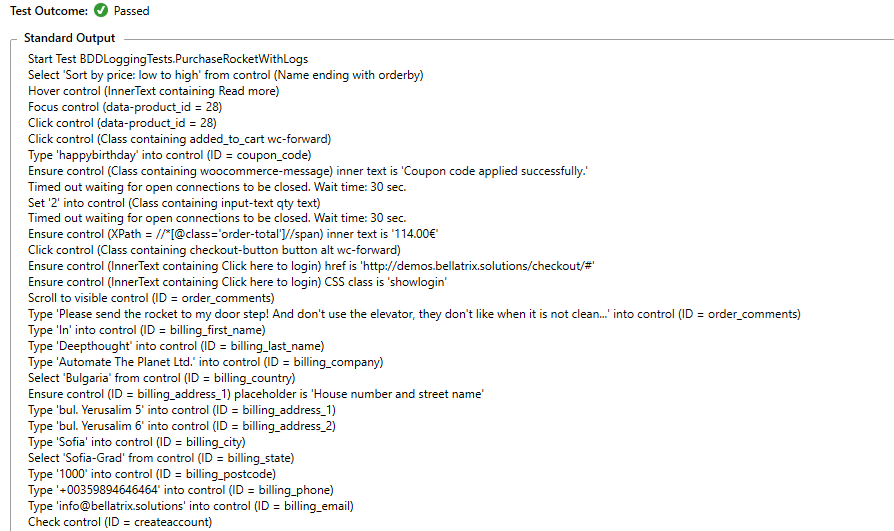
We want to be able to configure all aspects of the logging process through the configuration file. We leverage the configuration module that we implemented in the previous article.
"logging": {
    "isEnabled": true,
    "isConsoleLoggingEnabled": true,
    "isDebugLoggingEnabled": true,
    "isFileLoggingEnabled": true,
    "outputTemplate": "[{Timestamp:HH:mm:ss}] {Message:lj}{NewLine}"
}
Centralized, we can stop the whole logging feature or individual loggers- console, debug, file. Also, we can change the format of the logging messages.
Creating Logging Infrastructure
As we discussed in previous parts, we will put the configuration infrastructure code into a separate project called Bellatrix.Logging. We will leverage the .NET Core native support of logging. First, you need to install the following NuGet packages.
<PackageReference Include="Bellatrix.ServicesCollection" Version="2.0.1" />
<PackageReference Include="Microsoft.Extensions.Logging" Version="3.1.9" />
<PackageReference Include="Microsoft.Extensions.Logging.Abstractions" Version="3.1.9" />
<PackageReference Include="Microsoft.Extensions.Logging.Configuration" Version="3.1.9" />
<PackageReference Include="Microsoft.Extensions.Logging.Console" Version="3.1.9" />
<PackageReference Include="Microsoft.Extensions.Logging.Debug" Version="3.1.9" />
<PackageReference Include="Serilog.Extensions.Logging.File" Version="2.0.0" />
<PackageReference Include="Serilog.Settings.Configuration" Version="3.1.0" />
<PackageReference Include="Serilog.Sinks.Console" Version="3.1.1" />
<PackageReference Include="Serilog.Sinks.Debug" Version="1.0.1" />
<PackageReference Include="Serilog.Sinks.File" Version="4.1.0" />
On top of the Microsoft logging libraries, we will use another powerful logging library called Serilog, which will provide many more capabilities and configurations.
All loggers will share a common interface with two methods LogInformation and LogWarning.
public interface IBellaLogger
{
    void LogInformation(string message, params object[] args);

    void LogWarning(string message, params object[] args);
}
We will need a POCO settings class to hold the settings.
public class LoggingSettings
{
    public bool IsEnabled { get; set; }

    public bool IsConsoleLoggingEnabled { get; set; }

    public bool IsDebugLoggingEnabled { get; set; }

    public bool IsFileLoggingEnabled { get; set; }

    public string OutputTemplate { get; set; }
}
Logger Service Implementation
Here is the implantation of our general logger. We will later register it in our IoC container, mapping it to the IBellaLogger interface.
public class BellaLogger: IBellaLogger
{
    private readonly ILogger _logger;

    static BellaLogger()
    {
        var loggingSettings = ConfigurationService.Instance
                              .Root.GetSection("logging")?
                              .Get<LoggingSettings>();
        var loggerConfiguration = new LoggerConfiguration();

        if (loggingSettings != null
            && loggingSettings.IsEnabled)
        {
            if (loggingSettings.IsConsoleLoggingEnabled)
            {
                loggerConfiguration.WriteTo.Console(outputTemplate: loggingSettings.OutputTemplate);
            }

            if (loggingSettings.IsDebugLoggingEnabled)
            {
                loggerConfiguration.WriteTo.Debug(outputTemplate: loggingSettings.OutputTemplate);
            }

            if (loggingSettings.IsFileLoggingEnabled)
            {
                loggerConfiguration.WriteTo.File("bellatrix-log.txt",
                                    rollingInterval: RollingInterval.Day,
                                    outputTemplate: loggingSettings.OutputTemplate);
            }
        }

        Log.Logger = loggerConfiguration.CreateLogger();
    }

    public BellaLogger(ILogger logger)
            => _logger = logger;

    public void LogInformation(string message, params object[] args)
    {
        try
        {
            _logger.Information(message, args);
        }
        catch (Exception ex)
        {
            Debug.WriteLine(ex);
        }
    }

    public void LogWarning(string message, params object[] args)
    {
        try
        {
            _logger.Warning(message, args);
        }
        catch (Exception ex)
        {
            Debug.WriteLine(ex);
        }
    }
}
We have a private variable of type ILogger which comes from Microsoft.Extensions.Configuration package. We load the logging settings in the static constructor and based on the boolean properties from the LoggingSettings class. We add different Serilog logging listeners. In the LogInformation and LogWarning methods, we just call the Serilog logger.
The implantation of the DebugLogger is quite simple. Inside it, we just use the general BellaLogger. The difference is that it is static and exposes static methods.
public static class DebugLogger
{
    private static readonly IBellaLogger s_logger;

    static DebugLogger()
    {
        s_logger = new BellaLogger(Log.Logger);
    }

    public static void LogInformation(string message, params object[] args)
    {
        s_logger.LogInformation(message, args);
    }

    public static void LogWarning(string message, params object[] args)
    {
        s_logger.LogWarning(message, args);
    }
}
Usage Example
The usage is straightforward. Here for example we log exceptions to find out the reason for failed test cases updates.
protected override void PostTestCleanup(object sender, TestWorkflowPluginEventArgs e)
{
    if (!ConfigurationService.Instance.GetDynamicTestCasesSettings().IsEnabled)
    {
        return;
    }

    base.PostTestCleanup(sender, e);

    try
    {
        if (e.TestOutcome == TestOutcome.Passed
            && _dynamicTestCasesService?.Context != null)
        {
            _dynamicTestCasesService.Context.TestCase =
                _testCaseManagementService.InitTestCase(_dynamicTestCasesService.Context);
        }
    }
    catch (Exception ex)
    {
        DebugLogger.LogWarning($"Test case failed to update, {ex.Message}");
    }

    _dynamicTestCasesService?.ResetContext();
}
To use the general logger, we need to pass it as a dependency through the constructor. Later on, the QTestTestCaseManagementService will be initialized through the IoC container, and the BellaLogger will be injected.
public class QTestTestCaseManagementService : ITestCaseManagementService
{
    private QT.TestDesignService _testDesignService;
    private QT.ProjectService _projectService;
    private IBellaLogger _bellaLogger;

    public QTestTestCaseManagementService(IBellaLogger bellaLogger)
    {
        // we must login first to be able to make any request to the server
        // or we will get 401 error
        try
        {
            LoginToService(_testDesignService = new QT.TestDesignService(ConfigurationService.Instance.GetQTestDynamicTestCasesSettings().ServiceAddress));
            LoginToService(_projectService = new QT.ProjectService(ConfigurationService.Instance.GetQTestDynamicTestCasesSettings().ServiceAddress));
        }
        catch (Exception ex)
        {
            bellaLogger.LogWarning($"qTest Login was unsuccesful, {ex.Message}");
        }
    }
}
Summary
In the article, we implemented a module for logging data to console, test output, debug window, files, etc. In the next articles from the series, we will start working on the framework’s plug-in architecture, allowing us later to add many more features without modifying the core code.