
In the new Build Custom Automation Framework Series, we will look into detailed explanations on creating custom test automation frameworks. Many people starting a new position have this particular assignment, so I think it is crucial to understand how to follow all high-quality standards and practices properly. I am not a fan of reinventing the wheel, so I will encourage you to leverage other proven open-source solutions if they can be used and fit your needs instead of writing your own. Leverage the knowledge and expertise of proven experts in the field. If you follow this advice, this series will be highly useful to you again because you will understand how the test automation frameworks are designed, written, and maintained + how to work internally. The information about the subject will be invaluable to you choosing the right tool for your tests. The series can be even more useful to you if you decide to do everything from scratch.
Article by article, we will discuss different aspects and features of the custom test automation frameworks. At the end of the course, we will have a full-fledged custom test automation framework. The first article from the series will talk not so much about code but rather on how to define what we need (our requirements), how to do research properly- finding the right tools that we will base our framework, and lastly, creating a detailed list of desired characteristics for our solution grouping all of the various features that we will build in the next articles. In the course, I will use as a demo/example our open-source BELLATRIX test automation framework, which I believe is one of the most feature richest open-source frameworks out there.
In the first article from the series “Custom Test Automation Framework: Define Requirements and Characteristics”, we defined our future framework’s requirements and qualities/characteristics. This publication will continue with defining more precisely the various features grouped by the previously described characteristics. They will help us to prioritize and plan our work on the framework. We already looked into a few features in part 1, part 2 and part3. Planning and designing framework modularity is essential for supporting more comfortable usage, maintainability, and extensibility. So, in this article, we will talk about that. When you create a project for automating desktop apps, you don’t expect to find DLLs related to automating web or big driver executables, making your compiled output hundreds of MBs, right? This is why modularity is so essential. We will achieve it through the framework’s proper design into many smaller modules (libraries) within the whole big test automation framework.
Overall Solution and Folders Structure
As we discussed, we want to achieve modularity to reference only the projects that we need. This will also decrease the compilation time and the size of the build output folders.
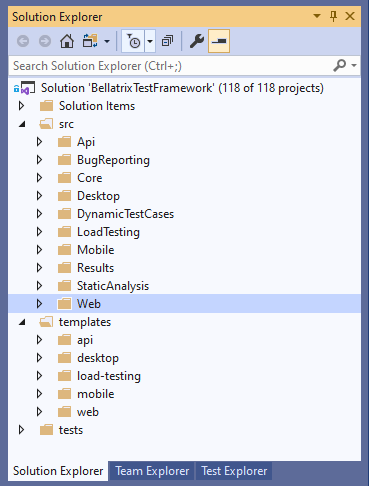
As depicted in the image, our framework, in its fullest, will consist of more than 100 projects! All of these projects are grouped in several folders that we will discuss in the next sections. But now, I will give you just a high-level overview.
Under the Solution Items folder, we will put any misc files that are not related to the primary framework projects. For example, we can create there a shared MSBuild targets file called SharedAssemblyInfo.targets to share common project info and referenced NuGet packages.
We have a folder for each technology module: API, Web, Desktop, Mobile, and LoadTesting. All of them will need Core infrastructure modules such as plug-ins, reading configuration data, exception logging, and many more. All of them will be placed under the folder Core.
We have additional folders for integration modules such as logging bugs automatically in a couple of bug tracking softwares - BugReporting, creating/updating automatically test cases based on tests in TCM systems - DynamicTestCases and publishing test results - Results.
Core Framework Modules
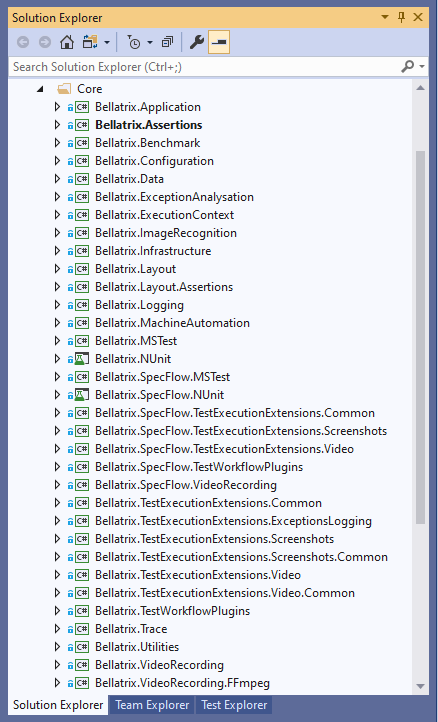
As we said, under the Core folder, we place various shared projects among all technologies that are essential for the structure of the framework. Maybe some of the most important are:
Bellatrix.MSTest and Bellatrix.NUnit there, we will place the core base classes for all tests. These base classes will be derived from all technology-specific ones- web, mobile, desktop, API. Also, these two projects will have a reference to Bellatrix.Assertions where we will define a common interface for all assertions. In the MSTest and NUnit specific projects, we will implement these interfaces.
Bellatrix.Logging - will contain logic for logging in files, debug, console, and options for detailed configuration.
Bellatrix.Configuration - will hold all core logic for reading configuration info from JSON files that we will use across different environments- PROD, TEST, UAT, etc.
Bellatrix.Data - will expose various attributes and useful constants.
Bellatrix.Layout - a module containing core shared logic for layout, responsive, and style tests among all technologies.
Bellatrix.ImageRecognition - a project that will verify PDFs and other hard to verify components such as charts, graphs, and others.
Bellatrix.TestWorkflowPlugins - contains the core logic for implementing plug-ins for the execution flow of the framework.
Bellatrix.TestExecutionExtensions.Video - will hold the video plug-in for taking videos on test failures.
Bellatrix.TestExecutionExtensions.Screenshots - will hold the screenshot plug-in for taking videos on test failures.
Bellatrix.VideoRecording.FFmpeg - will contain the cross-platform FFmpeg video recorder used in the video plug-in.
Bellatrix.MachineAutomation - will have logic for installing required browsers, software, extensions on the machine during compilation or updating them to the correct version.
Also, under the Core folder, we will have similar shared and plug-in projects for SpecFlow.
Web Modules
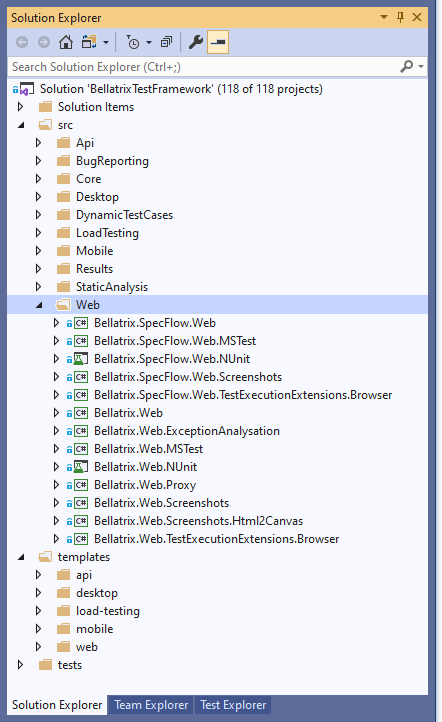
We will have all the necessary projects for the web part of our framework under the Web folder. First, Bellatrix.Web will contain all the required components, services, and utilities to execute web tests using WebDriver. We have two other projects that will reference core MSTest and NUnit projects + Bellatrix.Web, these are Bellatrix.Web.MSTest and Bellatrix.Web.NUnit. They will hold the base test classes for web MSTest and NUnit tests and add additional properties and logic to the core MSTest and NUnit classes. We have similar projects for SpecFlow.
Bellatrix.Web.TestExecutionExtensions.Browser and Bellatrix.SpecFlow.Web.TestExecutionExtensions.Browser projects will hold the plug-ins for controlling the browser’s execution, whether it needs to be closed, restarted, or changed with another version.
Bellatrix.Web.Screenshots.Html2Canvas will hold the full-page screenshot engine used for web tests from the screenshot-on-failure plug-in instead of using the native WebDriver screenshot engine usually can take screenshots only of the visible part of the screen.
Mobile Modules
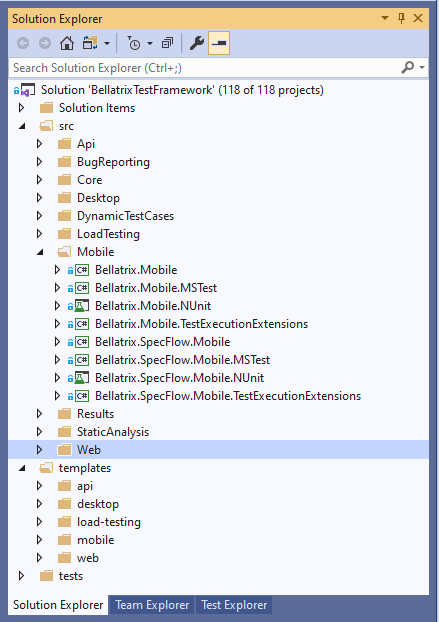
We will have all the necessary projects for the mobile part of our framework under the Mobile folder. First, Bellatrix.Mobile will contain all the required components, services, and utilities to execute Android and iOS tests using Appium. We have two other projects that will reference core MSTest and NUnit projects + Bellatrix.Mobile, these are Bellatrix.Mobile.MSTest and Bellatrix.Mobile.NUnit. They will hold the base test classes for mobile MSTest and NUnit tests and add additional properties and logic to the core MSTest and NUnit classes. We have similar projects for SpecFlow.
Bellatrix.Mobile.TestExecutionExtensions and Bellatrix.SpecFlow.Mobile.TestExecutionExtensions projects will hold the plug-ins for controlling the mobile app’s execution, whether it needs to be closed or restarted.
Desktop Modules
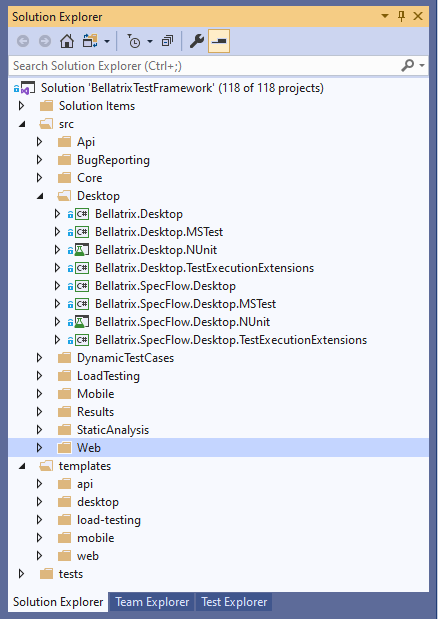
We will have all the necessary projects for the desktop part of our framework under the Desktop folder. First, Bellatrix.Desktop will contain all the required components, services, and utilities to automate WinForms, WPF, UWP, Win32 apps on Windows10 using WinAppDriver. We have two other projects that will reference core MSTest and NUnit projects + Bellatrix.Desktop, these are Bellatrix.Desktop.MSTest and Bellatrix.Desktop.NUnit. They will hold the base test classes for desktop MSTest and NUnit tests and add additional properties and logic to the core MSTest and NUnit classes. We have similar projects for SpecFlow.
Bellatrix.Desktop.TestExecutionExtensions and Bellatrix.SpecFlow.Desktop.TestExecutionExtensions projects will hold the plug-ins for controlling the desktop app’s execution, whether it needs to be closed or restarted.
API Modules
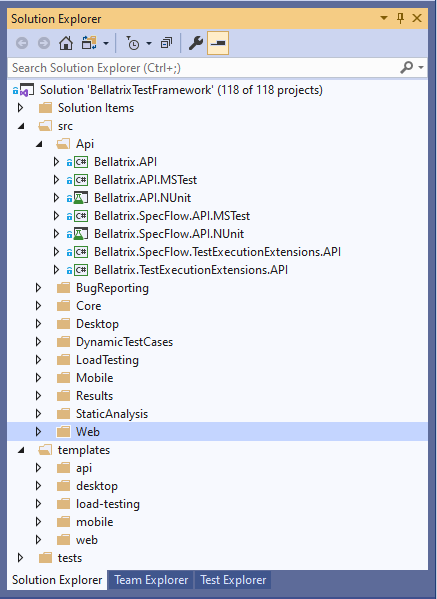
We will have all the necessary projects for the API part of our framework under the API folder. First, Bellatrix.API will contain all the required services and utilities to automate REST web service apps using RestSharp. We have two other projects that will reference core MSTest and NUnit projects + Bellatrix.API, these are Bellatrix.API.MSTest and Bellatrix.API.NUnit. They will hold the base test classes for API MSTest and NUnit tests and add additional properties and logic to the core MSTest and NUnit classes. We have similar projects for SpecFlow.
Bellatrix.TestExecutionExtensions.API and Bellatrix.SpecFlow.Desktop.TestExecutionExtensions projects will hold the plug-ins for authentication and retry of requests.
Load Testing Modules
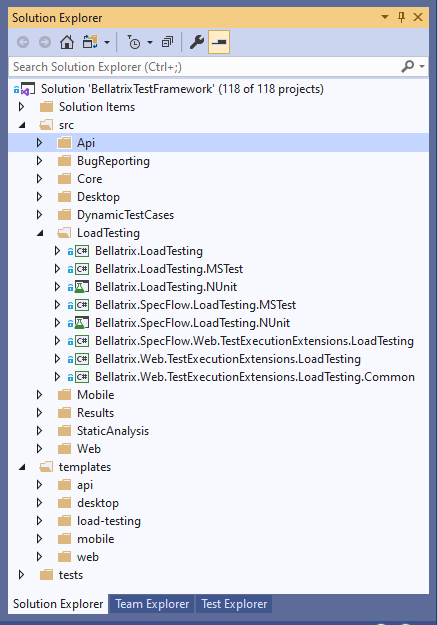
Under the LoadTesting folder, we will hold all projects for reusing functional web tests for load testing. Bellatrix.LoadTesting will be the main project that will contain all required services, reference all libraries, and so on. Then we will have two more specific projects for NUnit and MSTest that will expose base classes for all MSTest and NUnit tests. We will have similar projects for SpecFlow.
3rd-party Integrations Modules
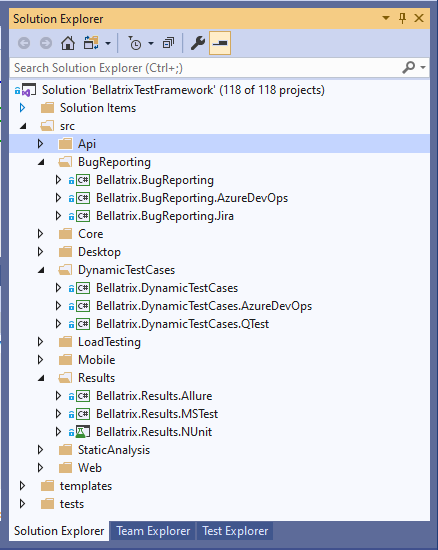
For now, we will have three types of 3rd-party projects - for automatic bug reporting, for automatic creation of test cases in TCM systems, and test reporting. In all of them, we have specific projects for holding unique system integration, such as Bellatrix.Allure or Bellatrix.BugReporting.Jira.
Static Analysis
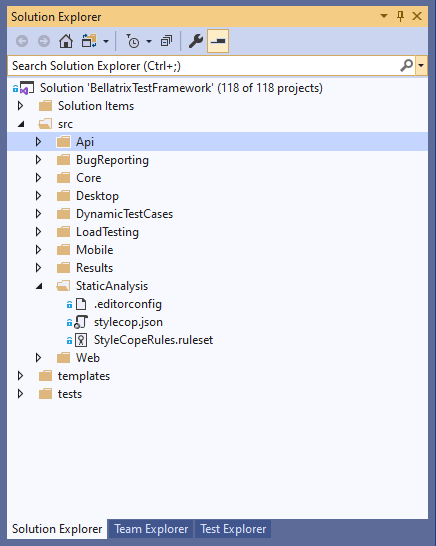
Our framework will support code static analysis and conventions through .editorconfig and StyleCop. Under the folder StaticAnalysis, we will hold the files defining these rules for the framework’s solution.
Templates
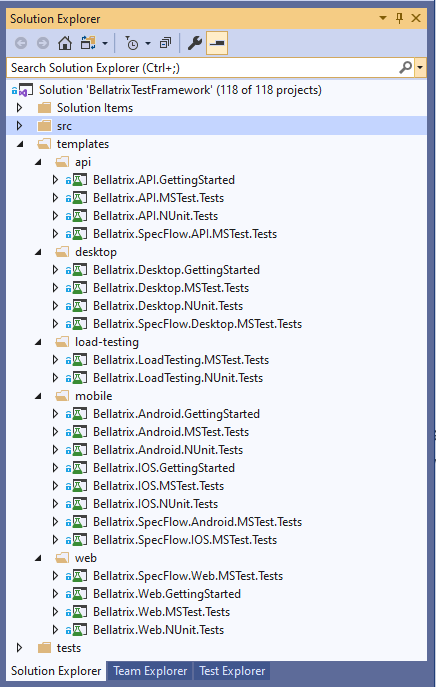
Under the Templates folder, we will have two types of projects grouped by technology - preconfigured empty ones with all necessary references and configurations and one more type - the so-called getting started guides (containing explanations, real-world demos/examples, and exercises).
Framework Tests
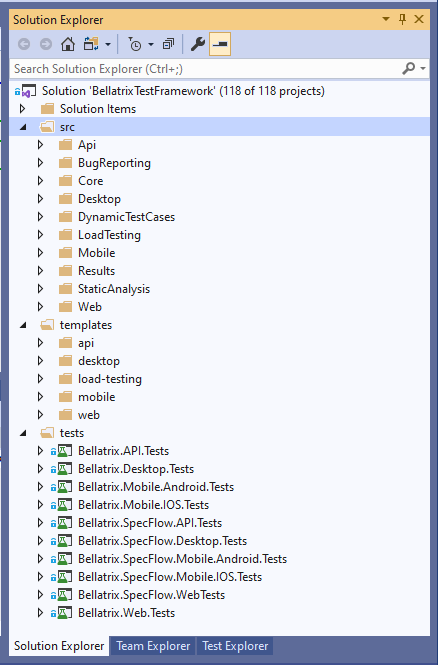
The folder Tests will hold all test projects for verifying that everything in the framework is working correctly.
