
Last week I announced a new series of articles dedicated to Specflow (Behavior Driven Development for .NET). In my first publication, I showed you how to create a simple test using the framework. Today’s post will be more advanced explaining the concept of SpecFlow hooks. Or how to extend the tests’ execution workflow running additional code on various points of the workflow.
What are Hooks?
Definition
The hooks (event bindings) can be used to perform additional automation logic on specific events, such as before executing a scenario. Hooks are global but can be restricted to run only for features or scenarios with a particular tag (see below). The execution order of hooks for the same event is undefined.
Create SpecFlow Hooks’ File
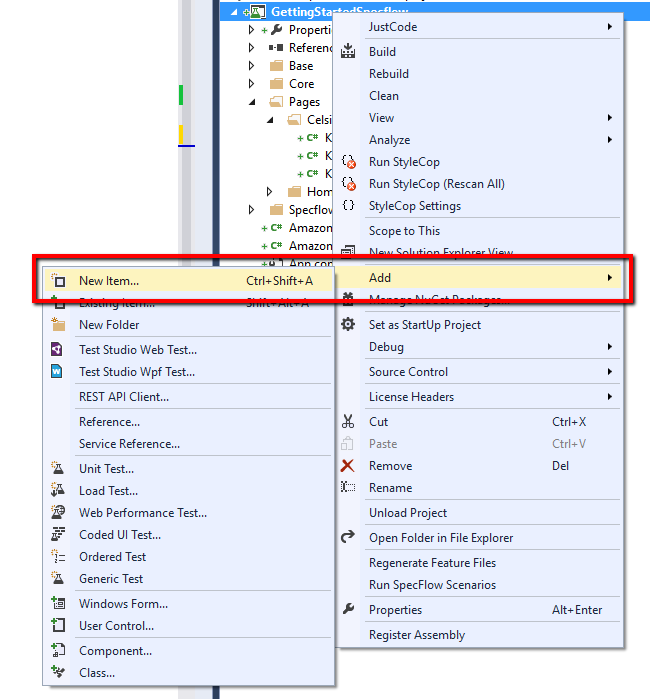
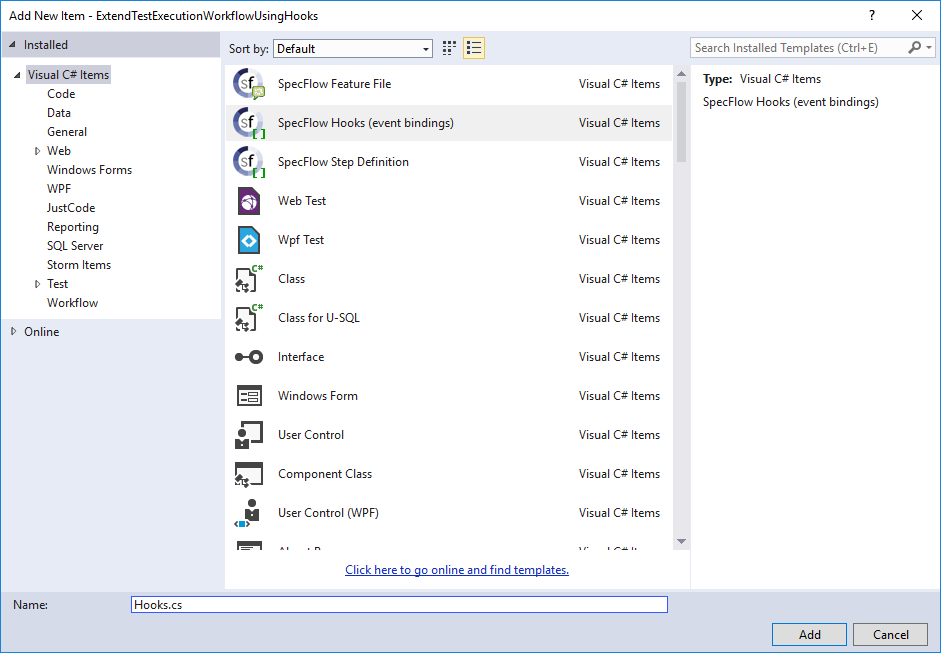
using System;
using System.Collections.Generic;
using System.Linq;
using System.Text;
using TechTalk.SpecFlow;
namespace ExtendTestExecutionWorkflowUsingHooks
{

    public sealed class Hooks
    {
        // For additional details on SpecFlow hooks see http://go.specflow.org/doc-hooks

        public void BeforeScenario()
        {
            //TODO: implement logic that has to run before executing each scenario
        }

        public void AfterScenario()
        {
            //TODO: implement logic that has to run after executing each scenario
        }
    }
}
Types of SpecFlow Hooks
SpecFlow comes with some predefined hooks that are executed after some events are fired during the tests’ execution. To make an analogy, think about TestInitialize and TestCleanup from MSTest framework.
The available hooks and their running order are:
| Attribute | Description | Is Static | MSTest Analogue |
|---|---|---|---|
[BeforeTestRun] / [AfterTestRun] | Run before/after the entire test run | Yes | AssemblyInitialize and AssemblyCleanup |
[BeforeFeature] / [AfterFeature] | Run before/after executing each feature | Yes | ClassInitialize and ClassCleanup |
[BeforeScenario] / [AfterScenario] | Run before/after executing each scenario | No | TestInitialize and TestCleanup |
[BeforeScenarioBlock] / [AfterScenarioBlock] | Run before/after executing each scenario block (e.g. between the “givens” and the “whens”) | No | - |
[BeforeStep] / [AfterStep] | Run before/after executing each scenario step | No | - |
SpecFlow Hooks in Tests
I will leverage on the test example from the first article from the series where we built a test for converting Kilowatt-Hours to Newton Meters. One of the drawbacks of the first implementation was that we needed to start the browser in SpecFlow background section and close it in a separate Then step.
Previous Feature File
Feature: Convert Metrics for Nuclear Science
To do my nuclear-related job
As a Nuclear Engineer
I want to be able to convert different metrics.
Background:
Given web browser is opened
@testingFramework
Scenario: Successfully Convert Kilowatt-hours to Newton-meters
When I navigate to Metric Conversions
And navigate to Energy and power section
And navigate to Kilowatt-hours
And choose conversions to Newton-meters
And type 30 kWh
Then assert that 1.080000e+8 Nm are displayed as answer
Then close web browser
Bindings Class without Hooks
public class ConvertMetricsForNuclearScienceSteps
{
    private HomePage homePage;
    private KilowattHoursPage kilowattHoursPage;
    [Given(@"web browser is opened")]
    public void GivenWebBrowserIsOpened()
    {
        Driver.StartBrowser(BrowserTypes.Chrome);
    }
    [Then(@"close web browser")]
    public void ThenCloseWebBrowser()
    {
        Driver.StopBrowser();
    }
    [When(@"I navigate to Metric Conversions")]
    public void WhenINavigateToMetricConversions_()
    {
        this.homePage = new HomePage(Driver.Browser);
        this.homePage.Open();
    }
    [When(@"navigate to Energy and power section")]
    public void WhenNavigateToEnergyAndPowerSection()
    {
        this.homePage.EnergyAndPowerAnchor.Click();
    }
    [When(@"navigate to Kilowatt-hours")]
    public void WhenNavigateToKilowatt_Hours()
    {
        this.homePage.KilowattHours.Click();
    }
    [When(@"choose conversions to Newton-meters")]
    public void WhenChooseConversionsToNewton_Meters()
    {
        this.kilowattHoursPage = new KilowattHoursPage(Driver.Browser);
        this.kilowattHoursPage.KilowatHoursToNewtonMetersAnchor.Click();
    }
    [When(@"type (.*) kWh")]
    public void WhenTypeKWh(double kWh)
    {
        this.kilowattHoursPage.ConvertKilowattHoursToNewtonMeters(kWh);
    }
    [Then(@"assert that (.*) Nm are displayed as answer")]
    public void ThenAssertThatENmAreDisplayedAsAnswer(string expectedNewtonMeters)
    {
        this.kilowattHoursPage.AssertFahrenheit(expectedNewtonMeters);
    }
}
Here we have binding methods for starting and closing the browser. Also, every page is created using the new keyword.
Test Run Reuse Browser- Hooks Class
public sealed class TestRunSingleBrowserHooks
{

    public static void RegisterPages()
    {
        Driver.StartBrowser(BrowserTypes.Chrome);
        UnityContainerFactory.GetContainer().RegisterType<HomePage>(new ContainerControlledLifetimeManager());
        UnityContainerFactory.GetContainer().RegisterType<KilowattHoursPage>(new ContainerControlledLifetimeManager());
        UnityContainerFactory.GetContainer().RegisterInstance<IWebDriver>(Driver.Browser);
    }
    // Reuse browser for the whole run.

    public static void AfterTestRun()
    {
        Driver.StopBrowser();
    }
}
Test Scenario Reuse Browser- Hooks Class
public sealed class TestScenarioBrowserHooks
{

    public static void RegisterPages()
    {
        UnityContainerFactory.GetContainer().RegisterType<HomePage>(new ContainerControlledLifetimeManager());
        UnityContainerFactory.GetContainer().RegisterType<KilowattHoursPage>(new ContainerControlledLifetimeManager());
    }

    public static void CloseBrowser()
    {
        Driver.StopBrowser();
    }
}
Feature File with Hooks
@firefox
Feature: Convert Metrics for Nuclear Science
To do my nuclear-related job
As a Nuclear Engineer
I want to be able to convert different metrics.
@hooksExample @firefox
Scenario: Successfully Convert Kilowatt-hours to Newton-meters
When I navigate to Metric Conversions
And navigate to Energy and power section
And navigate to Kilowatt-hours
And choose conversions to Newton-meters
And type 30 kWh
Then assert that 1.080000e+8 Nm are displayed as answer
Bindings Class with Hooks
public class ConvertMetricsForNuclearScienceSteps
{
    private readonly HomePage homePage;
    private readonly KilowattHoursPage kilowattHoursPage;
    public ConvertMetricsForNuclearScienceSteps()
    {
        this.homePage =
        UnityContainerFactory.GetContainer().Resolve<HomePage>();
        this.kilowattHoursPage =
        UnityContainerFactory.GetContainer().Resolve<KilowattHoursPage>();
    }
    ////[Given(@"web browser is opened")]
    ////public void GivenWebBrowserIsOpened()
    ////{
    //// Driver.StartBrowser(BrowserTypes.Chrome);
    ////}
    ////[Then(@"close web browser")]
    ////public void ThenCloseWebBrowser()
    ////{
    //// Driver.StopBrowser();
    ////}
    [When(@"I navigate to Metric Conversions")]
    public void WhenINavigateToMetricConversions_()
    {
        ////this.homePage = new HomePage(Driver.Browser);
        ////this.homePage = UnityContainerFactory.GetContainer().Resolve<HomePage>();
        this.homePage.Open();
    }
    [When(@"navigate to Energy and power section")]
    public void WhenNavigateToEnergyAndPowerSection()
    {
        this.homePage.EnergyAndPowerAnchor.Click();
    }
    [When(@"navigate to Kilowatt-hours")]
    public void WhenNavigateToKilowatt_Hours()
    {
        this.homePage.KilowattHours.Click();
    }
    [When(@"choose conversions to Newton-meters")]
    public void WhenChooseConversionsToNewton_Meters()
    {
        ////this.kilowattHoursPage = new KilowattHoursPage(Driver.Browser);
        this.kilowattHoursPage.KilowatHoursToNewtonMetersAnchor.Click();
    }
    [When(@"type (.*) kWh")]
    public void WhenTypeKWh(double kWh)
    {
        this.kilowattHoursPage.ConvertKilowattHoursToNewtonMeters(kWh);
    }
    [Then(@"assert that (.*) Nm are displayed as answer")]
    public void ThenAssertThatENmAreDisplayedAsAnswer(string expectedNewtonMeters)
    {
        this.kilowattHoursPage.AssertFahrenheit(expectedNewtonMeters);
    }
}
Configure SpecFlow Hooks’ Execution Order
Another cool feature of the SpecFlow hooks is that you can specific execution order if multiple hooks are specified of the same type. By default, the execution order is unspecified, and they can be executed in any order. To ensure that they are performed in a specified order, the hook attribute allows an arbitrary order to be configured. The lowest order values run before the higher order methods. After some refactoring, our hooks’ file will look like this.
public sealed class Hooks
{
    // Reuse browser for the whole run.
    [BeforeTestRun(Order = 1)]
    public static void RegisterPages()
    {
        System.Console.WriteLine("Execute BeforeTestRun- RegisterPages");
        Driver.StartBrowser(BrowserTypes.Chrome);
        UnityContainerFactory.GetContainer().RegisterType<HomePage>(new ContainerControlledLifetimeManager());
        UnityContainerFactory.GetContainer().RegisterType<KilowattHoursPage>(new ContainerControlledLifetimeManager());
    }
    [BeforeTestRun(Order = 2)]
    public static void RegisterDriver()
    {
        System.Console.WriteLine("Execute BeforeTestRun- RegisterDriver");
        UnityContainerFactory.GetContainer().RegisterInstance<IWebDriver>(Driver.Browser);
    }
    // Reuse browser for the whole run.

    public static void AfterTestRun()
    {
        System.Console.WriteLine("Execute AfterTestRun- StopBrowser");
        Driver.StopBrowser();
    }

    public static void BeforeFeature()
    {
    }

    public static void AfterFeature()
    {
    }
    [BeforeScenario(Order = 2)]
    public static void StartBrowser()
    {
        // New Browser Instance for each test.
        ////Driver.StartBrowser(BrowserTypes.Chrome);
        System.Console.WriteLine("Execute BeforeScenario- StartBrowser");
    }
    [BeforeScenario(Order = 1)]
    public static void LoginUser()
    {
        System.Console.WriteLine("Execute BeforeScenario- LoginUser");
        // Login to your site.
    }
    [AfterScenario(Order = 2)]
    public static void CloseBrowser()
    {
        System.Console.WriteLine("Execute AfterScenario- CloseBrowser");
        // New Browser Instance for each test.
        ////Driver.StopBrowser();
    }
    [AfterScenario(Order = 1)]
    public static void LogoutUser()
    {
        System.Console.WriteLine("Execute AfterScenario- LogoutUser");
        // Logout the user
    }

    public void BeforeStep()
    {
        System.Console.WriteLine("BeforeStep- Start Timer");
    }

    public static void AfterStep()
    {
        System.Console.WriteLine("BeforeStep- Log something in DB.");
    }
}
Hooks’ Tag Scoping
We can scope based on tags. The tags are added to each test scenario starting with the ‘@’ symbol. Most of the hooks support tag scoping, meaning that they are executed only if the feature or the scenario has at least one of the tags specified in the filter.
Scope Attribute
[AfterScenario(Order = 1)]
[Scope(Tag = "hooksExample")]
public static void LogoutUser()
{
    System.Console.WriteLine("Execute AfterScenario- LogoutUser");
    // Logout the user
}
Step Attribute
[AfterScenario(Order = 1)]
[AfterScenario("hooksExample")]
public static void LogoutUser()
{
    System.Console.WriteLine("Execute AfterScenario- LogoutUser");
    // Logout the user
}
Advanced Tag Scoping
If you use the ScenarioContext class, you can perform even more advanced scoping. In the below example we throw an exception if the browser tag is not specified.
[BeforeScenario(Order = 2)]
public static void StartBrowser()
{
    // Advanced tag filtering
    if (!ScenarioContext.Current.ScenarioInfo.Tags.Contains("firefox"))
    {
        throw new ArgumentException("The browser is not specfied");
    }
    // New Browser Instance for each test.
    ////Driver.StartBrowser(BrowserTypes.Chrome);
    System.Console.WriteLine("Execute BeforeScenario- StartBrowser");
}
Hooks’ Methods Execution Order
public sealed class OrderHooks
{
    // Reuse browser for the whole run.
    [BeforeTestRun(Order = 1)]
    public static void RegisterPages()
    {
        System.Console.WriteLine("BeforeTestRun");
        Driver.StartBrowser(BrowserTypes.Chrome);
        UnityContainerFactory.GetContainer().RegisterType<HomePage>(new ContainerControlledLifetimeManager());
        UnityContainerFactory.GetContainer().RegisterType<KilowattHoursPage>(new ContainerControlledLifetimeManager());
    }
    [BeforeTestRun(Order = 2)]
    public static void RegisterDriver()
    {
        System.Console.WriteLine("Execute BeforeTestRun- RegisterDriver");
        UnityContainerFactory.GetContainer().RegisterInstance<IWebDriver>(Driver.Browser);
    }
    // Reuse browser for the whole run.

    public static void AfterTestRun()
    {
        System.Console.WriteLine("AfterTestRun");
        Driver.StopBrowser();
    }

    public static void BeforeFeature()
    {
        System.Console.WriteLine("BeforeFeature");
    }

    public static void AfterFeature()
    {
        System.Console.WriteLine("AfterFeature");
    }

    public void LoginUser()
    {
        System.Console.WriteLine("BeforeScenario");
    }
    [AfterScenario(Order = 1)]
    public void AfterScenario()
    {
        System.Console.WriteLine("AfterScenario");
    }

    public void BeforeStep()
    {
        System.Console.WriteLine("BeforeStep");
    }

    public void AfterStep()
    {
        System.Console.WriteLine("AfterStep");
    }
}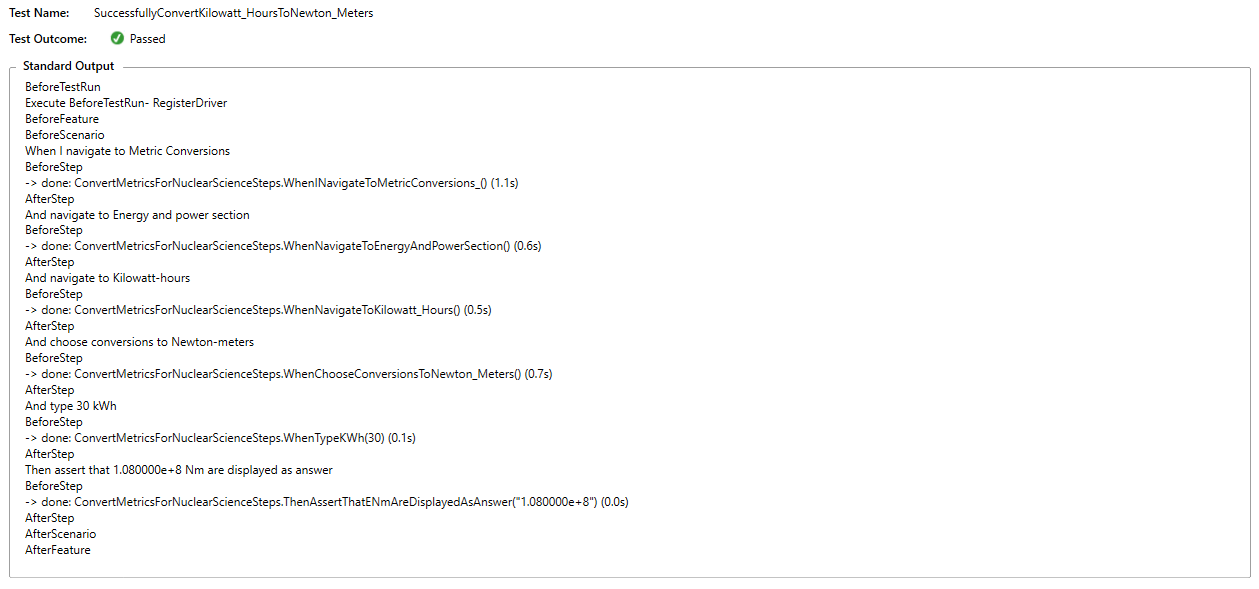
Actually, the after test is executed, I am not sure why it was not printed in the output. Anyway, it is executed last.
