

In my previous articles from the series Design Patterns in Automated Testing, I explained in detail how to improve your test automation framework through the implementation of Page Objects and Facades. Here I am going to extend further the ideas of the Page Object Pattern. More efficient usage and improved readability are achievable through the incorporation of the Page Objects with Fluent API. The result will be Fluent Page Objects or Fluent Page Object Pattern.
Definition
In software engineering, a fluent interface (as first coined by Eric Evans and Martin Fowler) is an implementation of an object-oriented API that aims to provide the most readable code. A fluent interface is typically implemented by using method cascading (concretely method chaining) to relay the instruction context of a subsequent call (but a fluent interface entails more than just method chaining).
Benefits:
-
The context is defined through the return value of a called method-self-referential, where the new context is equivalent to the last context.
-
Self-referential, where the new context is equivalent to the last contest terminated by the return of a void context.
-
Terminated by the return of a void context.
UML Class Diagram
classDiagram
    BasePage~ElementsT, AssertionsT~ <|-- BingMainPage
    BaseElements <|-- BingMainPageElements
    BaseAssertions~ElementsT~ <|-- BingMainPageAssertions
    BingMainPage --> BingMainPageElements
    BingMainPage --> BingMainPageAssertions
    class BingMainPage {
        +search()
    }
    class BingMainPageElements {
        +searchBox()
        +goButton()
        +resultsCountDiv()
    }
    class BingMainPageAssertions {
        +resultsCount()
    }
    class BasePage~ElementsT, AssertionsT~ {
        #elements()
        #assertions()
        +navigate()
    }
    class BaseElements {
        +switchToDefault()
    }
    class BaseAssertions~ElementsT~ {
        #elements()
    }
The classes and objects participating in this pattern are:
-
Page Objects (BingMainPage)
Holds the actions that can be performed on the page like search and navigate. It exposes an easy access to the page assertions through the assertions method. The best implementations of the pattern hide the usage of the elements, wrapping it through all action methods.
-
BasePage
Gives access to the child’s page elements and assertions class through reflection of generic type parameters and defines a standard navigation operation.
-
BaseElements
Provides easier access to current browser and functions to switch between different frames.
-
BaseAssertions
Gives all child instance to the current element map through reflection of generic type parameter so there’s no need to instantiate it in every assertions class.
While ago we were working on the first version of the BELLATRIX test automation framework, I did this research so that we can find the most convenient way for creating page objects.
Fluent Page Object Pattern Java Code
Test’s Test Case
The primary goal of the example test for the Fluent Page Object Pattern is going to be to search for images in Bing with different settings.
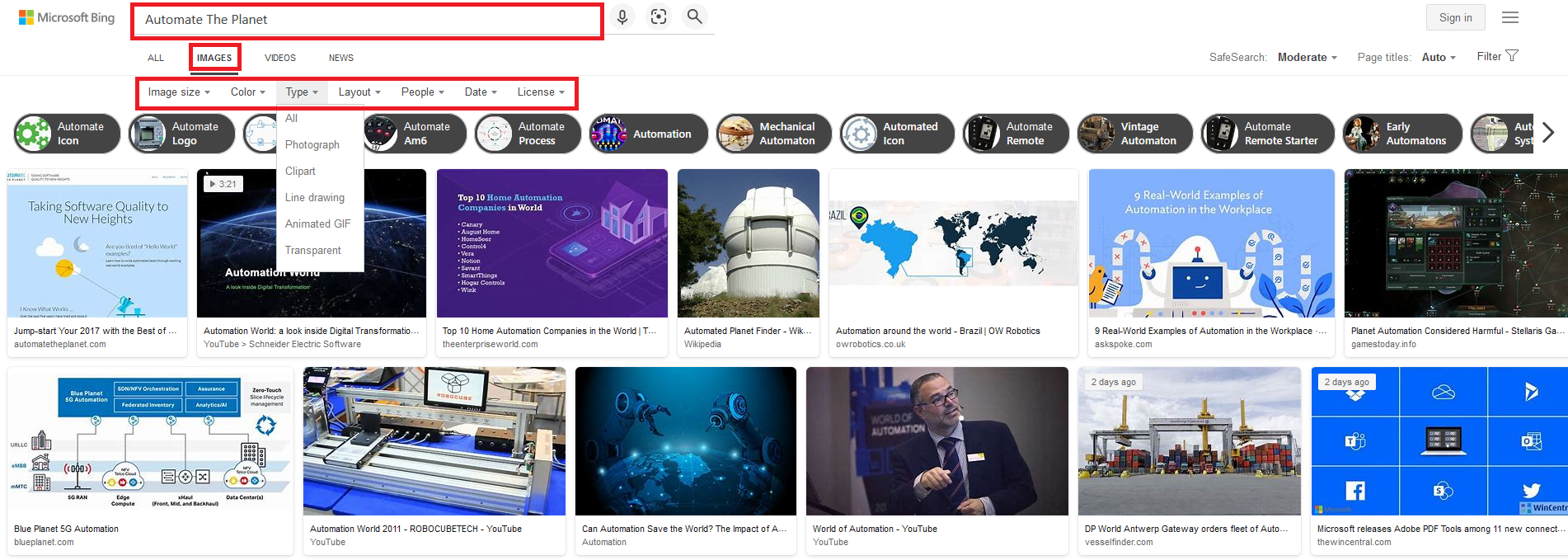
Fluent Page Objects Implementation Code
If we don’t use Fluent Page Objects, our test looks like the code below.
public class FluentBingTests {
  @BeforeMethod
  public void testInit() {
    Driver.startBrowser();
  }

  @AfterMethod
  public void testCleanup() {
    Driver.stopBrowser();
  }

  @Test
  public void searchImageInBing_when_NoFluentPageObjectPatternUsed() {
    var bingMainPage = new BingMainPage();
    bingMainPage.navigate();
    bingMainPage.search("Automate The Planet");
    bingMainPage.clickImages();
    bingMainPage.clickImagesFilter();
    bingMainPage.setSize(Size.LARGE);
    bingMainPage.setColor(Color.COLOR_ONLY);
    bingMainPage.setType(Type.CLIPART);
    bingMainPage.setPeople(People.ALL);
    bingMainPage.setDate(Date.PAST_YEAR);
    bingMainPage.setLicense(License.ALL);
  }
}
The primary goal of the Fluent Page Object Pattern is to enable you to use the power of method chaining. To achieve it, the BingMainPage should be slightly modified.
public class BingMainPage
  extends BasePage<BingMainPageElements, BingMainPageAssertions> {

  @Override
  protected String getUrl() {
    return "http://www.bing.com/";
  }

  @Override
  public BingMainPage navigate() {
    super.navigate();
    return this;
  }

  @Override
  public BingMainPage navigate(String part) {
    super.navigate(part);
    return this;
  }

  public BingMainPage search(String textToType) {
    elements().searchBox().clear();
    elements().searchBox().sendKeys(textToType);
    elements().goButton().click();
    return this;
  }

  public BingMainPage clickImages() {
    elements().imagesLink().click();
    return this;
  }

  public BingMainPage clickImagesFilter() {
    elements().filterMenu().click();
    return this;
  }

  public BingMainPage setSize(Size size) {
    waitForAsyncRefresh(elements().sizes());
    elements().sizes().click();
    elements().sizesOption().get(size.ordinal()).click();
    return this;
  }

  public BingMainPage setColor(Color color) {
    waitForAsyncRefresh(elements().color());
    elements().color().click();
    elements().colorOption().get(color.ordinal()).click();
    return this;
  }

  public BingMainPage setType(Type type) {
    waitForAsyncRefresh(elements().type());
    elements().type().click();
    elements().typeOption().get(type.ordinal()).click();
    return this;
  }

  public BingMainPage setLayout(Layout layout) {
    waitForAsyncRefresh(elements().layout());
    elements().layout().click();
    elements().layoutOption().get(layout.ordinal()).click();
    return this;
  }

  public BingMainPage setPeople(People people) {
    waitForAsyncRefresh(elements().people());
    elements().people().click();
    elements().peopleOption().get(people.ordinal()).click();
    return this;
  }

  public BingMainPage setDate(Date date) {
    waitForAsyncRefresh(elements().date());
    elements().date().click();
    elements().dateOption().get(date.ordinal()).click();
    return this;
  }

  public BingMainPage setLicense(License license) {
    waitForAsyncRefresh(elements().license());
    elements().license().click();
    elements().licenseOption().get(license.ordinal()).click();
    return this;
  }

  private void waitForAsyncRefresh(WebElement element) {
    Driver
      .getBrowserWait()
      .until(ExpectedConditions.elementToBeClickable(element));
    Driver
      .getBrowserWait()
      .until(
        ExpectedConditions.invisibilityOfElementLocated(By.id("ajaxMaskLayer"))
      );
  }
}
The most important part of the above code is that all methods return the current instance of the page.
return this;Not related to the pattern itself but interesting to point here is the way of choosing the different options. You need to click on the menu element so the list of options becomes visible. Although after choosing an options, the page asynchronously refreshes the content while blocking the UI with ajaxMaskLayer div, which gets added to the DOM and then removed. This is why we created a private waitForAsyncRefresh method that can handle the wait of the element to become clickable and the invisibility of the UI blocker. Here are the different settings elements that you can discover in the BingMainPageMap.
public WebElement sizes() {
return browser.findElement(By.xpath("//div/ul/li/span/span[text() = 'Image size']"));
}
public List<WebElement> sizesOption() {
return browser.findElements(By.xpath("//div/ul/li/span/span[text() = 'Image size']/ancestor::li/div/div//a"));
}
public WebElement color() {
return browser.findElement(By.xpath("//div/ul/li/span/span[text() = 'Color']"));
}
public List<WebElement> colorOption() {
return browser.findElements(By.xpath("//div/ul/li/span/span[text() = 'Color']/ancestor::li/div/div//a"));
}
public WebElement type() {
return browser.findElement(By.xpath("//div/ul/li/span/span[text() = 'Type']"));
}
public List<WebElement> typeOption() {
return browser.findElements(By.xpath("//div/ul/li/span/span[text() = 'Type']/ancestor::li/div/div//a"));
}
public WebElement layout() {
return browser.findElement(By.xpath("//div/ul/li/span/span[text() = 'Layout']"));
}
public List<WebElement> layoutOption() {
return browser.findElements(By.xpath("//div/ul/li/span/span[text() = 'Layout']/ancestor::li/div/div//a"));
}
public WebElement people() {
return browser.findElement(By.xpath("//div/ul/li/span/span[text() = 'People']"));
}
public List<WebElement> peopleOption() {
return browser.findElements(By.xpath("//div/ul/li/span/span[text() = 'People']/ancestor::li/div/div//a"));
}
public WebElement date() {
return browser.findElement(By.xpath("//div/ul/li/span/span[text() = 'Date']"));
}
public List<WebElement> dateOption() {
return browser.findElements(By.xpath("//div/ul/li/span/span[text() = 'Date']/ancestor::li/div/div//a"));
}
public WebElement license() {
return browser.findElement(By.xpath("//div/ul/li/span/span[text() = 'License']"));
}
public List<WebElement> licenseOption() {
return browser.findElements(By.xpath("//div/ul/li/span/span[text() = 'License']/ancestor::li/div/div//a"));
}
All of them use the same location technique – XPath expression that finds the div by its inner text. The options are returning List of We****bElements, with locator relative to the one of the menu element. I believe that it is a poor decision to switch settings through text variable, so in my implementation I use enums.
Sample Settings Enum
public enum Date {
  ALL,
  PAST_24_HOURS,
  PAST_WEEK,
  PAST_MONTH,
  PAST_YEAR,
}
This way the chosen enum value represents an integer from 0-4 that is the same as the index of the same values in the select element. We use enums’ built-in ordinal method which returns the position in the enum declaration. We then choose the element from the List by it’s index using the get method.
public BingMainPage setDate(Date date) {
    waitForAsyncRefresh(elements().date());
    elements().date().click();
    elements().dateOption().get(date.ordinal()).click();
    return this;
}
Create Fluent Page Assertions
In order to keep the method chaining available when using assertions, we need to make them return their own instance in the assertion methods.
Not Fluent BingMainPageAssertions
public class BingMainPageAssertions
  extends BaseAssertions<BingMainPageElements> {

  public BingMainPageAssertions resultsCountFluent(String expectedCount) {
    Assert.assertTrue(
      elements().resultsCountDiv().getText().contains(expectedCount),
      "The results DIV doesn't contain the specified text."
    );
    return this;
  }
}
Fluent BingMainPageAssertions
public class BingMainPageAssertions
  extends BaseAssertions<BingMainPageElements> {

  public BingMainPageAssertions resultsCountFluent(String expectedCount) {
    Assert.assertTrue(
      elements().resultsCountDiv().getText().contains(expectedCount),
      "The results DIV doesn't contain the specified text."
    );
    return this;
  }
}
Fluent Page Objects Usage in Tests
public class FluentBingTests {

  @BeforeMethod
  public void testInit() {
    Driver.startBrowser();
  }

  @AfterMethod
  public void testCleanup() {
    Driver.stopBrowser();
  }

  @Test
  public void searchImageInBing_when_FluentPageObjectPatternUsed() {
    var bingMainPage = new BingMainPage();
    bingMainPage
      .navigate()
      .search("Automate The Planet")
      .clickImages()
      .clickImagesFilter()
      .setSize(Size.LARGE)
      .setColor(Color.COLOR_ONLY)
      .setType(Type.CLIPART)
      .setPeople(People.ALL)
      .setDate(Date.PAST_YEAR)
      .setLicense(License.ALL);
  }
}
Summary
The fluent page objects significantly improve the readability of tests. Also, it is quite easy to write tests, thanks to the method chaining.
For more detailed overview and usage of many more design patterns and best practices in automated testing, check my book “Design Patterns for High-Quality Automated Tests, Java Edition, Clean Code for Bulletproof Tests”. (+ with the book you will get an access to more than 20000+ lines of real-world code examples and video explanations to solidify your knowledge)