

During the years of consulting, many people asked me to help them get started to write unit tests. During the process always pop up one question- “What should I test and what not?”. Here, I will try to give you some guidelines/tips and tricks.
Benefits of Unit Testing
-
Unit tests prove that your code actually works
-
You get a low-level regression-test suite
-
You can improve the design without breaking it
-
It’s more fun to code with them than without
-
They demonstrate concrete progress
-
Unit tests are a form of sample code
-
It forces you to plan before you code
-
It reduces the cost of bugs
-
It’s even better than code inspections
-
Unit tests make better designs
Test Strategy
In most cases, it will be a heuristic approach. It is hard to define set in stone rules. So most of the things listed in the article can be changed or overwritten case by case.
Normal testing should be done even more extensively. Because imagine that right now when someone creates a code he will write unit tests based on its structure and understanding of the story. Many times the one that makes code review doesn’t understand 100% in depth all pieces of the code and tests. We usually look for more fundamental errors in most cases. Meaning that if you don’t test by hand or another way, the unit tests won’t catch these potential hidden problems.
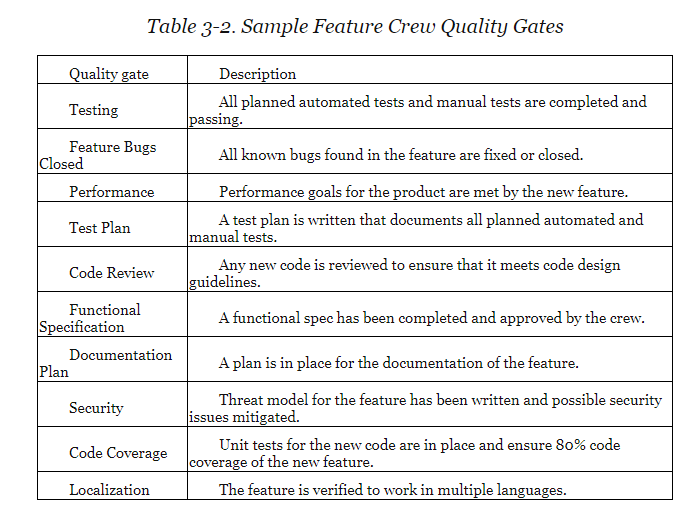
Below you can find an image from the quality gates which some of the teams in Microsoft use. As you may notice there are many other practices beyond unit testing to ensure that the product quality standards are met.
Unit Testing Is Not About Finding Bugs
In most cases, unit tests are not an effective way to find bugs. Unit tests, by definition, examine each unit of your code separately. But when your application is run for real, all those units have to work together, and the whole is more complex and subtle than the sum of its independently-tested parts. Proving that components X and Y both work independently doesn’t prove that they’re compatible with one another or configured correctly. Also, defects in an individual component may bear no relationship to the symptoms an end user would experience and report. And since you’re designing the preconditions for your unit tests, they won’t ever detect problems triggered by preconditions that you didn’t anticipate (for example, someone forgot to register his service in the container).
Note: there’s one exception where unit tests do effectively detect bugs. It’s when you’re refactoring, i.e., restructuring a unit’s code but without meaning to change its behavior. In this case, unit tests can often tell you if the unit’s behavior has changed.
Requirements Testing and Understanding
The essential part before sitting to write the unit tests is to review and “test” your requirements. Imagine that an algorithm is described in an Excel sheet with example data. You can use this one use case to write a test. However, there are many cases where the requirements can be wrong. Or this scenario is only one of the many examples that can occur. You should deeply understand what you need to test before you can design proper tests. This type of understanding beforehand helps to improve the design and code quality beforehand instead of using a reactive approach of fixing bugs after introducing them.
Unit Tests Scenarios Review Before Code Writing
It is better to review the unit testing strategy with a senior team member before writing any tests. This will save you lots of time of fixing and rewriting the code later on. Moreover, during this short brainstorming session, you can both assign the risk associated to the module under test and think the most appropriate ways to test it. Another reason why this is better than reviewing the tests when they are already written is that nobody likes to be criticized no matter the seniority. The more code is written the possibility of potential rewrite increases. As coders, we get attached to what we write and don’t like very much to change it which means that it will be much easier to change and shift our minds in the right direction. Moreover, you feel much better knowing that you don’t waste your time writing something that has a significant chance to be changed in one day. So, I believe this practice will increase team happiness, morale and team collaboration.
Any new code is reviewed to ensure that it meets code design guidelines.
Designing Unit Test Cases
A primary approach for designing various unit test scenarios should use Boundary Value Analysis. Using it, you can better test the different branches in the code. However, an essential step before depending on it is to test the requirements. Most unit tests are not about testing business cases accurately. Most of them test the architecture of the code, conditions, exceptions, etc. So, it is crucial to test the algorithm/engine/utility parts extensively. Sometimes may be easier to find sample data online or asking the product owners and use it later in the unit tests examples.
Prioritization and Risk Assessment Matrix
A risk is the probability of occurrence of an uncertain event. It could be events that have occurred in the past or current events or something that could happen in the future. These unpredictable events can have an impact on the cost, business, technical and quality targets of a project.
Based on the calculated risk rating we can decide how many unit tests we will write, the higher the priority higher the test coverage should be. Please review the types of code coverage.
Risk assessment matrix is the probability impact matrix. It provides the project team with a quick view of the risks and the priority with which each of these risks needs to be addressed.
Risk rating = Probability x Severity
Definition
Probability is the measure of the chance for an uncertain event to occur- exposure concerning time, proximity and repetition. It is expressed as a percentage. This can be classified as Frequent(A), Probable(B), Occasional(C), Remote(D), Improbable(E), Eliminated(F)
-
Frequent
It is expected to occur several times in most circumstances (91 - 100%)
-
Probable
Likely to occur several times in most circumstances (61 - 90%)
-
Occasional
Might occur sometime (41 - 60%)
-
Remote
Unlikely to occur /could occur sometime ( 11 - 40%)
-
Improbable
May occur in rare and exceptional circumstances (0 -10%)
-
Eliminate
Impossible to occur (0%)
Definition
Severity is the degree of impact of damage or loss caused due to the uncertain event. Scored 1 to 4 and can be classified as Catastrophic=1, Critical=2, Marginal=3, Negligible=4
-
Catastrophic
Harsh Consequences that make the project wholly unproductive and could even lead to project shut down. This must be a top priority during risk management.
-
Critical
Large consequences which can lead to a great amount of loss. The project is severely threatened.
-
Marginal
Short term damage still reversible through restoration activities.
-
Negligible
Little or minimal damage or loss. This can be monitored and managed by routine procedures.
The priority is classified into four categories, which is mapped against the severity and probability of the risk as shown in below image.
-
Serious
The risks that fall in this category are marked in Amber color. The activity must be stopped, and immediate action must be taken to isolate the risk. Effective controls must be identified and implemented. Further, the activity must not proceed unless the risk is reduced to a low or medium level.
-
High
The risks that fall in this category are marked in Red color ate action or risk management strategies. Immediate action must be taken to isolate, eliminate, substitute the risk and to implement effective risk controls. If these issues cannot be resolved immediately, strict timelines must be defined to address these issues.
-
Medium
The risks that fall in this category are marked in Yellow color. Reasonable and practical steps must be taken to minimize the risks.
-
Low
The risks that fall in this category are marked in green color) marked can be ignored as they usually do not pose any significant problem. A periodical review is a must to ensure the controls remain effective.
Risk Assessment Matrix
| SeverityProbability | Catastrophic (1) | Critical (2) | Marginal (3) | Negligible (4) |
|---|---|---|---|---|
| Frequent (A) | High | High | Serious | Medium |
| Probable (B) | High | High | Serious | Medium |
| Occasional (C) | High | Serious | Medium | Low |
| Remote (D) | Serious | Medium | Medium | Low |
| Improbable (E) | Medium | Medium | Medium | Low |
| Eliminate (F) | Eliminated | Eliminated | Eliminated | Eliminated |
What To Be Tested with Higher Priority?
-
Collections passed as parameter not changed in the method
-
Algorithm Engines
-
Utility methods
-
Core business logic methods
-
Simple DB queries checking predicates
-
Services that are high-risk
What Not to Unit Test?
-
Constructors or properties (if they just return variables). Test them only if they contain validations.
-
Configurations like constants, readonly fields, configs, enumerations, etc.
-
Facades of just wrapping other frameworks or libraries
-
Container service registrations
-
Exception messages
-
POCO classes- models, etc.
-
.NET Core/Framework logic- like default parameters
-
Private methods directly
-
Complex SQL Queries (more than 3 joins or grouping, etc.). Better to test it with manual or some kind of system test against real DB.
-
ASPNET.Core controller methods
-
Complex multi-threading code (it is better to be tested with integration tests)
-
Methods that call another public method
References
-
I Pity The Fool Who Doesn’t Write Unit Tests
-
How Much Unit Testing is Enough?
-
JUnit FAQ
-
Unit Testing - What not to test- StackOverflow
-
Why Most Unit Testing is Waste — Tests Don’t Developers Do
-
Risk Based Testing : When and How?
-
Risk Based Testing: Approach, Matrix, Process & Examples
-
Art of Unit Testing Testing 2nd book
-
How We Test Software at Microsoft book
-
Experiences of Test Automation book
