
In the series of articles Design Patterns in Automated Testing, you can read about useful techniques for structuring the automation test code. Today’s publication is going to be about the Facade Design Pattern. I have explained how to use the most famous pattern – Page Object Model Pattern in two previous publications. The Facade Design Pattern can bring even more abstraction over the page objects, so if you are not familiar with them, I advise you to read my articles on the matter.
Definition
A facade is an object that provides a simplified interface to a larger body of code, such as a class library. It makes a software library easier to use and understand, is more readable, and reduces dependencies on external or other code.
Benefits:
-
Make a software library easier to use, understand, and more readable.
-
Reduce dependencies of outside code.
-
Keeps the Principle of least knowledge.
-
Wrap a poorly designed APIs in a better one.
UML Class Diagram
classDiagram
    PurchaseFacade *-- BellatrixDemoItemPage
    PurchaseFacade *-- BellatrixDemoShoppingCartPage
    PurchaseFacade *-- BellatrixDemoCheckoutPage
    StorePurchaseTests --> PurchaseFacade
    class BellatrixDemoItemPage {
        #elements()
        +assertions()
        +navigate()
        +clickBuyNowButton()
        +clickViewShoppingCartButton()
    }
    class BellatrixDemoShoppingCartPage {
        #elements()
        +assertions()
        +navigate()
        +clickProceedToCheckoutButton()
    }
    class BellatrixDemoCheckoutPage {
        #elements()
        +assertions()
        +navigate()
        +fillBillingInfo()
    }
    class PurchaseFacade {
        -bellatrixDemoItemPage
        -bellatrixDemoShoppingCartPage
        -bellatrixDemoCheckoutPage
        +purchaseItem()
    }
    class StorePurchaseTests {
        +subtotalPriceOfFalcon9CalculatedCorrect()
        +subtotalPriceOfSaturnVCalculatedCorrect()
    }
Participants
The classes and objects participating in this pattern are:
-
Facade
Holds methods that combine actions executed on multiple pages.
-
Page Objects (BellatrixDemoItemPage)
Holds the actions that can be performed on the page like search and navigate. Exposes easy access to the page assertions through the assertions method. The best implementations of the pattern hide the elements’ usage, wrapping it through all action methods.
-
UI Tests (StorePurchaseTests)
This class contains a group of tests related to the above facade. It can hold only a single instance of the facade.
Test’s Test Case
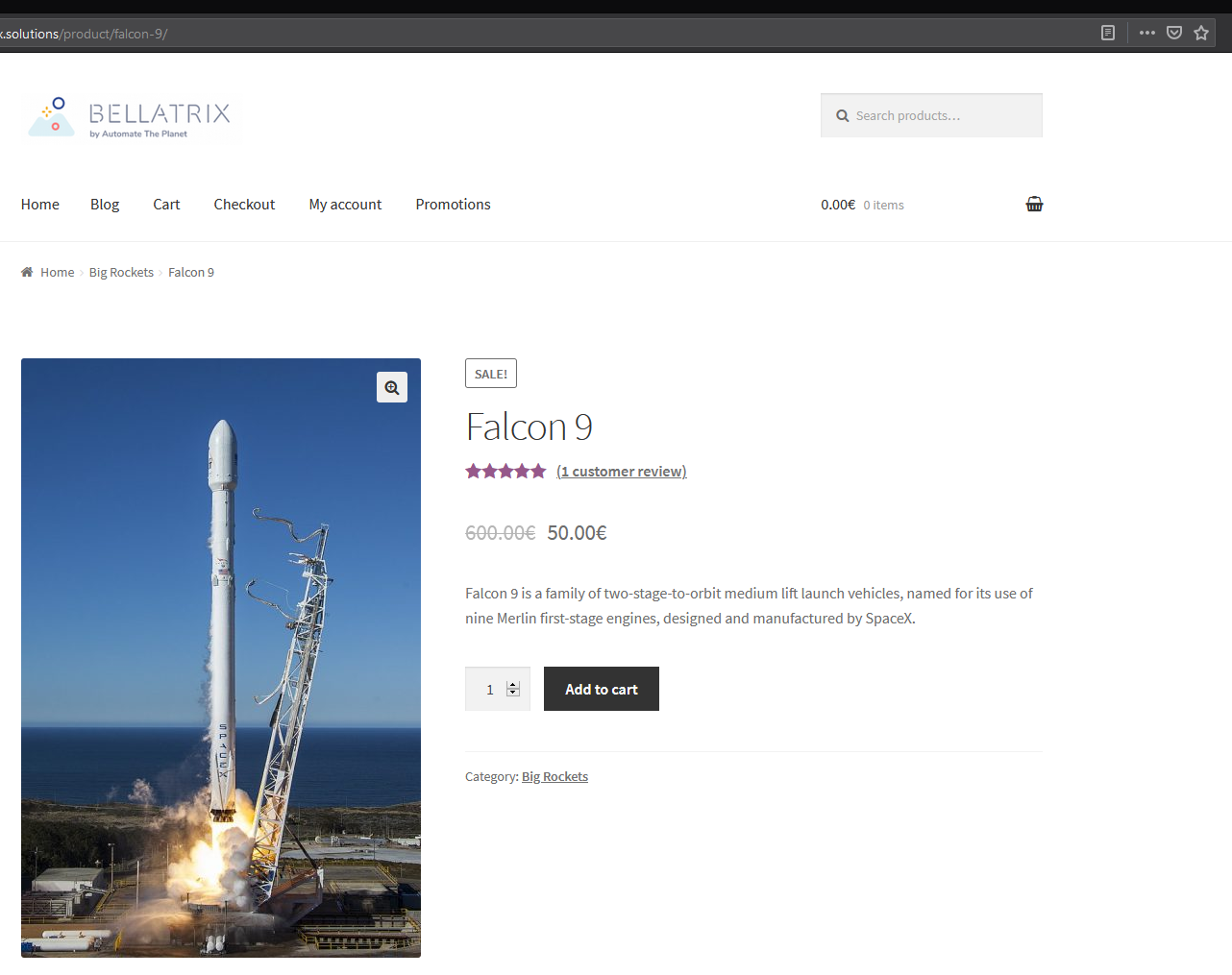
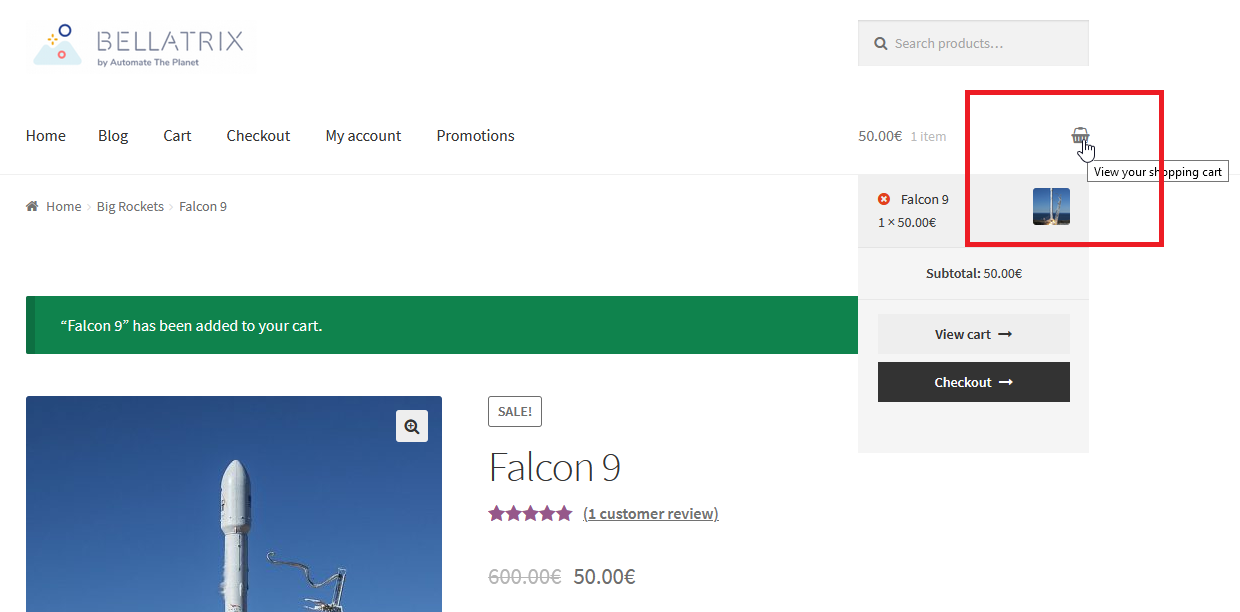
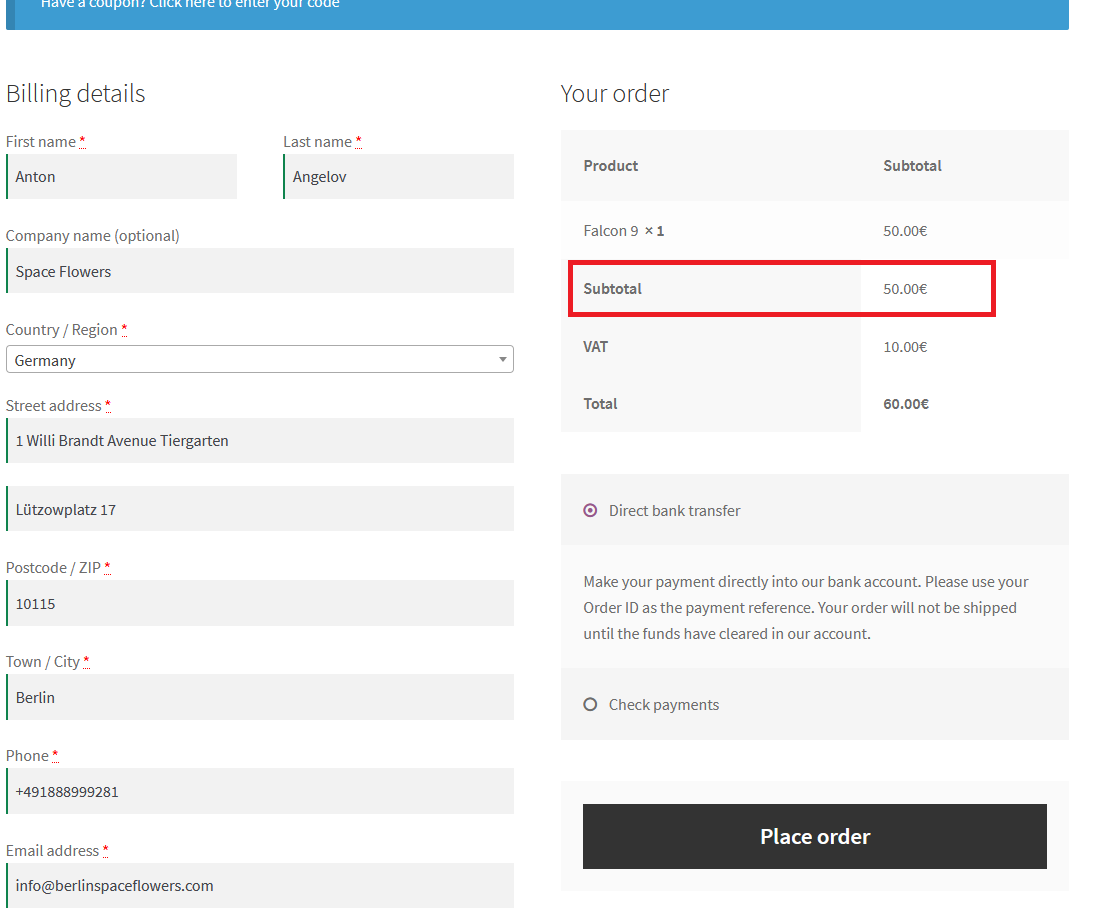
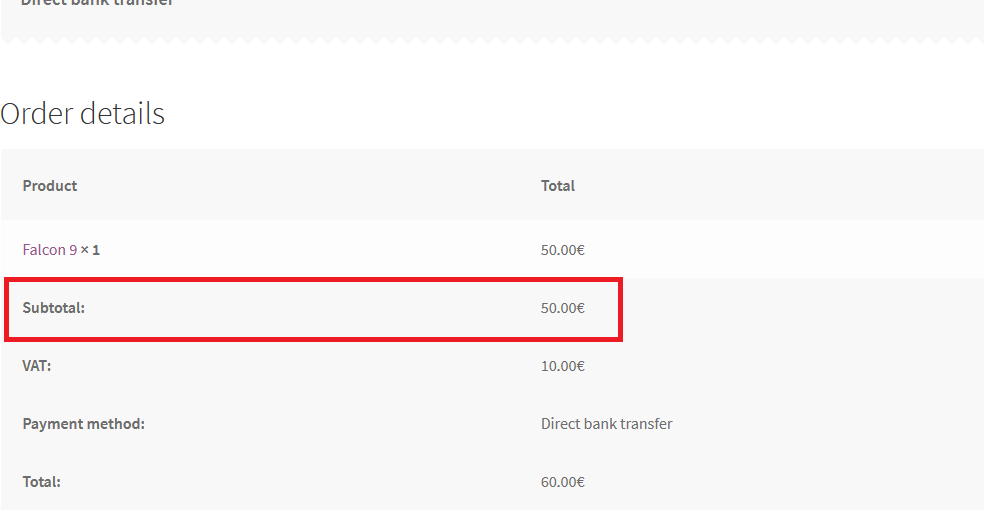
The primary goal of the test classes’ design is to enable us to reuse the code for all different test cases. For example, you are purchasing other items with а different combinations of shipping data, thus other total and/or subtotal prices.
Facade Design Pattern Java Code
The following class structure is going to be used.
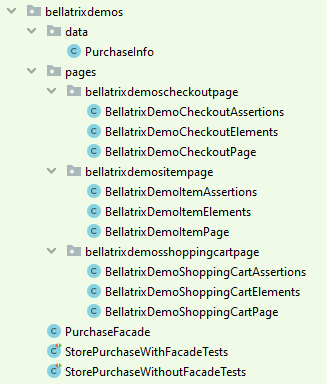
There is nothing unusual in most of the page objects. Probably, the most interesting logic is located in the BellatrixDemoCheckoutPage.
public class BellatrixDemoCheckoutPage
  extends BasePage<BellatrixDemoCheckoutElements, BellatrixDemoCheckoutAssertions> {

  @Override
  protected String getUrl() {
    return "http://demos.bellatrix.solutions/checkout/";
  }

  public void fillBillingInfo(PurchaseInfo purchaseInfo) {
    if (purchaseInfo.getCouponCode() != null) {
      elements().couponCodeShowInputButton().click();
      Driver
        .getBrowserWait()
        .until(
          ExpectedConditions.elementToBeClickable(elements().couponCodeInput())
        );
      elements().couponCodeInput().sendKeys(purchaseInfo.getCouponCode());
      elements().couponCodeApplyButton().click();
    }
    elements().billingFirstName().sendKeys(purchaseInfo.getFirstName());
    elements().billingLastName().sendKeys(purchaseInfo.getLastName());
    elements().billingCompany().sendKeys(purchaseInfo.getCompany());
    elements().billingCountryWrapper().click();
    elements().billingCountryFilter().sendKeys(purchaseInfo.getCountry());
    elements().getCountryOptionByName(purchaseInfo.getCountry()).click();
    elements().billingAddress1().sendKeys(purchaseInfo.getAddress1());
    elements().billingAddress2().sendKeys(purchaseInfo.getAddress2());
    elements().billingCity().sendKeys(purchaseInfo.getCity());
    elements().billingZip().sendKeys(purchaseInfo.getZip());
    elements().billingPhone().sendKeys(purchaseInfo.getPhone());
    elements().billingEmail().sendKeys(purchaseInfo.getEmail());
    if (purchaseInfo.getShouldCreateAccount()) {
      elements().createAccountCheckBox().click();
    }
    if (purchaseInfo.getShouldCheckPayment()) {
      elements().checkPaymentsRadioButton().click();
    }
    Driver.waitForAjax();
    Driver
      .getBrowserWait()
      .until(
        ExpectedConditions.elementToBeClickable(elements().placeOrderButton())
      );
    Driver
      .getBrowserWait()
      .until(
        ExpectedConditions.invisibilityOfElementLocated(
          By.xpath("//div[@class='blockUI blockOverlay']")
        )
      );
    elements().placeOrderButton().click();
  }
}
Note
The Driver class now contains an additional method called w****aitForAjax, responsible for handling the waiting of asynchronous web requests.
There are two public methods. The fillBillingInfo uses the data class P****urchaseInfo to fill in the current client’s purchase info.
The PurchaseInfo class holds mostly string properties and getters & setters for them.
public class PurchaseInfo {

  private String firstName;
  private String lastName;
  private String company;
  private String country;
  private String address1;
  private String address2;
  private String city;
  private String zip;
  private String phone;
  private String email;
  private Boolean shouldCreateAccount = false;
  private Boolean shouldCheckPayment = false;
  private String couponCode = null;

  public String getFirstName() {
    return firstName;
  }

  public void setFirstName(String firstName) {
    this.firstName = firstName;
  }

  public String getLastName() {
    return lastName;
  }

  public void setLastName(String lastName) {
    this.lastName = lastName;
  }

  public String getCompany() {
    return company;
  }

  public void setCompany(String company) {
    this.company = company;
  }

  public String getCountry() {
    return country;
  }

  public void setCountry(String country) {
    this.country = country;
  }

  public String getAddress1() {
    return address1;
  }

  public void setAddress1(String address1) {
    this.address1 = address1;
  }

  public String getAddress2() {
    return address2;
  }

  public void setAddress2(String address2) {
    this.address2 = address2;
  }

  public String getCity() {
    return city;
  }

  public void setCity(String city) {
    this.city = city;
  }

  public String getZip() {
    return zip;
  }

  public void setZip(String zip) {
    this.zip = zip;
  }

  public String getPhone() {
    return phone;
  }

  public void setPhone(String phone) {
    this.phone = phone;
  }

  public String getEmail() {
    return email;
  }

  public void setEmail(String email) {
    this.email = email;
  }

  public Boolean getShouldCreateAccount() {
    return shouldCreateAccount;
  }

  public void setShouldCreateAccount(Boolean shouldCreateAccount) {
    this.shouldCreateAccount = shouldCreateAccount;
  }

  public Boolean getShouldCheckPayment() {
    return shouldCheckPayment;
  }

  public void setShouldCheckPayment(Boolean shouldCheckPayment) {
    this.shouldCheckPayment = shouldCheckPayment;
  }

  public String getCouponCode() {
    return couponCode;
  }

  public void setCouponCode(String couponCode) {
    this.couponCode = couponCode;
  }
}
After clicking the Place order button, the page loads asynchronously (it doesn’t reload the page) so we have to put explicit wait condition presenceOfElementLocated for the orderDetailsSubtotal element. The logic is located in the BellatrixDemoCheckoutElements class.
public class BellatrixDemoCheckoutElements extends BaseElements {

  public WebElement billingFirstName() {
    return browser.findElement(By.id("billing_first_name"));
  }

  public WebElement billingLastName() {
    return browser.findElement(By.id("billing_last_name"));
  }

  public WebElement billingCompany() {
    return browser.findElement(By.id("billing_company"));
  }

  public WebElement billingCountryWrapper() {
    return browser.findElement(By.id("select2-billing_country-container"));
  }

  public WebElement billingCountryFilter() {
    return browser.findElement(By.className("select2-search__field"));
  }

  public WebElement billingAddress1() {
    return browser.findElement(By.id("billing_address_1"));
  }

  public WebElement billingAddress2() {
    return browser.findElement(By.id("billing_address_2"));
  }

  public WebElement billingCity() {
    return browser.findElement(By.id("billing_city"));
  }

  public WebElement billingZip() {
    return browser.findElement(By.id("billing_postcode"));
  }

  public WebElement billingPhone() {
    return browser.findElement(By.id("billing_phone"));
  }

  public WebElement billingEmail() {
    return browser.findElement(By.id("billing_email"));
  }

  public WebElement couponCodeShowInputButton() {
    return browser.findElement(By.className("showcoupon"));
  }

  public WebElement couponCodeInput() {
    return browser.findElement(By.id("coupon_code"));
  }

  public WebElement couponCodeApplyButton() {
    return browser.findElement(By.name("apply_coupon"));
  }

  public WebElement createAccountCheckBox() {
    return browser.findElement(By.id("createaccount"));
  }

  public WebElement checkPaymentsRadioButton() {
    return browser.findElement(
      By.cssSelector("[for*='payment_method_cheque']")
    );
  }

  public WebElement placeOrderButton() {
    return browser.findElement(By.id("place_order"));
  }

  public WebElement orderDetailsSubtotal() {
    String locator = "//th[text()='Subtotal:']/following-sibling::td/span";
    browserWait.until(
      ExpectedConditions.presenceOfElementLocated(By.xpath(locator))
    );
    return browser.findElement(By.xpath(locator));
  }
}
We can then assert if the price located on the order page is correct.
Tests without Facade Design Pattern
If we wish to write two separate tests – buy two different products with varying information. We can perform them only with the above classes without a facade class.
public class StorePurchaseWithoutFacadeTests {

  @BeforeMethod
  public void testInit() {
    Driver.startBrowser();
  }

  @AfterMethod
  public void testCleanup() {
    Driver.stopBrowser();
  }

  @Test
  public void subtotalPriceOfFalcon9CalculatedCorrect_when_NoFacadePatternUsed() {
    var itemUrl = "falcon-9";
    var itemPrice = 50.00;
    var purchaseInfo = new PurchaseInfo();
    purchaseInfo.setEmail("info@berlinspaceflowers.com");
    purchaseInfo.setFirstName("Anton");
    purchaseInfo.setLastName("Angelov");
    purchaseInfo.setCompany("Space Flowers");
    purchaseInfo.setCountry("Germany");
    purchaseInfo.setAddress1("1 Willi Brandt Avenue Tiergarten");
    purchaseInfo.setAddress2("Lützowplatz 17");
    purchaseInfo.setCity("Berlin");
    purchaseInfo.setZip("10115");
    purchaseInfo.setPhone("+491888999281");
    var itemPage = new BellatrixDemoItemPage();
    var shoppingCartPage = new BellatrixDemoShoppingCartPage();
    var checkoutPage = new BellatrixDemoCheckoutPage();
    itemPage.navigate(itemUrl);
    itemPage.assertions().assertProductPrice(itemPrice);
    itemPage.clickBuyNowButton();
    itemPage.clickViewShoppingCartButton();
    shoppingCartPage.clickProceedToCheckoutButton();
    shoppingCartPage.assertions().assertShoppingCartSubtotalPrice(itemPrice);
    checkoutPage.fillBillingInfo(purchaseInfo);
    checkoutPage.assertions().assertOrderSubtotalPrice(itemPrice);
  }

  @Test
  public void subtotalPriceOfSaturnVCalculatedCorrect_when_NoFacadePatternUsed() {
    var itemUrl = "saturn-v";
    var itemPrice = 120.00;
    var purchaseInfo = new PurchaseInfo();
    purchaseInfo.setEmail("info@berlinspaceflowers.com");
    purchaseInfo.setFirstName("Anton");
    purchaseInfo.setLastName("Angelov");
    purchaseInfo.setCompany("Space Flowers");
    purchaseInfo.setCountry("Germany");
    purchaseInfo.setAddress1("1 Willi Brandt Avenue Tiergarten");
    purchaseInfo.setAddress2("Lützowplatz 17");
    purchaseInfo.setCity("Berlin");
    purchaseInfo.setZip("10115");
    purchaseInfo.setPhone("+491888999281");
    var itemPage = new BellatrixDemoItemPage();
    var shoppingCartPage = new BellatrixDemoShoppingCartPage();
    var checkoutPage = new BellatrixDemoCheckoutPage();
    itemPage.navigate(itemUrl);
    itemPage.assertions().assertProductPrice(itemPrice);
    itemPage.clickBuyNowButton();
    itemPage.clickViewShoppingCartButton();
    shoppingCartPage.clickProceedToCheckoutButton();
    shoppingCartPage.assertions().assertShoppingCartSubtotalPrice(itemPrice);
    checkoutPage.fillBillingInfo(purchaseInfo);
    checkoutPage.assertions().assertOrderSubtotalPrice(itemPrice);
  }
}
As you can see, the main problem in the examples is that we need to create instances of our pages for every test. Moreover, the whole workflow of the tests as method calls is copied. The practices mentioned above make our tests much harder to maintain. Also, it breaks one of the essential programming principles – DRY (Don’t Repeat Yourself).
Tests Using Facade Design Pattern
The solution to the above problems is to encapsulate our test’s logic/workflow in a f****acade class.
public class PurchaseFacade {

  private final BellatrixDemoItemPage bellatrixDemoItemPage;
  private final BellatrixDemoShoppingCartPage bellatrixDemoShoppingCartPage;
  private final BellatrixDemoCheckoutPage bellatrixDemoCheckoutPage;

  public PurchaseFacade(
    ItemPage itempage,
    ShoppingCartPage shoppingCartPage,
    CheckoutPage checkoutPage
  ) {
    this.bellatrixDemoItemPage = new BellatrixDemoItemPage();
    this.bellatrixDemoShoppingCartPage = new BellatrixDemoShoppingCartPage();
    this.bellatrixDemoCheckoutPage = new BellatrixDemoCheckoutPage();
  }

  public void purchaseItem(
    String itemUrl,
    double itemPrice,
    PurchaseInfo purchaseInfo
  ) {
    bellatrixDemoItemPage.navigate(itemUrl);
    bellatrixDemoItemPage.assertions().assertProductPrice(itemPrice);
    bellatrixDemoItemPage.clickBuyNowButton();
    bellatrixDemoItemPage.clickViewShoppingCartButton();
    bellatrixDemoShoppingCartPage.clickProceedToCheckoutButton();
    bellatrixDemoShoppingCartPage
      .assertions()
      .assertShoppingCartSubtotalPrice(itemPrice);
    bellatrixDemoCheckoutPage.fillBillingInfo(purchaseInfo);
    bellatrixDemoCheckoutPage.assertions().assertOrderSubtotalPrice(itemPrice);
  }
}
If the test case’s workflow is changed, it can be quickly updated only in a single place. Or, if you want to add additional assertions, they can be added to the purchaseItem method.
Find below the code of the same tests refactored to use the Facade Design Pattern.
public class StorePurchaseWithFacadeTests {

  @BeforeMethod
  public void testInit() {
    Driver.startBrowser();
  }

  @AfterMethod
  public void testCleanup() {
    Driver.stopBrowser();
  }

  @Test
  public void subtotalPriceOfFalcon9CalculatedCorrect_when_FacadePatternUsed() {
    var itemUrl = "falcon-9";
    var itemPrice = 50.00;
    var purchaseInfo = new PurchaseInfo();
    purchaseInfo.setEmail("info@berlinspaceflowers.com");
    purchaseInfo.setFirstName("Anton");
    purchaseInfo.setLastName("Angelov");
    purchaseInfo.setCompany("Space Flowers");
    purchaseInfo.setCountry("Germany");
    purchaseInfo.setAddress1("1 Willi Brandt Avenue Tiergarten");
    purchaseInfo.setAddress2("Lützowplatz 17");
    purchaseInfo.setCity("Berlin");
    purchaseInfo.setZip("10115");
    purchaseInfo.setPhone("+491888999281");
    new ShoppingCart().purchaseItem(itemUrl, itemPrice, purchaseInfo);
  }

  @Test
  public void subtotalPriceOfSaturnVCalculatedCorrect_when_FacadePatternUsed() {
    var itemUrl = "saturn-v";
    var itemPrice = 120.00;
    var purchaseInfo = new PurchaseInfo();
    purchaseInfo.setEmail("info@berlinspaceflowers.com");
    purchaseInfo.setFirstName("Anton");
    purchaseInfo.setLastName("Angelov");
    purchaseInfo.setCompany("Space Flowers");
    purchaseInfo.setCountry("Germany");
    purchaseInfo.setAddress1("1 Willi Brandt Avenue Tiergarten");
    purchaseInfo.setAddress2("Lützowplatz 17");
    purchaseInfo.setCity("Berlin");
    purchaseInfo.setZip("10115");
    purchaseInfo.setPhone("+491888999281");
    new ShoppingCart().purchaseItem(itemUrl, itemPrice, purchaseInfo);
  }
}
Improved Facade Design Pattern
The only issue with the previously presented code is that it doesn’t follow the Dependency Inversion Principle.
Definition
It suggests that our high-level components (the facades) should not depend on our low-level components (the pages); rather, they should both depend on abstractions.
UML Class Diagram
classDiagram
    ItemPage <|-- BellatrixDemoItemPage
    ShoppingCartPage <|-- BellatrixDemoShoppingCartPage
    CheckoutPage <|-- BellatrixDemoCheckoutPage
    PurchaseFacade *-- ItemPage
    PurchaseFacade *-- ShoppingCartPage
    PurchaseFacade *-- CheckoutPage
    StorePurchaseTests --> PurchaseFacade
    class BellatrixDemoItemPage {
        #elements()
        +assertions()
        +navigate()
        +clickBuyNowButton()
        +clickViewShoppingCartButton()
        +assertPrice()
    }
    class BellatrixDemoShoppingCartPage {
        #elements()
        +assertions()
        +navigate()
        +clickProceedToCheckoutButton()
        +assertSubtotalAmount()
    }
    class BellatrixDemoCheckoutPage {
        #elements()
        +assertions()
        +navigate()
        +fillBillingInfo()
        +assertSubtotal()
    }
    class ItemPage {
        +navigate()
        +clickBuyNowButton()
        +clickViewShoppingCartButton()
        +assertPrice()
    }
    class ShoppingCartPage {
        +clickProceedToCheckoutButton()
        +assertSubtotalAmount()
    }
    class CheckoutPage {
        +fillBillingInfo()
        +assertSubtotal()
    }
    class PurchaseFacade {
        -itemPage
        -shoppingCartPage
        -checkoutPage
        +purchaseItem()
    }
    class StorePurchaseTests {
        +subtotalPriceOfFalcon9CalculatedCorrect()
        +subtotalPriceOfSaturnVCalculatedCorrect()
    }
Find below the code of the improved version of the facade that holds the logic related to the creation of purchases.
public class PurchaseFacade {

  private final ItemPage itemPage;
  private final ShoppingCartPage shoppingCartPage;
  private final CheckoutPage checkoutPage;

  public ShoppingCart(
    ItemPage itempage,
    ShoppingCartPage shoppingCartPage,
    CheckoutPage checkoutPage
  ) {
    this.itemPage = itempage;
    this.shoppingCartPage = shoppingCartPage;
    this.checkoutPage = checkoutPage;
  }

  public void purchaseItem(
    String itemUrl,
    double itemPrice,
    PurchaseInfo purchaseInfo
  ) {
    itemPage.navigate(itemUrl);
    itemPage.assertPrice(itemPrice);
    itemPage.clickBuyNowButton();
    itemPage.clickViewShoppingCartButton();
    shoppingCartPage.clickProceedToCheckoutButton();
    shoppingCartPage.assertSubtotalAmount(itemPrice);
    checkoutPage.fillBillingInfo(purchaseInfo);
    checkoutPage.assertSubtotal(itemPrice);
  }
}
Through the usage of the pages’ interfaces, the facade follows the Dependency Inversion Principle. You can replace the version of some of the pages without changing even a single code line in the facades.
The facade combines the different pages’ methods to complete the wizard of the order. If there is a change in the order of the executed actions, you can edit it only here. It will apply to tests that are using the facade. The different test cases are accomplished through the various parameters passed to the facade’s methods. You can read how to create these pages in my article Page Objects That Make Code More Maintainable.
These facades contain much less code because most of the logic is held by the pages instead of the facade itself.
Tests Using the Improved Facade Design Pattern
public class StorePurchaseWithFacadeTests {

  @BeforeMethod
  public void testInit() {
    Driver.startBrowser();
  }

  @AfterMethod
  public void testCleanup() {
    Driver.stopBrowser();
  }

  @Test
  public void subtotalPriceOfFalcon9CalculatedCorrect_when_FacadePatternUsed() {
    var itemUrl = "falcon-9";
    var itemPrice = 50.00;
    var purchaseInfo = new PurchaseInfo();
    purchaseInfo.setEmail("info@berlinspaceflowers.com");
    purchaseInfo.setFirstName("Anton");
    purchaseInfo.setLastName("Angelov");
    purchaseInfo.setCompany("Space Flowers");
    purchaseInfo.setCountry("Germany");
    purchaseInfo.setAddress1("1 Willi Brandt Avenue Tiergarten");
    purchaseInfo.setAddress2("Lützowplatz 17");
    purchaseInfo.setCity("Berlin");
    purchaseInfo.setZip("10115");
    purchaseInfo.setPhone("+491888999281");
    var itemPage = new BellatrixDemoItemPage();
    var shoppingCartPage = new BellatrixDemoShoppingCartPage();
    var checkoutPage = new BellatrixDemoCheckoutPage();
    new PurchaseFacade(itemPage, shoppingCartPage, checkoutPage)
      .purchaseItem(itemUrl, itemPrice, purchaseInfo);
  }

  @Test
  public void subtotalPriceOfSaturnVCalculatedCorrect_when_FacadePatternUsed() {
    var itemUrl = "saturn-v";
    var itemPrice = 120.00;
    var purchaseInfo = new PurchaseInfo();
    purchaseInfo.setEmail("info@berlinspaceflowers.com");
    purchaseInfo.setFirstName("Anton");
    purchaseInfo.setLastName("Angelov");
    purchaseInfo.setCompany("Space Flowers");
    purchaseInfo.setCountry("Germany");
    purchaseInfo.setAddress1("1 Willi Brandt Avenue Tiergarten");
    purchaseInfo.setAddress2("Lützowplatz 17");
    purchaseInfo.setCity("Berlin");
    purchaseInfo.setZip("10115");
    purchaseInfo.setPhone("+491888999281");
    var itemPage = new BellatrixDemoItemPage();
    var shoppingCartPage = new BellatrixDemoShoppingCartPage();
    var checkoutPage = new BellatrixDemoCheckoutPage();
    new PurchaseFacade(itemPage, shoppingCartPage, checkoutPage)
      .purchaseItem(itemUrl, itemPrice, purchaseInfo);
  }
}
For more detailed overview and usage of many more design patterns and best practices in automated testing, check my book “Design Patterns for High-Quality Automated Tests, Java Edition, Clean Code for Bulletproof Tests”. (+ with the book you will get an access to more than 20000+ lines of real-world code examples and video explanations to solidify your knowledge)
