

In the series of articles Design Patterns in Automated Testing, I am presenting the most useful techniques for structuring the code of your automation tests. One of the most popular patterns in web automation is the so-called Page Object Design Pattern. The Page Object wraps all elements, actions, and assertions happening on a page in one single object. In my last post about Page Object Pattern, from the series Design Patterns in Automated Testing, I gave you examples of using one of the pattern. In this article, I am going to improve further the main idea of the design.
Driver Factory Class
The class’s main goal below is to provide a direct way to initialize and access the web driver instance.
public class Driver {

  private static WebDriverWait browserWait;
  private static WebDriver browser;

  public static WebDriver getBrowser() {
    if (browser == null) {
      throw new NullPointerException(
        "The WebDriver browser instance was not initialized. You should first call the start() method."
      );
    }
    return browser;
  }

  public static void setBrowser(WebDriver browser) {
    Driver.browser = browser;
  }

  public static WebDriverWait getBrowserWait() {
    if (browserWait == null || browser == null) {
      throw new NullPointerException(
        "The WebDriver browser wait instance was not initialized. You should first call the start() method."
      );
    }
    return browserWait;
  }

  public static void setBrowserWait(WebDriverWait browserWait) {
    Driver.browserWait = browserWait;
  }

  public static void startBrowser(BrowserType browserType, int defaultTimeout) {
    switch (browserType) {
      case FIREFOX:
        WebDriverManager.firefoxdriver().setup();
        setBrowser(new FirefoxDriver());
        break;
      case CHROME:
        WebDriverManager.chromedriver().setup();
        setBrowser(new ChromeDriver());
        break;
      case EDGE:
        WebDriverManager.edgedriver().setup();
        setBrowser(new EdgeDriver());
        break;
      default:
        break;
    }
    setBrowserWait(new WebDriverWait(getBrowser(), defaultTimeout));
  }

  public static void startBrowser(BrowserType browserType) {
    startBrowser(browserType, 30);
  }

  public static void startBrowser() {
    startBrowser(BrowserType.FIREFOX);
  }

  public static void stopBrowser() {
    getBrowser().quit();
    setBrowser(null);
    setBrowserWait(null);
  }
}
Note
To download the correct version of the selected browser’s driver, we use a library called WebDriverManager. I installed it through the Maven artifact/dependency webdrivermanager. You can find all installed packages in the project’s or modules’ pom.xml files.
The driver is initialized through the startBrowser where the client is capable to set a particular browser type and timeout. Actually, this methods implements another design pattern called Factory Method design pattern. (we will discuss it in another article) The stop of the browser that is usually performed after each test method is also an easy task via the static stopBrowser method. If the client tries to access the instance before the initialization, an exception is thrown.
Note
The Simple Factory design pattern is a factory class in its simplest form (in comparison to Factory Method or Abstract Factory design patterns). In this creational design pattern, we have a class that has a method that returns different types of an object based on a given input. The creational design patterns are design patterns that deal with object creation mechanisms, trying to create objects in a manner suitable to the situation. The basic form of object creation could result in design problems or added complexity to the design. Creational design patterns solve this problem by somehow controlling this object creation.
Advanced Page Object Pattern OOP Design
The first class that needs improvement is the element map.
First Version
public class BingMainPageElements {

  private final WebDriver browser;

  public BingMainPageElements(WebDriver browser) {
    this.browser = browser;
  }

  public WebElement searchBox() {
    return browser.findElement(By.id("sb_form_q"));
  }
}
The main problem here is that every class client should pass to its constructor the current WebDriver instance. We can make it better with the help of the previously created static class Driver. We can create a base element map that all other element maps are going to derive.
public abstract class BaseElements {

  protected WebDriver browser;

  public BaseElements() {
    browser = Driver.getBrowser();
  }
}
Improved Version
public class BingMainPageElements extends BaseElements {

  public WebElement searchBox() {
    return browser.findElement(By.id("sb_form_q"));
  }
}
As you can see in the new version, the class doesn’t have a constructor. So this code block is not going to be repeated in all other element map classes. The next step in the improving process is to create a base class for the assertion classes.
First Version
public class BingMainPageAssertions {

  private final WebDriver browser;

  public BingMainPageAssertions(WebDriver browser) {
    this.browser = browser;
  }

  protected BingMainPageElements elements() {
    return new BingMainPageElements(browser);
  }

  public void resultsCount(String expectedCount) {
    Assert.assertTrue(
      elements().resultsCountDiv().getText().contains(expectedCount),
      "The results DIV doesn't contain the specified text."
    );
  }
}
In the first version of the class, the DRY design principle is again not followed. The elements method and the constructor need to be placed in every assertion class.
Improved Version
public abstract class BaseAssertions<ElementsT extends BaseElements> {

  protected ElementsT elements() {
    return NewInstanceFactory.createByTypeParameter(getClass(), 0);
  }
}
When derived this generic class is going to provide direct access to the element map. Note that we are using a new factory class we called NewInstanceFactory since in Java generic type classes can’t be instantiated. In the arguments, we’re referencing the class itself using the getClass(), which will be the derived class when the method is called, as well as the index of the generic type (starting from 0). Here’s how we made it work:
public class NewInstanceFactory {

  public static <T> T createByTypeParameter(Class parameterClass, int index) {
    try {
      var elementsClass = (Class) (
        (ParameterizedType) parameterClass.getGenericSuperclass()
      ).getActualTypeArguments();
      return (T) elementsClass.getDeclaredConstructor().newInstance();
    } catch (Exception e) {
      return null;
    }
  }
}
In this example, using the reflection API of Java. First, we’re casting the superclass of the class we passed through the arguments, which is will be BaseAssertions, holding the generic types, to a ParameterizedType. Then we wrap the whole thing in parentheses and call the getActualTypeArguments() method, which returns an array of types. We extract the type with the index, given in the arguments of our method. We cast the result of the whole expression to Class because it’s still Type and types don’t have constructors. Since it’s unsure if the class has constructors, the methods getDeclaredConstructor and newInstance give us warnings about an unhandled exception so we need to wrap it in a try-catch block. It’s not the best practice to return null in the catch block, but we may never get to this point anyway. We’re casting the return to a generic type since evert time we call it, the class will be different, this way we don’t need to cast the returned object in every derived class.
public class BingMainPageAssertions
  extends BaseAssertions<BingMainPageElements> {

  public void resultsCount(String expectedCount) {
    Assert.assertTrue(
      elements().resultsCountDiv().getText().contains(expectedCount),
      "The results DIV doesn't contain the specified text."
    );
  }
}
After the refactoring, we end up with a more readable and cleaner solution. The final step in making a better page object pattern OOP design is to create a base class for all page classes.
First Version
public class BingMainPage {

  private final WebDriver browser;
  private final String url = "http://www.bing.com/";

  public BingMainPage(WebDriver browser) {
    this.browser = browser;
  }

  protected BingMainPageElements elements() {
    return new BingMainPageElements(browser);
  }

  public BingMainPageAssertions assertions() {
    return new BingMainPageAssertions(browser);
  }

  public void navigate() {
    browser.navigate().to(url);
  }

  public void search(String textToType) {
    elements().searchBox().clear();
    elements().searchBox().sendKeys(textToType);
    elements().goButton().click();
  }
}
Note
Please note that again I didn’t completely follow the naming conventions for getters. If I did, I had to name the new getters – getElements and getAssertions. I did the same for the get methods returning the web elements. I believe this leads to improved readability and API usability of the library.
If you follow the “Google Java Style Guide” it suggests to arrange all members based on their modifiers – “Class and member modifiers, when present, appear in the order recommended by the Java Language Specification: public protected private abstract default static final transient volatile synchronized native strictfp”. However, you will notice that I don’t completely follow this suggestion for the page object models. There I group the methods by meaning to improve the readability. First, I put the protected methods such as getUrl and waitForPageLoad. Then I place the elements and assertions getters or the private elements getters. They are followed by page actions and, eventually, assertion methods if there are any and are not placed in a separate class. Note that this is completely OK, depending on which standards you follow. I will quote the “Oracle Code Conventions for the Java Programming Language” file organization section – “The methods should be grouped by functionality rather than by scope or accessibility. For example, a private class method can be in between two public instance methods. The goal is to make reading and understanding the code easier”
There are a couple of items in the above class that is going to be repeated for every page class – the constructor, the navigate method, the assertions method, and the elements method. As you can imagine, this is a lot of boilerplate code. In order to fix this problem, we can create the following base class.
public abstract class BasePage<
  ElementsT extends BaseElements, AssertionsT extends BaseAssertions<ElementsT>
> {

  protected abstract String getUrl();

  protected ElementsT elements() {
    return NewInstanceFactory.createByTypeParameter(getClass(), 0);
  }

  public AssertionsT assertions() {
    return NewInstanceFactory.createByTypeParameter(getClass(), 1);
  }

  public void navigate(String part) {
    Driver.getBrowser().navigate().to(getUrl().concat(part));
  }

  public void navigate() {
    Driver.getBrowser().navigate().to(getUrl());
  }
}
public class BingMainPage
extends BasePage<BingMainPageElements, BingMainPageAssertions> {
@Override
protected String getUrl() {
return "http://www.bing.com/";
}
public void search(String textToType) {
elements().searchBox().clear();
elements().searchBox().sendKeys(textToType);
elements().goButton().click();
}
}Now the BingMainPage class consists only of a single constructor, the search method and a consistent way of returning page elements and assertions, all of the boilerplate code is moved to the base class.
Advanced Page Object Pattern – Usage in Tests
public class AdvancedBingTests {

  @BeforeMethod
  public void testInit() {
    Driver.startBrowser();
  }

  @AfterMethod
  public void testCleanup() {
    Driver.stopBrowser();
  }

  @Test
  public void searchTextInBing_when_AdvancedPageObjectPatternUsed() {
    var bingMainPage = new BingMainPage();
    bingMainPage.navigate();
    bingMainPage.search("Automate The Planet");
    bingMainPage.assertions().resultsCount(",000 Results");
  }
}
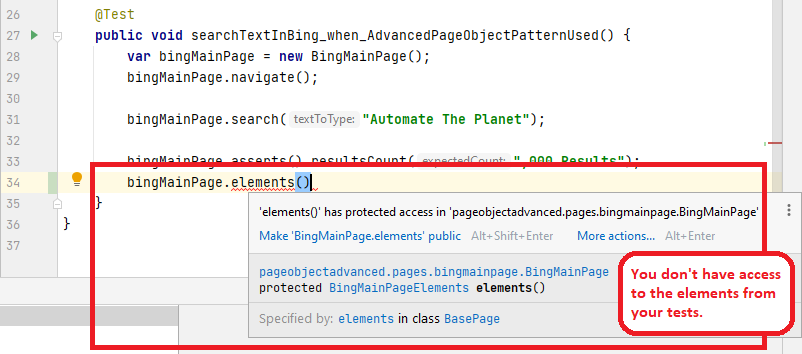
If you compare this sample usage with the one presented in the previous solution, you will notice that they are completely identical. Another benefit comes from the usage of the BasePage object – you cannot use the elements method directly in your tests. The direct usage of element maps in the tests is not a good practice because it breaks the DRY principle.
For more detailed overview and usage of many more design patterns and best practices in automated testing, check my book “Design Patterns for High-Quality Automated Tests, Java Edition, Clean Code for Bulletproof Tests”. (+ with the book you will get an access to more than 20000+ lines of real-world code examples and video explanations to solidify your knowledge)
