
Definition
An object that provides a simplified interface to a larger body of code, such as class library. Make a software library easier to use, understand and more readable. Reduce dependencies of outside code. Keeps the Principle of least knowledge. Wrap a poorly designed APIs in a better one.
UML Class Diagram
Participants
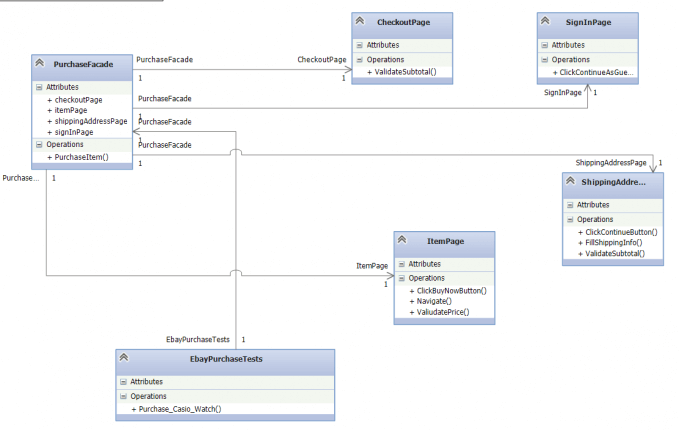
The classes and objects participating in this pattern are:
-
Facade
Holds methods that combine actions executed on multiple pages.
-
Page Objects (ItemPage)
olds the actions that can be performed on the page like Search and Navigate. Exposes an easy access to the Page Validator though the Validate() method. The best implementations of the pattern hide the usage of the Element Map, wrapping it through all action methods.
-
UI Tests (EbayPurchaseTests)
This class contains a group of tests related to the above facade; it can hold only a single instance of the facade.
Test’s Test Case
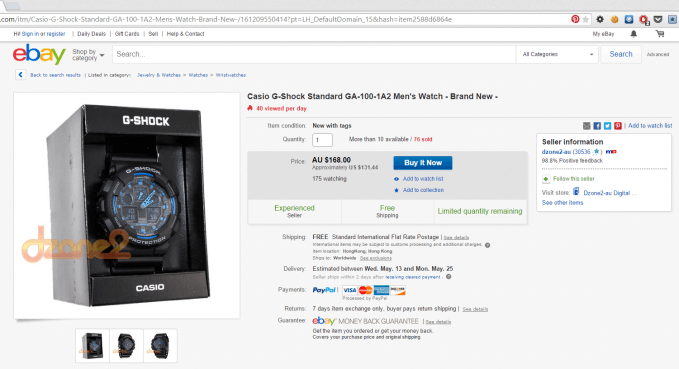
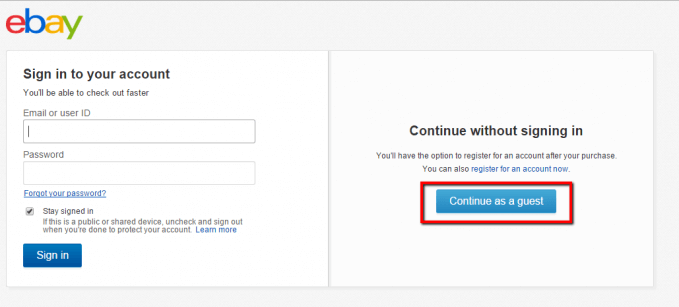
5. Fill Shipping Info
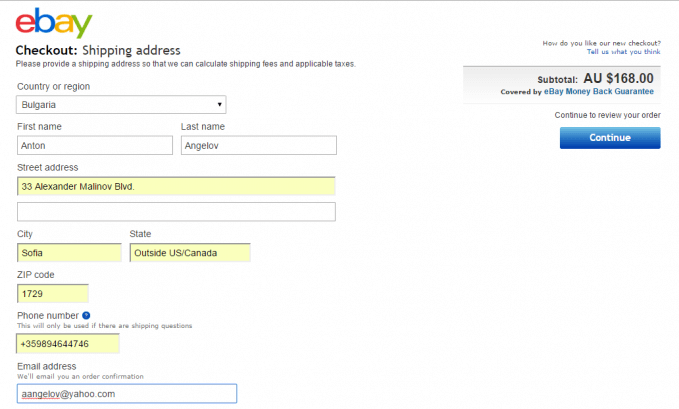
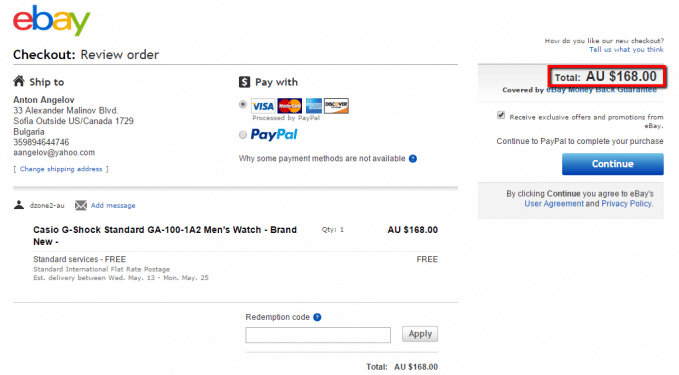
The primary goal of the design of the test classes is going to be to enable us to reuse the code for all different test cases. For example, purchasing different items with а different combination of shipping data, thus different total and subtotal prices.
For more detailed overview and usage of many more design patterns and best practices in automated testing, check my book “Design Patterns for High-Quality Automated Tests, C# Edition, High-Quality Tests Attributes, and Best Practices”. You can read part of three of the chapters:
Defining High-Quality Test Attributes for Automated Tests
Benchmarking for Assessing Automated Test Components Performance
Generic Repository Design Pattern- Test Data Preparation
Facade Design Pattern C# Code
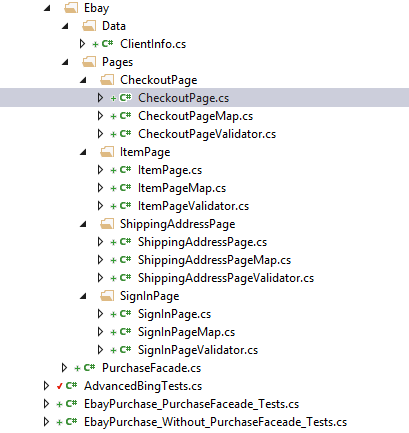
The following class structure is going to be used.
There is nothing unusual in the most of the page objects. Probably, the most interesting logic is located in the ShippingAddressPage.
public class ShippingAddressPage : BasePage<ShippingAddressPageMap, ShippingAddressPageValidator>
{
    public void ClickContinueButton()
    {
        this.Map.ContinueButton.Click();
    }

    public void FillShippingInfo(ClientInfo clientInfo)
    {
        this.Map.SwitchToShippingFrame();
        this.Map.CountryDropDown.SelectByText(clientInfo.Country);
        this.Map.FirstName.SendKeys(clientInfo.FirstName);
        this.Map.LastName.SendKeys(clientInfo.LastName);
        this.Map.Address1.SendKeys(clientInfo.Address1);
        this.Map.City.SendKeys(clientInfo.City);
        this.Map.Zip.SendKeys(clientInfo.Zip);
        this.Map.Phone.SendKeys(clientInfo.Phone);
        this.Map.Email.SendKeys(clientInfo.Email);
        this.Map.SwitchToDefault();
    }
}
public class ClientInfo
{
public string FirstName { get; set; }
public string LastName { get; set; }
public string Country { get; set; }
public string Address1 { get; set; }
public string City { get; set; }
public string Phone { get; set; }
public string Zip { get; set; }
public string Email { get; set; }
}Before the engine can start typing the information, the shipping frame should be switched to first. Otherwise, our test is going to fail. This logic is located in the ShippingAddressMap class.
public class ShippingAddressPageMap : BasePageElementMap
{
    public SelectElement CountryDropDown
    {
        get
        {
            this.browserWait.Until<IWebElement>((d) => { return d.FindElement(By.Name("country")); });
            return new SelectElement(this.browser.FindElement(By.Name("country")));
        }
    }

    public IWebElement FirstName
    {
        get
        {
            return this.browser.FindElement(By.Id("firstName"));
        }
    }

    public IWebElement LastName
    {
        get
        {
            return this.browser.FindElement(By.Id("lastName"));
        }
    }

    public IWebElement Address1
    {
        get
        {
            return this.browser.FindElement(By.Id("address1"));
        }
    }

    public IWebElement City
    {
        get
        {
            return this.browser.FindElement(By.Id("city"));
        }
    }

    public IWebElement Zip
    {
        get
        {
            return this.browser.FindElement(By.Id("zip"));
        }
    }

    public IWebElement Phone
    {
        get
        {
            return this.browser.FindElement(By.Id("dayphone1"));
        }
    }

    public IWebElement Email
    {
        get
        {
            return this.browser.FindElement(By.Id("email"));
        }
    }

    public IWebElement Subtotal
    {
        get
        {
            return this.browser.FindElement(By.Id("xo_tot_amt"));
        }
    }

    public IWebElement ContinueButton
    {
        get
        {
            return this.browser.FindElement(By.Id("but_address_continue"));
        }
    }

    public void SwitchToShippingFrame()
    {
        this.WaitForLogo();
        this.browser.SwitchTo().Frame("shpFrame");
    }

    private void WaitForLogo()
    {
        this.browserWait.Until<IWebElement>((d) => { return d.FindElement(By.Id("gh-logo")); });
    }
}
In order the switch frame command to be successful, a wait operation is performed. The logo of the page is located outside of the frame, so its waiting guarantees that the page is completely loaded.
Tests without Facade Design Pattern
If we desire to perform two different tests- buy two separate products with varying information. We can perform them only with the above classes without a Facade class.
public class OnlineStorePurchase_Without_PurchaseFaceade_Tests
{

    public void SetupTest()
    {
        Driver.StartBrowser();
    }


    public void TeardownTest()
    {
        Driver.StopBrowser();
    }


    public void Purchase_Casio_GShock()
    {
        string itemUrl = "watchItemUrl";
        string itemPrice = "AU $168.00";
        ClientInfo currentClientInfo = new ClientInfo()
        {
            FirstName = "Anton",
            LastName = "Angelov",
            Country = "Bulgaria",
            Address1 = "33 Alexander Malinov Blvd.",
            City = "Sofia",
            Zip = "1729",
            Phone = "0035964644885",
            Email = "aangelov@yahoo.com"
        };
        ItemPage itemPage = new ItemPage();
        CheckoutPage checkoutPage = new CheckoutPage();
        ShippingAddressPage shippingAddressPage = new ShippingAddressPage();
        SignInPage signInPage = new SignInPage();

        itemPage.Navigate(itemUrl);
        itemPage.Validate().Price(itemPrice);
        itemPage.ClickBuyNowButton();
        signInPage.ClickContinueAsGuestButton();
        shippingAddressPage.FillShippingInfo(currentClientInfo);
        shippingAddressPage.Validate().Subtotal(itemPrice);
        shippingAddressPage.ClickContinueButton();
        checkoutPage.Validate().Subtotal(itemPrice);
    }


    public void Purchase_WhiteOpticalKeyboard()
    {
        string itemUrl = "watchItemUrl";
        string itemPrice = "C $20.86";
        ClientInfo currentClientInfo = new ClientInfo()
        {
            FirstName = "Anton",
            LastName = "Angelov",
            Country = "Bulgaria",
            Address1 = "33 Alexander Malinov Blvd.",
            City = "Stara Zagora",
            Zip = "6000",
            Phone = "0035964644885",
            Email = "aangelov@yahoo.com"
        };
        ItemPage itemPage = new ItemPage();
        CheckoutPage checkoutPage = new CheckoutPage();
        ShippingAddressPage shippingAddressPage = new ShippingAddressPage();
        SignInPage signInPage = new SignInPage();

        itemPage.Navigate(itemUrl);
        itemPage.Validate().Price(itemPrice);
        itemPage.ClickBuyNowButton();
        signInPage.ClickContinueAsGuestButton();
        shippingAddressPage.FillShippingInfo(currentClientInfo);
        shippingAddressPage.Validate().Subtotal(itemPrice);
        shippingAddressPage.ClickContinueButton();
        checkoutPage.Validate().Subtotal(itemPrice);
    }
}
As you can see, the main problem in the examples is that we need to create instances of our pages for every test. Moreover, the whole workflow of the tests as method calls is copied. Practices mentioned above make our tests much harder to maintain. Also, it brakes one of the most important programming principles- DRY (Don’t-Repeat-Yourself).
Tests Using Facade Design Pattern
The solution of the above problems is to encapsulate our test’s logic/workflow in a Facade class.
public class PurchaseFacade
{
    private ItemPage itemPage;
    private CheckoutPage checkoutPage;
    private ShippingAddressPage shippingAddressPage;
    private SignInPage signInPage;

    public ItemPage ItemPage
    {
        get
        {
            if (itemPage == null)
            {
                itemPage = new ItemPage();
            }
            return itemPage;
        }
    }

    public SignInPage SignInPage
    {
        get
        {
            if (signInPage == null)
            {
                signInPage = new SignInPage();
            }
            return signInPage;
        }
    }

    public CheckoutPage CheckoutPage
    {
        get
        {
            if (checkoutPage == null)
            {
                checkoutPage = new CheckoutPage();
            }
            return checkoutPage;
        }
    }

    public ShippingAddressPage ShippingAddressPage
    {
        get
        {
            if (shippingAddressPage == null)
            {
                shippingAddressPage = new ShippingAddressPage();
            }
            return shippingAddressPage;
        }
    }

    public void PurchaseItem(string item, string itemPrice, ClientInfo clientInfo)
    {
        this.ItemPage.Navigate(item);
        this.ItemPage.Validate().Price(itemPrice);
        this.ItemPage.ClickBuyNowButton();
        this.SignInPage.ClickContinueAsGuestButton();
        this.ShippingAddressPage.FillShippingInfo(clientInfo);
        this.ShippingAddressPage.Validate().Subtotal(itemPrice);
        this.ShippingAddressPage.ClickContinueButton();
        this.CheckoutPage.Validate().Subtotal(itemPrice);
    }
}
public class OnlineStorePurchase_PurchaseFaceade_Tests
{

    public void SetupTest()
    {
        Driver.StartBrowser();
    }


    public void TeardownTest()
    {
        Driver.StopBrowser();
    }


    public void Purchase_Casio_GShock()
    {
        string itemUrl = "watchItemUrl";
        string itemPrice = "AU $168.00";
        ClientInfo currentClientInfo = new ClientInfo()
        {
            FirstName = "Anton",
            LastName = "Angelov",
            Country = "Bulgaria",
            Address1 = "33 Alexander Malinov Blvd.",
            City = "Sofia",
            Zip = "1729",
            Phone = "0035964644885",
            Email = "aangelov@yahoo.com"
        };
        new PurchaseFacade().PurchaseItem(itemUrl, itemPrice, currentClientInfo);
    }


    public void Purchase_WhiteOpticalKeyboard()
    {
        string itemUrl = "watchItemUrl";
        string itemPrice = "C $20.86";
        ClientInfo currentClientInfo = new ClientInfo()
        {
            FirstName = "Anton",
            LastName = "Angelov",
            Country = "Bulgaria",
            Address1 = "33 Alexander Malinov Blvd.",
            City = "Stara Zagora",
            Zip = "6000",
            Phone = "0035964644885",
            Email = "aangelov@yahoo.com"
        };
        new PurchaseFacade().PurchaseItem(itemUrl, itemPrice, currentClientInfo);
    }
}