

Achieving high-quality test automation that brings value- you need to understand core programming concepts such as SOLID and the usage of design patterns. In this article, we will investigate the Proxy design pattern and how it can help us to eliminate the usage of hard-coded pauses in our automated tests and instead automatically wait for elements to appear.
For a more detailed overview and usage of many more design patterns and best practices in automated testing, stay tuned for my upcoming book “Design Patterns for High-Quality Automated Tests, C# Edition, High-Quality Tests Attributes, and Best Practices”. It will be published at the end of February. You can read part of three of the chapters:
Defining High-Quality Test Attributes for Automated Tests
Benchmarking for Assessing Automated Test Components Performance
Generic Repository Design Pattern- Test Data Preparation
Overview Video
The Problem
We will start by checking the requirements of what we need to automate. Imagine that you work for a startup called “EU Space Rockets”. Our company makes the world a better place by allowing people to buy rockets through our website. How cool is that! Your job is to create a series of automated tests and make sure that everything is working as expected.
Our website uses modern web technologies and all actions are loading asynchronous instead of reloading the whole page.
Let us have a look at a step by step approach on how to create your first automated test case:
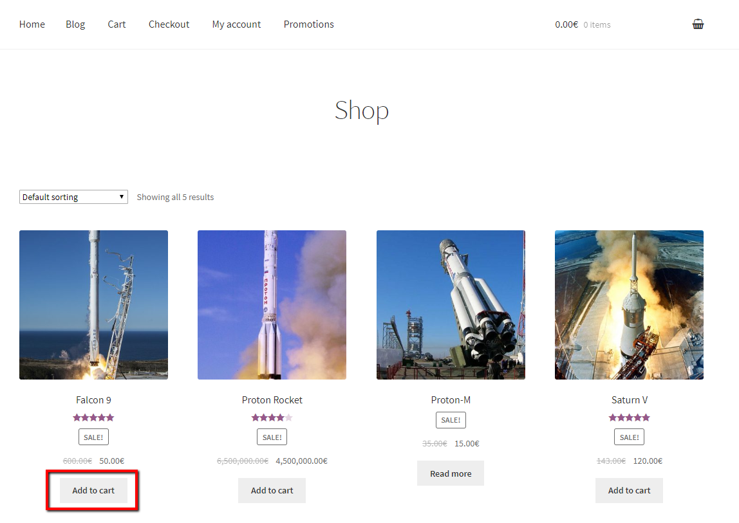
1. We navigate to the home page of our website and then click on the ‘Add to cart’ button that adds a ‘Falcon 9’ rocket to the cart.
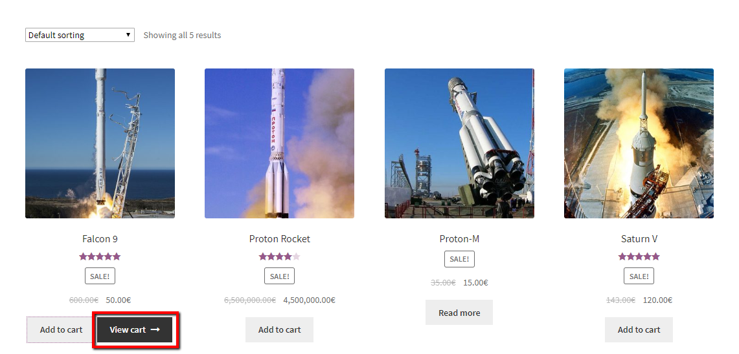
2. Next, we need to click on the ‘View cart’ button which will lead us to the cart page.
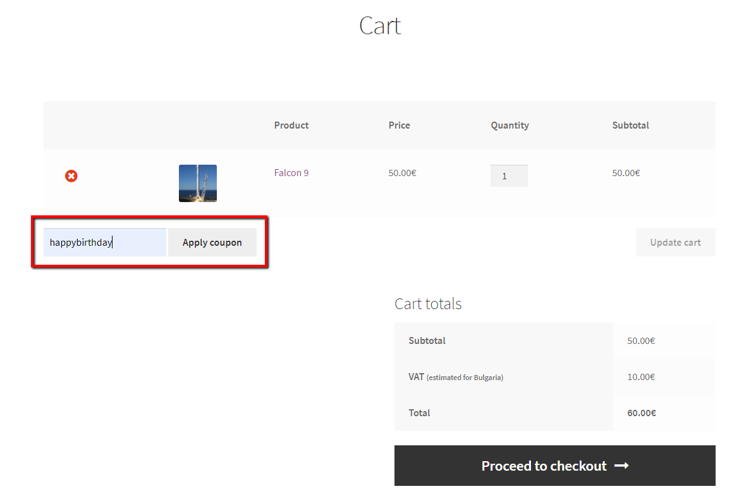
3. If it’s our birthday, we can apply the special discount coupon given to us by the company.
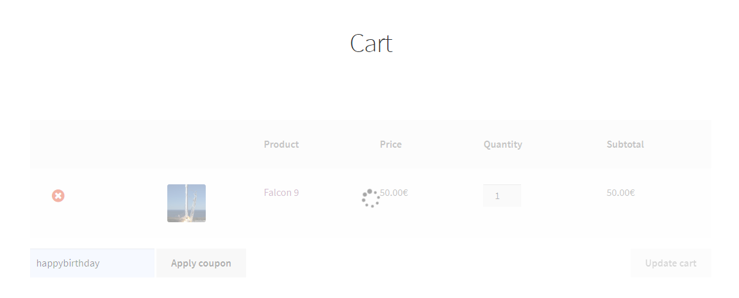
4. Before proceeding with any operations, we need to make sure that the loading indicator is not displayed.
5. Next, since we got a discount, we have additional funding to buy additional rockets. So, we increase the quantity to 2 and click on the ‘Update cart’ button.
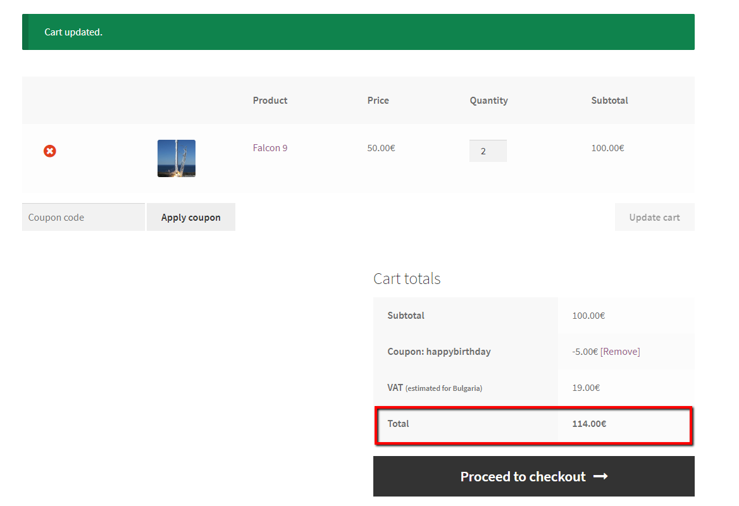
6. After the cart is updated, our test needs to check whether the total price has been changed correctly. If everything is OK, we click on the ‘Proceed to checkout’ button.
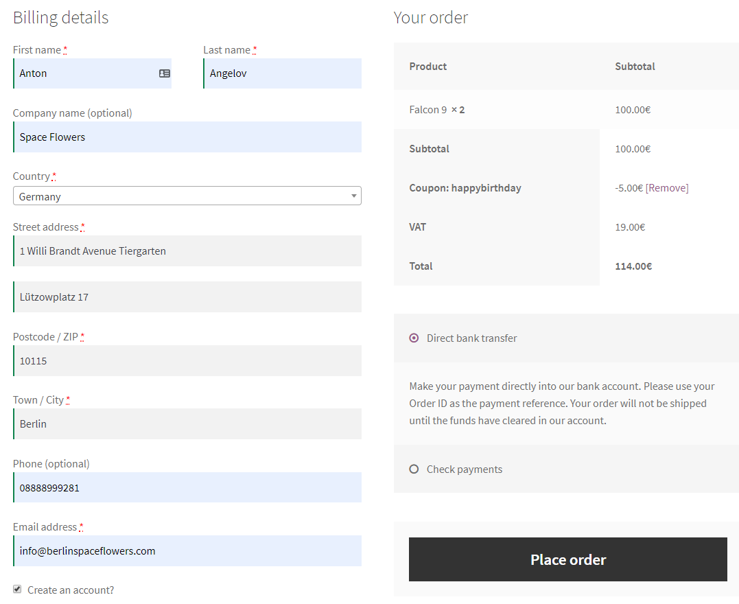
7. We fill all required information and click on the ‘Place order’ button. When the next page is loaded, we need to verify that the order was placed successfully.
Solution 1- Naive Implementation Hard-coded Pauses
Why not now have a look at the code for our first automated test case?
public class ProductPurchaseTestsHardCodedPauses
{
    private IWebDriver _driver;

    public void TestInitialize()
    {
        _driver = new ChromeDriver();
    }

    public void TestCleanup()
    {
        _driver.Quit();
    }

    public void CompletePurchaseSuccessfully_WhenNewClientAndHardCodedPauses()
    {
        _driver.Navigate().GoToUrl("http://demos.bellatrix.solutions/");
        var addToCartFalcon9 = _driver.FindElement(By.CssSelector("[data-product_id*='28']"));
        addToCartFalcon9.Click();
        Thread.Sleep(5000);
        var viewCartButton = _driver.FindElement(By.CssSelector("[class*='added_to_cart wc-forward']"));
        viewCartButton.Click();
        var couponCodeTextField = _driver.FindElement(By.Id("coupon_code"));
        couponCodeTextField.Clear();
        couponCodeTextField.SendKeys("happybirthday");
        var applyCouponButton = _driver.FindElement(By.CssSelector("[value*='Apply coupon']"));
        applyCouponButton.Click();
        Thread.Sleep(5000);
        var messageAlert = _driver.FindElement(By.CssSelector("[class*='woocommerce-message']"));
        Assert.AreEqual("Coupon code applied successfully.", messageAlert.Text);
        var quantityBox = _driver.FindElement(By.CssSelector("[class*='input-text qty text']"));
        quantityBox.Clear();
        Thread.Sleep(500);
        quantityBox.SendKeys("2");
        Thread.Sleep(5000);
        var updateCart = _driver.FindElement(By.CssSelector("[value*='Update cart']"));
        updateCart.Click();
        Thread.Sleep(5000);
        var totalSpan = _driver.FindElement(By.XPath("//*[@class='order-total']//span"));
        Assert.AreEqual("114.00€", totalSpan.Text);
        var proceedToCheckout = _driver.FindElement(By.CssSelector("[class*='checkout-button button alt wc-forward']"));
        proceedToCheckout.Click();
        var billingFirstName = _driver.FindElement(By.Id("billing_first_name"));
        billingFirstName.SendKeys("Anton");
        var billingLastName = _driver.FindElement(By.Id("billing_last_name"));
        billingLastName.SendKeys("Angelov");
        var billingCompany = _driver.FindElement(By.Id("billing_company"));
        billingCompany.SendKeys("Space Flowers");
        var billingCountryWrapper = _driver.FindElement(By.Id("select2-billing_country-container"));
        billingCountryWrapper.Click();
        var billingCountryFilter = _driver.FindElement(By.ClassName("select2-search__field"));
        billingCountryFilter.SendKeys("Germany");
        var germanyOption = _driver.FindElement(By.XPath("//*[contains(text(),'Germany')]"));
        germanyOption.Click();
        var billingAddress1 = _driver.FindElement(By.Id("billing_address_1"));
        billingAddress1.SendKeys("1 Willi Brandt Avenue Tiergarten");
        var billingAddress2 = _driver.FindElement(By.Id("billing_address_2"));
        billingAddress2.SendKeys("Lützowplatz 17");
        var billingCity = _driver.FindElement(By.Id("billing_city"));
        billingCity.SendKeys("Berlin");
        var billingZip = _driver.FindElement(By.Id("billing_postcode"));
        billingZip.Clear();
        billingZip.SendKeys("10115");
        var billingPhone = _driver.FindElement(By.Id("billing_phone"));
        billingPhone.SendKeys("+00498888999281");
        var billingEmail = _driver.FindElement(By.Id("billing_email"));
        billingEmail.SendKeys("info@berlinspaceflowers.com");
        Thread.Sleep(5000);
        var placeOrderButton = _driver.FindElement(By.Id("place_order"));
        placeOrderButton.Click();
        Thread.Sleep(10000);
        var receivedMessage = _driver.FindElement(By.XPath("/html/body/div[1]/div/div/div/main/div/header/h1"));
        Assert.AreEqual("Order received", receivedMessage.Text);
    }
}
I mentioned that our website is using modern JavaScript technologies and most of the operations are asynchronous. In order to handle them in the first version of our tests, we use hard-coded pauses like Thread.Sleep(5000). As you probably know this is a “bad practice”. With these pauses, we added 35.5 seconds on top of the standard test execution time. Sometimes these pauses may not be enough leading to probable test failure other times the element might be already there, and there won’t be a reason to wait for the whole interval.
Implicit VS Explicit Waits
One way to handle the synchronization issues is through a global implicit wait timeout.
IWebDriver driver = new ChromeDriver();
driver.Manage().Timeouts().ImplicitWait = TimeSpan.FromSeconds(30);
However, in some cases, you may need a larger wait interval. What do you do if this happens? One option is to increase the global timeout, but this will affect all existing tests. Another option is to mix implicit and explicit wait. But this is not recommended.
Note
To use WebDriverWait in your .NET tests you need to install a NuGet package called DotNetSeleniumExtras.WaitHelpers.
Let me show you how we can use the Proxy design pattern together with the explicit waits to solve our problems.
Proxy Design Pattern
Definition
Provide a surrogate or placeholder for another object to control access to it.
UML Class Diagram
classDiagram
    IWebDriver <|.. ChromeDriver
    IWebDriver <|.. WebDriverProxy
    WebDriverProxy --> IWebDriver
    class IWebDriver {
        <<interface>>
        +Navigate()
        +FindElement(By by)
        +FindElements(By by)
        +Quit()
    }
    class ChromeDriver {
        +Navigate()
        +FindElement(By by)
        +FindElements(By by)
        +Quit()
    }
    class WebDriverProxy {
        -IWebDriver _driver
        -WebDriverWait _webDriverWait
        +Navigate()
        +FindElement(By by)
        +FindElements(By by)
        +Quit()
    }
Participants
-
Subject (IWebDriver)
Defines the common interface for the tests and the WebDriver implementations. Our proxy should implement it too.
-
RealSubject (ChromeDriver)
Defines the real object that the proxy represents.
-
Proxy (WebDriverProxy)
Maintains a reference that lets the proxy access the real subject. Provides an interface identical to Subject’s so that a proxy can be substituted for the real subject. Controls access to the real subject and may be responsible for creating it and disposing of it.
Proxy Design Pattern Implementation
Now let’s review how we can implement the Proxy design pattern. Remember, it implements the same interface (IWebDriver) as the wrapped real subject (ChromeDriver). We will access the wrapper through the Composition Principle.
Note
The Composition Principle in object-oriented programming (OOP) is the principle where classes should achieve polymorphic behavior and code reuse by their composition (by containing instances of other classes that implement the desired functionality) rather than inheritance from a base or parent class. This is especially important in programming languages like C#, where multiple class inheritance is not allowed.
public class WebDriverProxy : IWebDriver
{
    private readonly IWebDriver _driver;
    private readonly WebDriverWait _webDriverWait;
    public WebDriverProxy(IWebDriver driver)
    {
        _driver = driver;
        var timeout = TimeSpan.FromSeconds(30);
        var sleepInterval = TimeSpan.FromSeconds(2);
        _webDriverWait = new WebDriverWait(new SystemClock(), _driver, timeout, sleepInterval);
    }
    public IWebElement FindElement(By @by)
    {
        return _webDriverWait.Until(ExpectedConditions.ElementExists(@by));
    }
    public ReadOnlyCollection<IWebElement> FindElements(By @by)
    {
        return _webDriverWait.Until(ExpectedConditions.PresenceOfAllElementsLocatedBy(@by));
    }
    public void Dispose()
    {
        _driver.Dispose();
    }
    public void Close()
    {
        _driver.Close();
    }
    public void Quit()
    {
        _driver.Quit();
    }
    public IOptions Manage()
    {
        return _driver.Manage();
    }
    public INavigation Navigate()
    {
        return _driver.Navigate();
    }
    public ITargetLocator SwitchTo()
    {
        return _driver.SwitchTo();
    }
    public string Url
    {
        get => _driver.Url;
        set => _driver.Url = value;
    }
    public string Title
    {
        get => _driver.Title;
    }
    public string PageSource
    {
        get => _driver.PageSource;
    }
    public string CurrentWindowHandle
    {
        get => _driver.CurrentWindowHandle;
    }
    public ReadOnlyCollection<string> WindowHandles
    {
        get => _driver.WindowHandles;
    }
}
The ‘magic’ is happening inside the FindElement and FindElements methods, where we first wait for the elements to exist before returning them.
Solution 2- Proxy Design Pattern Implementation
Let’s refactor our initial test to use the WebDriverProxy class. The usage in the test will stay absolutely the same since it implements the IWebDriver interface. Still, we will benefit from the automatic behind-the-scene wait for elements to exists, which will let us remove half of the hard-coded pauses.
public class ProductPurchaseTestsProxy
{
    private IWebDriver _driver;

    public void TestInitialize()
    {
        _driver = new WebDriverProxy(new ChromeDriver());
    }

    public void TestCleanup()
    {
        _driver.Quit();
    }

    public void CompletePurchaseSuccessfully_WhenNewClientAndWaitProxy()
    {
        _driver.Navigate().GoToUrl("http://demos.bellatrix.solutions/");
        var addToCartFalcon9 = _driver.FindElement(By.CssSelector("[data-product_id*='28']"));
        addToCartFalcon9.Click();
        ////Thread.Sleep(5000);
        var viewCartButton = _driver.FindElement(By.CssSelector("[class*='added_to_cart wc-forward']"));
        viewCartButton.Click();
        var couponCodeTextField = _driver.FindElement(By.Id("coupon_code"));
        couponCodeTextField.Clear();
        couponCodeTextField.SendKeys("happybirthday");
        var applyCouponButton = _driver.FindElement(By.CssSelector("[value*='Apply coupon']"));
        applyCouponButton.Click();
        ////Thread.Sleep(5000);
        var messageAlert = _driver.FindElement(By.CssSelector("[class*='woocommerce-message']"));
        Assert.AreEqual("Coupon code applied successfully.", messageAlert.Text);
        var quantityBox = _driver.FindElement(By.CssSelector("[class*='input-text qty text']"));
        quantityBox.Clear();
        ////Thread.Sleep(500);
        quantityBox.SendKeys("2");
        ////Thread.Sleep(5000);
        var updateCart = _driver.FindElement(By.CssSelector("[value*='Update cart']"));
        updateCart.Click();
        Thread.Sleep(5000);
        var totalSpan = _driver.FindElement(By.XPath("//*[@class='order-total']//span"));
        Assert.AreEqual("114.00€", totalSpan.Text);
        var proceedToCheckout = _driver.FindElement(By.CssSelector("[class*='checkout-button button alt wc-forward']"));
        proceedToCheckout.Click();
        var billingFirstName = _driver.FindElement(By.Id("billing_first_name"));
        billingFirstName.SendKeys("Anton");
        var billingLastName = _driver.FindElement(By.Id("billing_last_name"));
        billingLastName.SendKeys("Angelov");
        var billingCompany = _driver.FindElement(By.Id("billing_company"));
        billingCompany.SendKeys("Space Flowers");
        var billingCountryWrapper = _driver.FindElement(By.Id("select2-billing_country-container"));
        billingCountryWrapper.Click();
        var billingCountryFilter = _driver.FindElement(By.ClassName("select2-search__field"));
        billingCountryFilter.SendKeys("Germany");
        var germanyOption = _driver.FindElement(By.XPath("//*[contains(text(),'Germany')]"));
        germanyOption.Click();
        var billingAddress1 = _driver.FindElement(By.Id("billing_address_1"));
        billingAddress1.SendKeys("1 Willi Brandt Avenue Tiergarten");
        var billingAddress2 = _driver.FindElement(By.Id("billing_address_2"));
        billingAddress2.SendKeys("Lützowplatz 17");
        var billingCity = _driver.FindElement(By.Id("billing_city"));
        billingCity.SendKeys("Berlin");
        var billingZip = _driver.FindElement(By.Id("billing_postcode"));
        billingZip.Clear();
        billingZip.SendKeys("10115");
        var billingPhone = _driver.FindElement(By.Id("billing_phone"));
        billingPhone.SendKeys("+00498888999281");
        var billingEmail = _driver.FindElement(By.Id("billing_email"));
        billingEmail.SendKeys("info@berlinspaceflowers.com");
        Thread.Sleep(5000);
        var placeOrderButton = _driver.FindElement(By.Id("place_order"));
        placeOrderButton.Click();
        Thread.Sleep(10000);
        var receivedMessage = _driver.FindElement(By.XPath("/html/body/div[1]/div/div/div/main/div/header/h1"));
        Assert.AreEqual("Order received", receivedMessage.Text);
    }
}
The only difference is that the initialization of ChromeDriver is passed to the WebDriverProxy constructor. Also, we deleted 15.5 seconds of hard-coded pauses.
Summary

As you can see, the speed of the test was significantly improved using the new approach.
We couldn’t remove all hard-coded pauses since some of them are there so that we can handle asynchronous requests. In the next article of the series, I will show you how to remove them using the Adapter design pattern.
