
Editorial Note: I originally wrote this post for the Test Huddle Blog. You can check out the original here, at their site.
This is the fourth article from the WebDriver Page Objects Series. It is dedicated to page objects using partial classes and the so-called fluent API.
In the previous articles from the series, I showed you how to create more maintainable page objects through separating the code of the pages in three different files. Moreover, you are no more obligated to use the Selenium.Support NuGet package. Here we will create a different way for accessing the methods of the page in a single uninterrupted chain.
If you are using WebDriver often, you may find useful my Most Complete Selenium WebDriver C# Cheat Sheet. All you need to know- the most basic operations to the most advanced configurations.
Definition
In software engineering, a fluent interface is a method for constructing object-oriented APIs, where the readability of the source code is close to that of ordinary written prose. A fluent interface is usually implemented by using method cascading to relay the instruction context of a subsequent call.
Two years ago while we were working on the first version of the BELLATRIX test automation framework, I did this research so that we can find the most convenient way for creating page objects.
Test Case
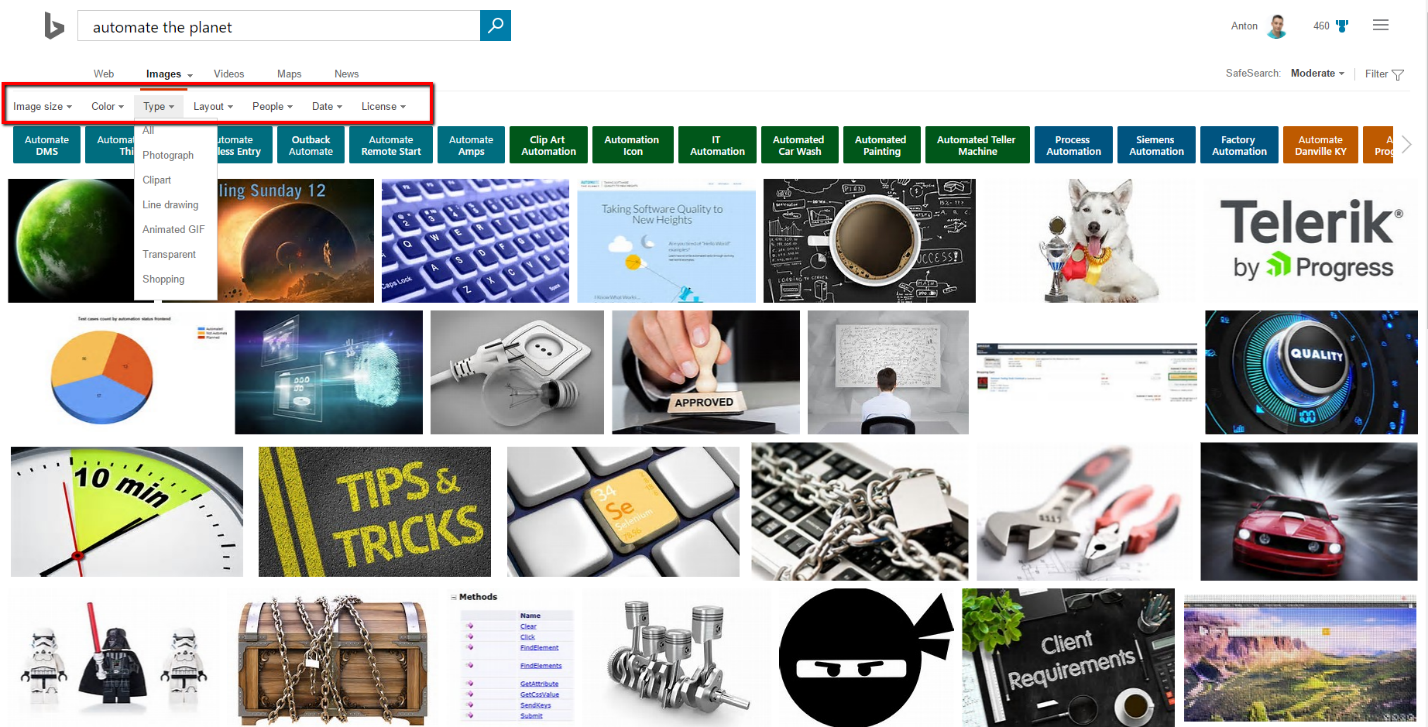
We will once again automate the main SearchEngine page. However, this time we will write logic for using the advanced images’ filtering options.
Page Objects using Fluent API Code
For each filter option, we have a dedicated enum- Colors, Dates, Layouts, Licenses, People, Sizes and Types.
public enum Colors
{
    All,
    ColorOnly,
    BlackWhite,
    Red,
    Orange,
    Yellow,
    Green
}
We will use these enums in the primary class of our page. The code of the rest of the enums is identical.
SearchEngineMainPage
Most of the differences compared to the other implementations of the pattern are located in this file.
public partial class SearchEngineMainPage
{
    private readonly IWebDriver _driver;
    private readonly string _url = @"searchEngineUrl";
    public SearchEngineMainPage(IWebDriver browser)
    {
        _driver = browser;
    }
    public SearchEngineMainPage Navigate()
    {
        _driver.Navigate().GoToUrl(_url);
        return this;
    }
    public SearchEngineMainPage Search(string textToType)
    {
        SearchBox.Clear();
        SearchBox.SendKeys(textToType);
        GoButton.Click();
        return this;
    }
    public SearchEngineMainPage ClickImages()
    {
        ImagesLink.Click();
        return this;
    }
    public SearchEngineMainPage SetSize(Sizes size)
    {
        Sizes.SelectByIndex((int)size);
        return this;
    }
    public SearchEngineMainPage SetColor(Colors color)
    {
        Color.SelectByIndex((int)color);
        return this;
    }
    public SearchEngineMainPage SetTypes(Types type)
    {
        Type.SelectByIndex((int)type);
        return this;
    }
    public SearchEngineMainPage SetLayout(Layouts layout)
    {
        Layout.SelectByIndex((int)layout);
        return this;
    }
    public SearchEngineMainPage SetPeople(People people)
    {
        People.SelectByIndex((int)people);
        return this;
    }
    public SearchEngineMainPage SetDate(Dates date)
    {
        Date.SelectByIndex((int)date);
        return this;
    }
    public SearchEngineMainPage SetLicense(Licenses license)
    {
        License.SelectByIndex((int)license);
        return this;
    }
}
Everything stays the same with the difference that each service method now returns the instance of the page itself. This way the fluent syntax is supported.
SearchEngineMainPage.Map
public partial class SearchEngineMainPage
{
    public IWebElement SearchBox => _driver.FindElement(By.Id("sb_form_q"));
    public IWebElement GoButton => _driver.FindElement(By.Id("sb_form_go"));
    public IWebElement ResultsCountDiv => _driver.FindElement(By.Id("b_tween"));
    public IWebElement ImagesLink => _driver.FindElement(By.LinkText("Images"));
    public SelectElement Sizes => new SelectElement(_driver.FindElement(By.XPath("//div/ul/li/span/span[text() = 'Size']")));
    public SelectElement Color => new SelectElement(_driver.FindElement(By.XPath("//div/ul/li/span/span[text() = 'Color']")));
    public SelectElement Type => new SelectElement(_driver.FindElement(By.XPath("//div/ul/li/span/span[text() = 'Type']")));
    public SelectElement Layout => new SelectElement(_driver.FindElement(By.XPath("//div/ul/li/span/span[text() = 'Layout']")));
    public SelectElement People => new SelectElement(_driver.FindElement(By.XPath("//div/ul/li/span/span[text() = 'People']")));
    public SelectElement Date => new SelectElement(_driver.FindElement(By.XPath("//div/ul/li/span/span[text() = 'Date']")));
    public SelectElement License => new SelectElement(_driver.FindElement(By.XPath("//div/ul/li/span/span[text() = 'License']")));
}
The map does not contain any differences compared to the other versions. Here, the file contains the various elements present in the advanced filtering menu.
SearchEngineMainPage.Asserter
public partial class SearchEngineMainPage
{
    public SearchEngineMainPage ResultsCount(string expectedCount)
    {
        Assert.IsTrue(ResultsCountDiv.Text.Contains(expectedCount), "The results DIV doesn't contains the specified text.");
        return this;
    }
}
To support the fluent API, the assert method returns the instance of the page.
Fluent API in Tests
public class FluentSearchEngineTests
{
    private IWebDriver _driver;
    private SearchEngineMainPage _bingPage;

    public void SetupTest()
    {
        _driver = new FirefoxDriver();
        _driver.Manage().Timeouts().ImplicitWait = TimeSpan.FromSeconds(30);
        _bingPage = new SearchEngineMainPage(_driver);
    }

    public void TeardownTest()
    {
        _driver.Quit();
    }

    public void SearchForImageFuent()
    {
        _bingPage
        .Navigate()
        .Search("facebook")
        .ClickImages()
        .SetSize(Sizes.Large)
        .SetColor(Colors.BlackWhite)
        .SetTypes(Types.Clipart)
        .SetPeople(People.All)
        .SetDate(Dates.PastYear)
        .SetLicense(Licenses.All);
    }
}
As you can observe in the code above, we do not call the methods in separate calls. Instead, we create a single chain of methods to create the test case. Some people believe that this way the writing process is simplified and the code more readable. I am a little bit sceptic, but you can try it.
In future articles, I will share with you other modifications of the design pattern that can make your tests even more maintainable. You can find even more articles in the Design Patterns in Automated Testing Series.
For more detailed overview and usage of many more design patterns and best practices in automated testing, check my book “Design Patterns for High-Quality Automated Tests, C# Edition, High-Quality Tests Attributes, and Best Practices”. You can read part of three of the chapters:
Defining High-Quality Test Attributes for Automated Tests
Benchmarking for Assessing Automated Test Components Performance
