
In my previous articles from the series “Design Patterns in Automated Testing”, I explained in details how to make your test automation framework better through the implementation of Page Objects, Facades, and Singletons. When we have to write tests for more complex use case scenarios, it gets usually harder and harder to follow the Open Close Principle, one of the primary principles part of SOLID. In this part of the series, I am going to use the Strategy Design Pattern to create extendable validators for an E-Commerce module.
Definition
In computer programming, the strategy pattern (also known as the policy pattern) is a software design pattern that enables an algorithm‘s behavior to be selected at runtime.
- Defines a family of algorithms.
- Encapsulates each algorithm.
- Makes the algorithms interchangeable within that family.
- The code is easier to maintain as modifying or understanding strategy does not require you to understand the whole main object.
UML Class Diagram
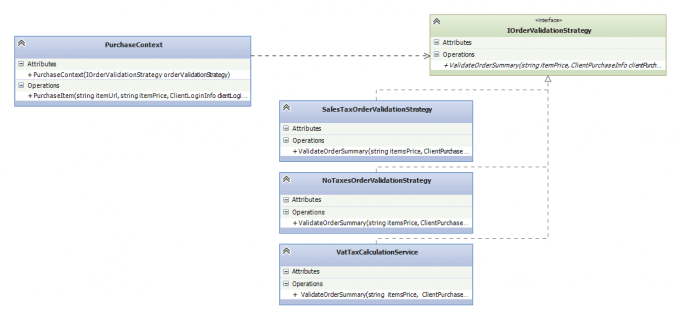
Participants
The classes and objects participating in this pattern are:
-
IStrategy (IOrderValidationStrategy)
Defines an interface common to all algorithms. The context class calls the interface to perform the algorithm, identified by the concrete strategy.
-
ConcreteStrategy (SalesTaxOrderValidationStrategy)
Implements the algorithm using the strategy interface.
-
Context (PurchaseContext)
Holds a dependency to IStrategy. Wraps the calls to the concrete strategies, may provide an interface to the strategies to access its data.
Test’s Test Case
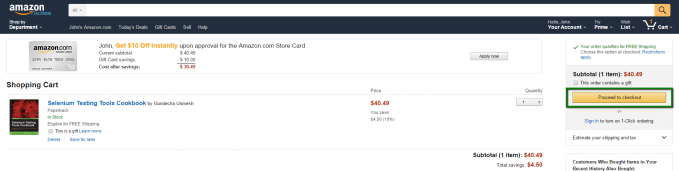
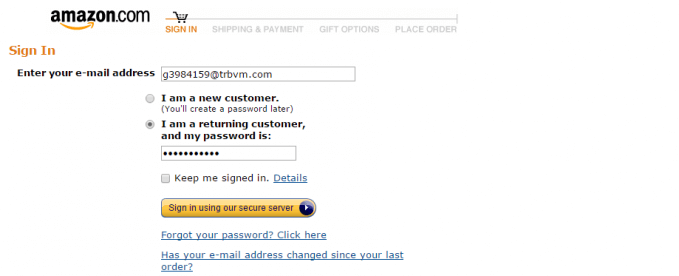
4. Fill Shipping Info
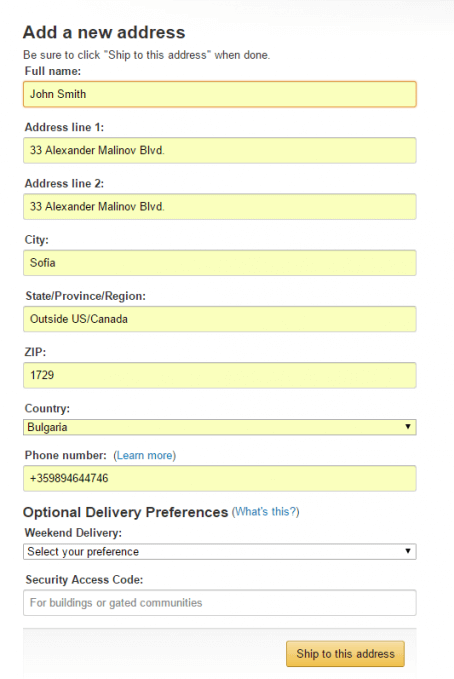
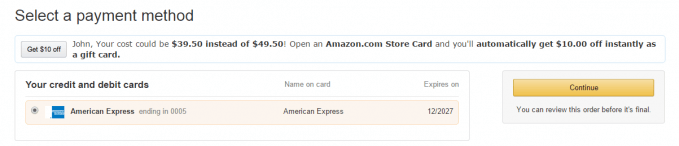
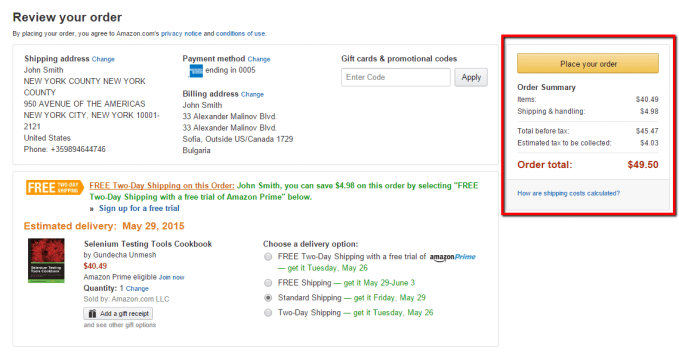
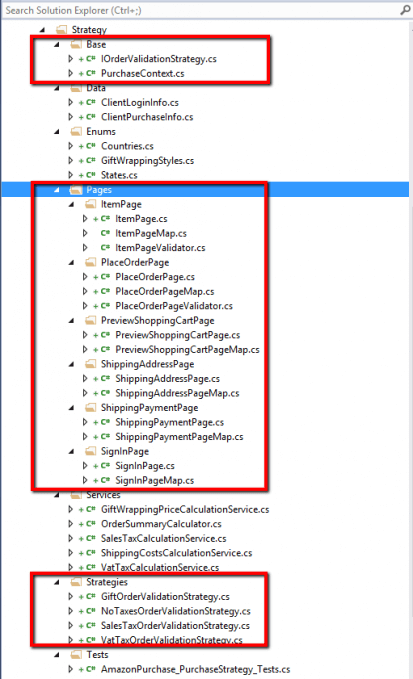
As you can see, the design of the tests uses heavily Page Object Pattern. There is nothing unusual in the different pages, so I’m not going to paste the code of every single page here because it is not relevant to the articles’ theme. Probably, the most interesting logic is located in the ShippingAddressPage.
public class ShippingAddressPage : BasePageSingleton<ShippingAddressPage, ShippingAddressPageMap>
{
    public void ClickContinueButton()
    {
        this.Map.ContinueButton.Click();
    }

    public void FillShippingInfo(ClientPurchaseInfo clientInfo)
    {
        this.Map.CountryDropDown.SelectByText(clientInfo.Country);
        this.Map.FullNameInput.SendKeys(clientInfo.FullName);
        this.Map.Address1Input.SendKeys(clientInfo.Address1);
        this.Map.CityInput.SendKeys(clientInfo.City);
        this.Map.ZipInput.SendKeys(clientInfo.Zip);
        this.Map.PhoneInput.SendKeys(clientInfo.Phone);
        this.Map.ShipToThisAddress.Click();
    }
}
The ClientPurchaseInfo class holds the data about the client’s purchase, most of the data is populated through string properties.
public class ClientPurchaseInfo
{
    public string FullName { get; set; }

    public string Country { get; set; }

    public string Address1 { get; set; }

    public string City { get; set; }

    public string Phone { get; set; }

    public string Zip { get; set; }

    public string Email { get; set; }

    public string State { get; set; }

    public string DeliveryType { get; set; }

    public GiftWrappingStyles GiftWrapping { get; set; }
}
Implementation without Strategy Design Pattern
The use cases can be automated easily via the usage of Facade Design Pattern.
public class PurchaseFacade
{
    public void PurchaseItemSalesTax(string itemUrl, string itemPrice, string taxAmount, ClientLoginInfo clientLoginInfo, ClientPurchaseInfo clientPurchaseInfo)
    {
        PurchaseItemInternal(itemUrl, clientLoginInfo, clientPurchaseInfo);
        PlaceOrderPage.Instance.Validate().EstimatedTaxPrice(taxAmount);
    }

    public void PurchaseItemGiftWrapping(string itemUrl, string itemPrice, string giftWrapTax, ClientLoginInfo clientLoginInfo, ClientPurchaseInfo clientPurchaseInfo)
    {
        PurchaseItemInternal(itemUrl, clientLoginInfo, clientPurchaseInfo);
        PlaceOrderPage.Instance.Validate().GiftWrapPrice(giftWrapTax);
    }

    public void PurchaseItemShippingTax(string itemUrl, string itemPrice, string shippingTax, ClientLoginInfo clientLoginInfo, ClientPurchaseInfo clientPurchaseInfo)
    {
        PurchaseItemInternal(itemUrl, clientLoginInfo, clientPurchaseInfo);
        PlaceOrderPage.Instance.Validate().ShippingTaxPrice(shippingTax);
    }

    private void PurchaseItemInternal(string itemUrl, ClientLoginInfo clientLoginInfo, ClientPurchaseInfo clientPurchaseInfo)
    {
        ItemPage.Instance.Navigate(itemUrl);
        ItemPage.Instance.ClickBuyNowButton();
        PreviewShoppingCartPage.Instance.ClickProceedToCheckoutButton();
        SignInPage.Instance.Login(clientLoginInfo.Email, clientLoginInfo.Password);
        ShippingAddressPage.Instance.FillShippingInfo(clientPurchaseInfo);
        ShippingAddressPage.Instance.ClickContinueButton();
        ShippingPaymentPage.Instance.ClickBottomContinueButton();
        ShippingPaymentPage.Instance.ClickTopContinueButton();
    }
}
The main drawback of such solution is the number of different methods for the different tax verification cases. If there is a need to introduce a new tax validation, a new method should be added that is going to break the Open Close Principle.
For more detailed overview and usage of many more design patterns and best practices in automated testing, check my book “Design Patterns for High-Quality Automated Tests, C# Edition, High-Quality Tests Attributes, and Best Practices”. You can read part of three of the chapters:
Defining High-Quality Test Attributes for Automated Tests
Benchmarking for Assessing Automated Test Components Performance
Generic Repository Design Pattern- Test Data Preparation
Strategy Design Pattern Implementation
There are hundreds of test cases that you can automate in this sample e-commerce module. Some of the most important are related to the correctness of the prices on the last page of the purchasing process. So the primary goal of the validations in the tests is going to be to test if the correct prices are displayed. There is a couple of types of taxes- Sales (US/Canada), VAT (EU Union Countries), Gift Wrapping, Shipping, etc. The page objects can be combined in the PurchaseContext class to perform a new purchase, the strategy design pattern can be applied to pass the specific validation strategy.

The main method of the validation strategy can be defined by the following interface.
public interface IOrderValidationStrategy
{
    void ValidateOrderSummary(string itemPrice, ClientPurchaseInfo clientPurchaseInfo);
}
public class PurchaseContext
{
private readonly IOrderValidationStrategy orderValidationStrategy;
public PurchaseContext(IOrderValidationStrategy orderValidationStrategy)
{
this.orderValidationStrategy = orderValidationStrategy;
}
public void PurchaseItem(string itemUrl, string itemPrice, ClientLoginInfo clientLoginInfo, ClientPurchaseInfo clientPurchaseInfo)
{
ItemPage.Instance.Navigate(itemUrl);
ItemPage.Instance.ClickBuyNowButton();
PreviewShoppingCartPage.Instance.ClickProceedToCheckoutButton();
SignInPage.Instance.Login(clientLoginInfo.Email, clientLoginInfo.Password);
ShippingAddressPage.Instance.FillShippingInfo(clientPurchaseInfo);
ShippingAddressPage.Instance.ClickContinueButton();
ShippingPaymentPage.Instance.ClickBottomContinueButton();
ShippingPaymentPage.Instance.ClickTopContinueButton();
this.orderValidationStrategy.ValidateOrderSummary(itemPrice, clientPurchaseInfo);
}
}In most cases, I believe that the best approach to validate taxes and similar money amounts is to call the real production web services that are used to power the actual e-commerce module. They should be already entirely tested via unit and integration tests, and their output should be guaranteed.

The primary goal of the E2E tests is to ensure that the correct prices are visualized on the page rather than to check the real calculation logic. So in my concrete implementation of the SalesTaxOrderValidationStrategy, I have created a dummy sample implementation. In actual tests instead of calculating the taxes manually, we should call the production web service. If the module doesn’t use web services, you can always create your test web-service and call the production code in wrapper methods. I had already done that for an old legacy module that I had to validate automatically.
public class SalesTaxOrderValidationStrategy : IOrderValidationStrategy
{
    public SalesTaxOrderValidationStrategy()
    {
        this.SalesTaxCalculationService = new SalesTaxCalculationService();
    }

    public SalesTaxCalculationService SalesTaxCalculationService { get; set; }

    public void ValidateOrderSummary(string itemsPrice, ClientPurchaseInfo clientPurchaseInfo)
    {
        States currentState = (States)Enum.Parse(typeof(States), clientPurchaseInfo.State);
        decimal currentItemPrice = decimal.Parse(itemsPrice);
        decimal salesTax = this.SalesTaxCalculationService.Calculate(currentItemPrice, currentState, clientPurchaseInfo.Zip);

        PlaceOrderPage.Instance.Validate().EstimatedTaxPrice(salesTax.ToString());
    }
}
I have implemented a similar logic for the VAT Tax Validation Strategy.
public class VatTaxOrderValidationStrategy : IOrderValidationStrategy
{
    public VatTaxOrderValidationStrategy()
    {
        this.VatTaxCalculationService = new VatTaxCalculationService();
    }

    public VatTaxCalculationService VatTaxCalculationService { get; set; }

    public void ValidateOrderSummary(string itemsPrice, ClientPurchaseInfo clientPurchaseInfo)
    {
        Countries currentCountry = (Countries)Enum.Parse(typeof(Countries), clientPurchaseInfo.Country);
        decimal currentItemPrice = decimal.Parse(itemsPrice);
        decimal vatTax = this.VatTaxCalculationService.Calculate(currentItemPrice, currentCountry);

        PlaceOrderPage.Instance.Validate().EstimatedTaxPrice(vatTax.ToString());
    }
}
Tests Using Strategy Design Pattern
public class OnlineStorePurchase_PurchaseStrategy_Tests
{

    public void SetupTest()
    {
        Driver.StartBrowser();
    }


    public void TeardownTest()
    {
        Driver.StopBrowser();
    }


    public void Purchase_SeleniumTestingToolsCookbook()
    {
        string itemUrl = "/Selenium-Testing-Cookbook-Gundecha-Unmesh/dp/1849515743";
        string itemPrice = "40.49";
        ClientPurchaseInfo clientPurchaseInfo = new ClientPurchaseInfo()
        {
            FullName = "John Smith",
            Country = "United States",
            Address1 = "950 Avenue of the Americas",
            State = "New York",
            City = "New York City",
            Zip = "10001-2121",
            Phone = "00164644885569",
            GiftWrapping = Enums.GiftWrappingStyles.None
        };
        ClientLoginInfo clientLoginInfo = new ClientLoginInfo()
        {
            Email = "g3984159@trbvm.com",
            Password = "ASDFG_12345"
        };

        new PurchaseContext(new SalesTaxOrderValidationStrategy()).PurchaseItem(itemUrl, itemPrice, clientLoginInfo, clientPurchaseInfo);
    }
}
The use of the Strategy Design Pattern to create automated tests is easy. The only thing that you have to do is to pass the desired algorithm to the newly created PurchaseContext.
