
Editorial Note: I originally wrote this post for the Test Huddle Blog. You can check out the original here, at their site.
This is the sixth article from the WebDriver Page Objects Series. It is dedicated to usage of page object model for more complex pages with lots of components that are present on other pages too. I will show you how to reuse the code of these components and skip the copy-paste development.
In the previous articles from the series, I showed you how to create more maintainable page objects through separating the code of the pages in three different files. Moreover, you are no more obligated to use the Selenium.Support NuGet package. The primary difference compared to the other versions of the pattern will be that we will reuse the over-occurring components through the usage of composition- using the so-called section properties. In general, a section is a part of the page which code is extracted to separate page object model files called sections.
Two years ago while we were working on the first version of the BELLATRIX test automation framework, I did this research so that we can find the most convenient way for creating page objects.
Test Case
Usually, the login screens of most sites are designed with multiple reusable controls. Take for example the login page of this products website.
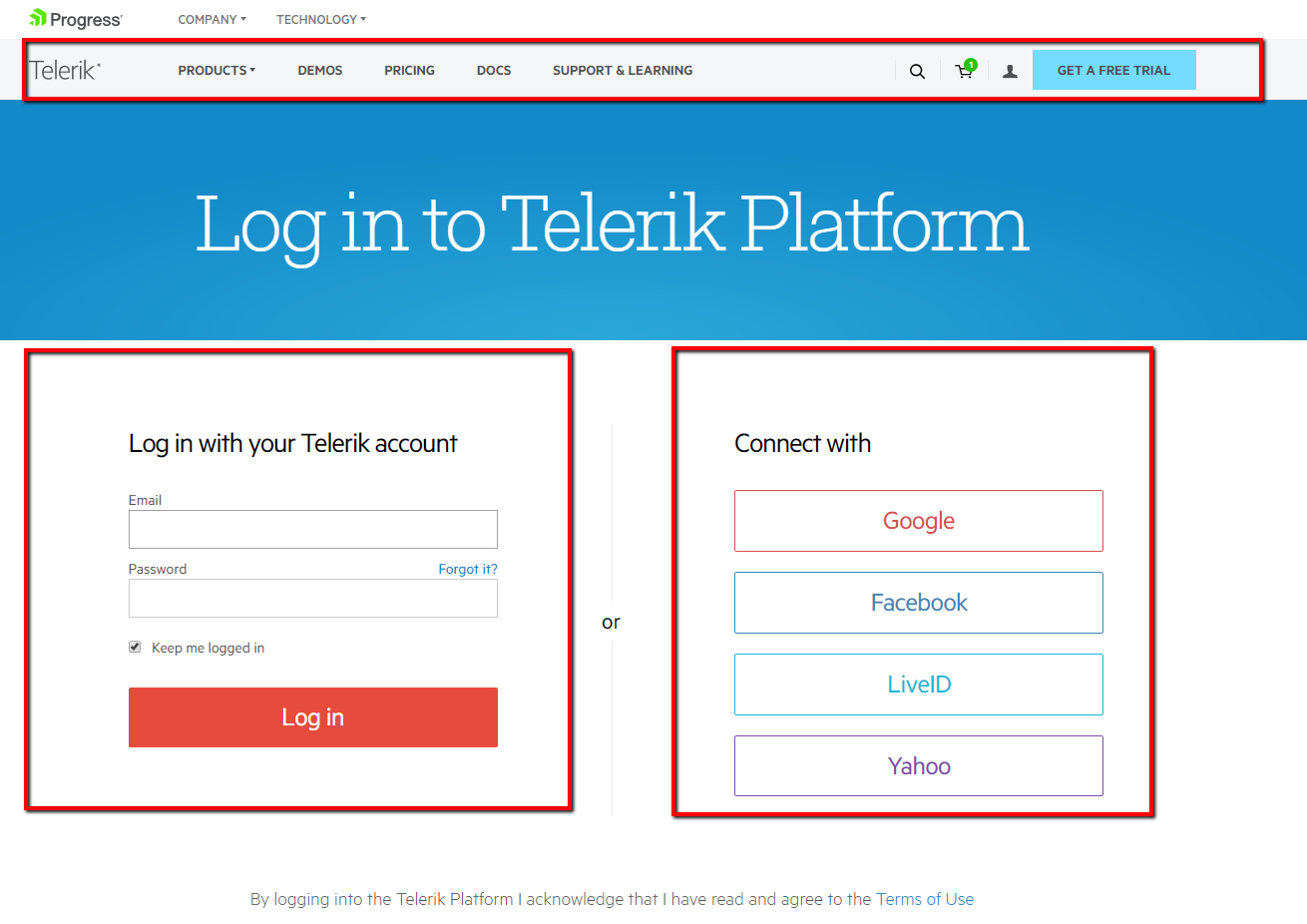
As depicted in the image there are three primary reusable regions on the page- the main navigation, the login form and the connect with buttons.
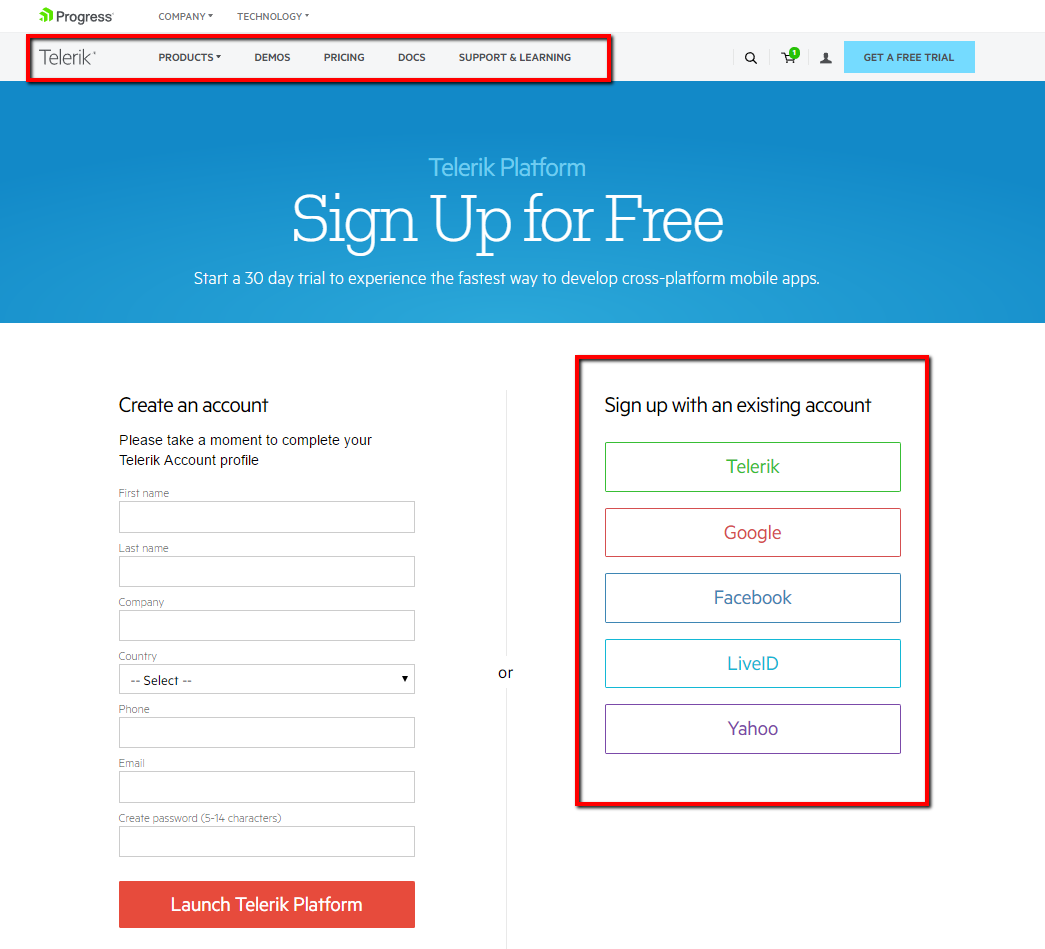
This is another page where the user can create an account. As you can see the connect with buttons region and the main navigation are displayed again.
When we create our page object model, we want to reuse these regions instead of copy pasting the same locators and action methods.
Reuse Page Regions through Page Sections- Code
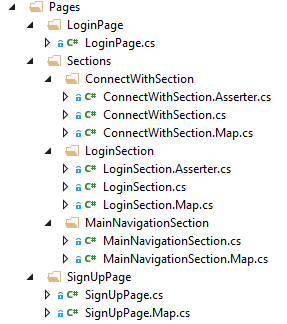
This is how the new files’ structure looks like. We have pages that use the sections as properties. The sections objects are placed under the Sections Folder.
LoginPage
public partial class LoginPage
{
    private readonly IWebDriver _driver;
    private readonly string _url = @"productSiteUrllogin";
    public LoginPage(IWebDriver browser)
    {
        _driver = browser;
        LoginSection = new LoginSection(_driver);
        MainNavigationSection = new MainNavigationSection(_driver);
        ConnectWithSection = new ConnectWithSection(_driver);
    }
    public LoginSection LoginSection { get; private set; }
    public MainNavigationSection MainNavigationSection { get; private set; }
    public ConnectWithSection ConnectWithSection { get; private set; }
    public void Navigate() => _driver.Navigate().GoToUrl(_url);
}
This is the code of the page that I initially showed you and circled the three reusable regions in red. They are here exposed as sections’ properties. Because of that, this page does not have its map and asserter files. However, this does not mean that they cannot be present.
LoginSection
public partial class LoginSection
{
    private readonly IWebDriver _driver;
    public LoginSection(IWebDriver browser)
    {
        _driver = browser;
    }
    public void Login(string email, string password)
    {
        Email.SendKeys(email);
        Password.SendKeys(password);
        LoginButton.Click();
    }
}
Above you can find the main class of the login section. It is implemented as a standard page object using three partial classes. The only difference is that the name of the class uses the Section suffix instead of Page.
LoginSection.Map
public partial class LoginSection
{
    public IWebElement Email => _driver.FindElement(By.Id("username"));
    public IWebElement Password => _driver.FindElement(By.Id("password"));
    public IWebElement LoginButton => _driver.FindElement(By.Id("LoginButton"));
    public IWebElement RememberMe => _driver.FindElement(By.Id("RememberMe"));
}
Nothing special about this one it is just a partial class of the LoginSection.
LoginSection.Asserter
public partial class LoginSection
{
    public void RememberMeChecked() => Assert.IsTrue(RememberMe.Selected);
}
SignUpPage
public partial class SignUpPage
{
    private readonly IWebDriver _driver;
    private readonly string _url = @"productSiteUrllogin/v2";
    public SignUpPage(IWebDriver browser)
    {
        _driver = browser;
        MainNavigationSection = new MainNavigationSection(_driver);
        ConnectWithSection = new ConnectWithSection(_driver);
    }
    public MainNavigationSection MainNavigationSection { get; private set; }
    public ConnectWithSection ConnectWithSection { get; private set; }
    public void Navigate() => _driver.Navigate().GoToUrl(_url);
    public void SignUpDefault(string email, string password)
    {
        FirstName.SendKeys(Guid.NewGuid().ToString());
        LastName.SendKeys(Guid.NewGuid().ToString());
        Company.SendKeys("Automate The Planet");
        Country.SelectByText("Bulgaria");
        Phone.SendKeys("+44 13 4436 0444");
        Email.SendKeys(email);
        Password.SendKeys(password);
        LaunchButton.Click();
    }
}
This is the second page that you have seen earlier. This time it contains its own map and asserter files and reuses two of the sections’ page models.
The rest of the others sections’ code is similar, and because of that, I will not publish it here.
Page Sections in Tests
public class LoginTests
{
    private IWebDriver _driver;

    public void SetupTest()
    {
        _driver = new FirefoxDriver();
        _driver.Manage().Timeouts().ImplicitWait = TimeSpan.FromSeconds(30);
    }

    public void TeardownTest()
    {
        _driver.Quit();
    }

    public void SuccessfullyLogin_WhenLoginWithExistingUser()
    {
        var loginPage = new LoginPage(_driver);
        loginPage.Navigate();
        loginPage.LoginSection.Login("myemail@automatetheplanet.com", "somePassword");
    }

    public void SuccessfullyLogin_WhenLoginWithExistingGoogleAccount()
    {
        var loginPage = new LoginPage(_driver);
        loginPage.Navigate();
        loginPage.ConnectWithSection.GoogleButton.Click();
    }

    public void SignUpWithNewDefaultUser()
    {
        var signUpPage = new SignUpPage(_driver);
        signUpPage.Navigate();
        signUpPage.SignUpDefault("myemail@automatetheplanet.com", "somePassword");
    }
}
As you can see from the above examples, the usage of the sections in tests is straightforward. We make calls to their methods or elements through the public properties exposed from the primary wrapper pages such as LoginPage and SignUpPage.
For more detailed overview and usage of many more design patterns and best practices in automated testing, check my book “Design Patterns for High-Quality Automated Tests, C# Edition, High-Quality Tests Attributes, and Best Practices”. You can read part of three of the chapters:
Defining High-Quality Test Attributes for Automated Tests
Benchmarking for Assessing Automated Test Components Performance
