

Editorial Note: I originally wrote this post for the Test Huddle Blog. You can check out the original text at their site.
One of the most popular design patterns in Web Automation is the so-called Page Object Pattern. The famous programmer Martin Fowler was one of the first that mentioned Page Object as a pattern and explained its usage. You may not be able to find it in the list of all “official” design patterns because the community started using it recently. Most of the other design patterns have been about for more than 20 years. You can find more about the usage of design patterns in the automated testing in my series- Design Patterns in Automated Testing Series.
In general, a page object abstracts an HTML page. It provides an easy to use interface for manipulating the page elements without searching for them in the HTML.
Two years ago while we were working on the first version of the BELLATRIX test automation framework, I did this research so that we can find the most convenient way for creating page objects.
Selenium WebDriver Page Objects
using Microsoft.VisualStudio.TestTools.UnitTesting;
using OpenQA.Selenium;
using OpenQA.Selenium.Support.PageObjects;
namespace ImprovedPageObjects
{
    public class SearchEngineMainPage
    {
        private readonly IWebDriver driver;
        private readonly string url = @"searchEngineUrl";
        public SearchEngineMainPage(IWebDriver browser)
        {
            this.driver = browser;
            PageFactory.InitElements(browser, this);
        }
        [FindsBy(How = How.Id, Using = "sb_form_q")]
        public IWebElement SearchBox { get; set; }
        [FindsBy(How = How.Id, Using = "sb_form_go")]
        public IWebElement GoButton { get; set; }
        [FindsBy(How = How.Id, Using = "b_tween")]
        public IWebElement ResultsCountDiv { get; set; }
        public void Navigate()
        {
            this.driver.Navigate().GoToUrl(this.url);
        }
        public void Search(string textToType)
        {
            this.SearchBox.Clear();
            this.SearchBox.SendKeys(textToType);
            this.GoButton.Click();
        }
        public void AssertResultsCount(string expectedCount)
        {
            Assert.AreEqual(this.ResultsCountDiv.Text, expectedCount);
        }
    }
}
In the example, the different properties represent the various elements of the pages. They are located through the help of the FindsBy attributes that are holding the finding strategy. Below them, you can find the different actions that can be performed on the page.
To use the code from the example, you need to install two NuGet packages- Selenium.WebDriver (holding the main WebDriver interfaces) and Selenium.Support (provides the page objects’ support). If you use Selenium WebDriver on a daily basis maybe, you will find useful the cheat sheet that I created.
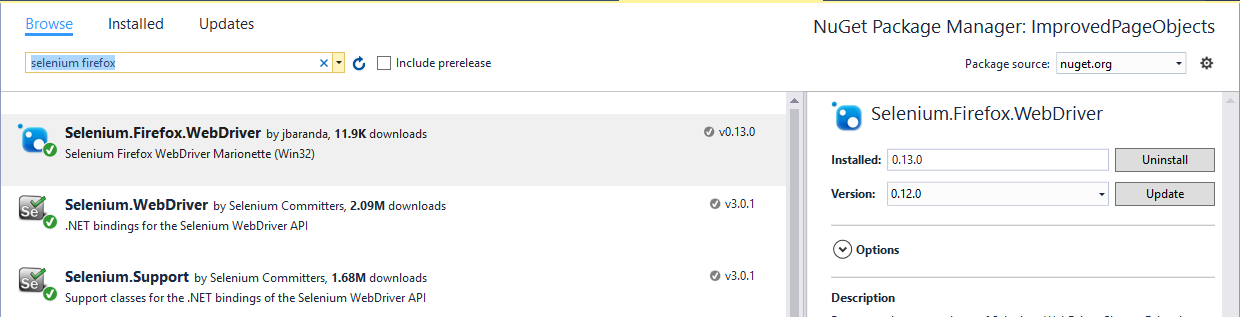
The usage in tests is straightforward. You only create an instance of the page and call some of the action methods and at the end- one of the assertions.
using System;
using Microsoft.VisualStudio.TestTools.UnitTesting;
using OpenQA.Selenium;
using OpenQA.Selenium.Firefox;
namespace ImprovedPageObjects
{

    public class SearchEngineTests
    {
        private IWebDriver driver;

        public void SetupTest()
        {
            this.driver = new FirefoxDriver();
            this.driver.Manage().Timeouts().ImplicitlyWait(new TimeSpan(0, 0, 30));
        }

        public void TeardownTest()
        {
            this.driver.Quit();
        }

        public void SearchTextInSearchEngine_First()
        {
            var searchEngineMainPage = new SearchEngineMainPage(this.driver);
            searchEngineMainPage.Navigate();
            searchEngineMainPage.Search("Automate The Planet");
            searchEngineMainPage.AssertResultsCount("236,000 RESULTS");
        }
    }
}
What Is the Problem with This Approach?
If you automate a page with lots of elements and complex logic, the code of the class can get enormous. Larger files increase the search time and decrease the readability of the page object. This is so because the class contains three different types of elements. The web page properties, the action methods and the assert methods. Usually, when you need to fix something in the page object, you need to change only one of these items.
One way to handle this problem is to separate these three types in different files. However, I want the usage of the page object to stay the same. You can use one of the features of C#- the partial classes.
Enhanced Page Objects through Partial Classes
You can read more about the partial classes and methods in the official MSDN documentation. But in general, it is possible to split the definition of a class over two or more source files. Each source file contains a section of the type or method definition, and all parts are combined when the application is compiled. Using this approach the SearchEngineMainPage class’s definition will be placed inside three different files:
SearchEngineMainPage class’s definition:
-
SearchEngineMainPage
Contains the constructor(s) and the action methods
-
SearchEngineMainPage.Map
Stores all web elements’ properties
-
SearchEngineMainPage.Asserter
Holds all assertions
SearchEngineMainPage
using OpenQA.Selenium;
using OpenQA.Selenium.Support.PageObjects;
namespace ImprovedPageObjects.ImprovedVersion
{
    public partial class SearchEngineMainPage
    {
        private readonly IWebDriver driver;
        private readonly string url = @"searchEngineUrl";
        public SearchEngineMainPage(IWebDriver browser)
        {
            this.driver = browser;
            PageFactory.InitElements(browser, this);
        }
        public void Navigate()
        {
            this.driver.Navigate().GoToUrl(this.url);
        }
        public void Search(string textToType)
        {
            this.SearchBox.Clear();
            this.SearchBox.SendKeys(textToType);
            this.GoButton.Click();
        }
    }
}
SearchEngineMainPage.Map
using OpenQA.Selenium;
using OpenQA.Selenium.Support.PageObjects;
namespace ImprovedPageObjects.ImprovedVersion
{
    public partial class SearchEngineMainPage
    {
        [FindsBy(How = How.Id, Using = "sb_form_q")]
        public IWebElement SearchBox { get; set; }
        [FindsBy(How = How.Id, Using = "sb_form_go")]
        public IWebElement GoButton { get; set; }
        [FindsBy(How = How.Id, Using = "b_tween")]
        public IWebElement ResultsCountDiv { get; set; }
    }
}
SearchEngineMainPage.Asserts
using Microsoft.VisualStudio.TestTools.UnitTesting;
namespace ImprovedPageObjects.ImprovedVersion
{
    public partial class SearchEngineMainPage
    {
        public void AssertResultsCount(string expectedCount)
        {
            Assert.AreEqual(this.ResultsCountDiv.Text, expectedCount);
        }
    }
}
The usage of the page object in tests stays the same.
For more detailed overview and usage of many more design patterns and best practices in automated testing, check my book “Design Patterns for High-Quality Automated Tests, C# Edition, High-Quality Tests Attributes, and Best Practices”. You can read part of three of the chapters:
Defining High-Quality Test Attributes for Automated Tests
Benchmarking for Assessing Automated Test Components Performance
