
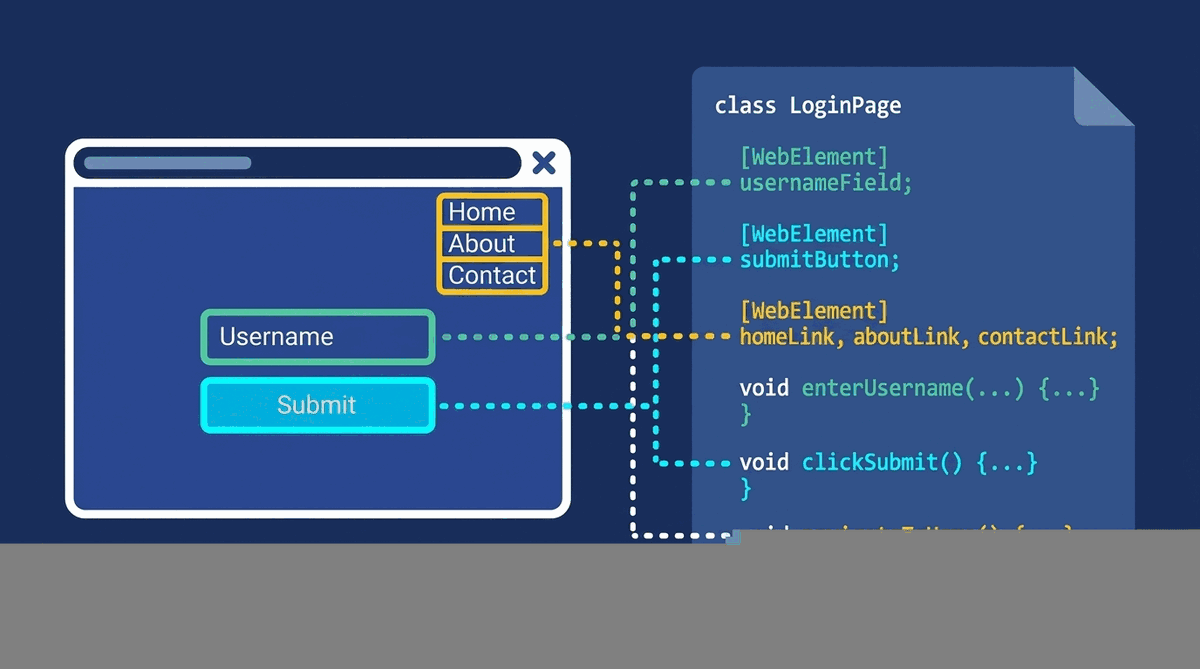
In my new series of articles “Design Patterns in Automated Testing”, I am going to present you the most useful techniques for structuring the code of your automation tests. In my examples, I am going to use Selenium WebDriver. However, the patterns are abstract structures, and they can be implemented with any similar automation framework or programming language. One of the most popular patterns in Web Automation is the so called Page Object Pattern. To understand the primary goal of the pattern, first you need to think what your web automation tests are doing. They navigate to different web pages and click/type on/in various elements. The Page Object Pattern wraps all elements, actions and validations happening on a page in one single object- Page Object. I am going to show you two ways how you can use this pattern. Through the usage of the built-in Page Objects in Selenium WebDriver and via manually created classes.
Page Object Pattern via Selenium WebDriver
UML Class Diagram
classDiagram
    SearchEngineTests --> SearchEngineMainPage
    class SearchEngineMainPage {
        +IWebElement SearchBox
        +IWebElement GoButton
        +IWebElement ResultsCountDiv
        +Navigate()
        +Search(string textToType)
        +AssertResultsCount(string count)
    }
    class SearchEngineTests {
        +SearchInSearchEngine_UsingSeleniumPageFactory()
    }
Participants
The classes and objects participating in this pattern are:
-
Page Object (SearchEngineMainPage)
Contains properties of all necessary web elements of the page. Also, there you can find all actions that can be performed (Search, Navigate). All validations can be placed here too.
-
UI Tests (SearchEngineTests)
This class contains a group of tests related to the above page; it can hold only a single instance of the page object.
Page Object Pattern C# Code
If you are not familiar with the WebDriver Framework, you can look into my article- Getting Started with WebDriver C# in 10 Minutes. To be able to use the page object pattern built-in feature of the framework, you need to install an additional NuGet Package- Selenium.Support
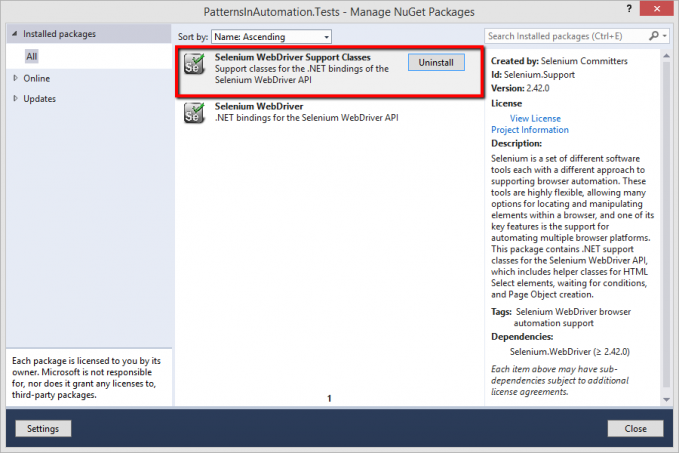
The automation test cases in the below examples will navigate to SearchEngine, search for “Automate The Planet” and validate the count of the returned results. In this particular case, there is a need of only two classes- SearchEngineMainPage and the test class SearchEngineTests.
public class SearchEngineMainPage
{
    private readonly IWebDriver driver;
    private readonly string url = @"searchEngineUrl";

    public SearchEngineMainPage(IWebDriver browser)
    {
        this.driver = browser;
        PageFactory.InitElements(browser, this);
    }

    [FindsBy(How = How.Id, Using = "sb_form_q")]
    public IWebElement SearchBox { get; set; }

    [FindsBy(How = How.Id, Using = "sb_form_go")]
    public IWebElement GoButton { get; set; }

    [FindsBy(How = How.Id, Using = "b_tween")]
    public IWebElement ResultsCountDiv { get; set; }

    public void Navigate()
    {
        this.driver.Navigate().GoToUrl(this.url);
    }

    public void Search(string textToType)
    {
        this.SearchBox.Clear();
        this.SearchBox.SendKeys(textToType);
        this.GoButton.Click();
    }

    public void ValidateResultsCount(string expectedCount)
    {
        Assert.IsTrue(this.ResultsCountDiv.Text.Contains(expectedCount), "The results DIV doesn't contains the specified text.");
    }
}
There are two important things to highlight in the above example.
[FindsBy(How = How.Id, Using = "sb_form_q")]
public IWebElement SearchBox { get; set; }
Just add a property with the desired name and place the above attribute with the appropriate properties- the type of the locator (Id, Class, CSS) and the value of the Locator.
Initialization of the Elements
public SearchEngineMainPage(IWebDriver browser)
{
    this.driver = browser;
    PageFactory.InitElements(browser, this);
}
The static method InitElements takes the responsibility to initialize all of the elements on the page the first time when the driver navigates to it.
Usage in Tests
public class SearchEngineTests
{
    public IWebDriver Driver { get; set; }
    public WebDriverWait Wait { get; set; }


    public void SetupTest()
    {
        this.Driver = new FirefoxDriver();
        this.Wait = new WebDriverWait(this.Driver, TimeSpan.FromSeconds(30));
    }


    public void TeardownTest()
    {
        this.Driver.Quit();
    }


    public void SearchTextInSearchEngine_First()
    {
        SearchEngineMainPage searchEngineMainPage = new SearchEngineMainPage(this.Driver);
        searchEngineMainPage.Navigate();
        searchEngineMainPage.Search("Automate The Planet");
        searchEngineMainPage.ValidateResultsCount("264,000 RESULTS");
    }
}
The main pros of the Page Object Pattern are the readability and that it follows the DRY (Do not Repeat Yourself) and Single Responsibility SOLID Principles. It helps you to built an easy to maintain tests that do not use element locators directly.
UPDATE: Keep in mind that this API for creating page objects was deprecated in March 2018 with the release of 3.11.0 of WebDriver.
You can read the full statement with additional explanations on the official blog of Jim Evans here.
Page Object Pattern without Selenium WebDriver
While ago we were working on the first version of the BELLATRIX test automation framework, I did this research so that we can find the most convenient way for creating page objects.
UML Class Diagram
classDiagram
    SearchEngineMainPage o-- SearchEnginePageValidator
    SearchEngineMainPage o-- SearchEngineElementMap
    SearchEngineTests --> SearchEngineMainPage
    class SearchEngineElementMap {
        +SearchBox()
        +GoButton()
        +ResultsCountDiv()
    }
    class SearchEnginePageValidator {
        #Elements()
        +ResultsCount(string expected)
    }
    class SearchEngineMainPage {
        #Elements()
        +Navigate()
        +Search(string textToType)
        +Validate()
    }
    class SearchEngineTests {
        +SearchInSearchEngine_WithoutSeleniumPageFactory()
    }
Participants
The classes and objects participating in this pattern are:
-
Page Object Element Map
Contains all element properties and their location logic.
-
Page Object Validator
Consists of the validations that will be performed on the page.
-
Page Object (SearchEngineMainPage)
Holds the actions that can be performed on the page like Search and Navigate. Exposes an easy access to the Page Validator through the Validate() method. The best implementations of the pattern hide the usage of the Element Map, wrapping it through all action methods.
-
UI Tests (SearchEngineTests)
This class contains a group of tests related to the above page; it can hold only a single instance of the page object.
public class SearchEngineMainPageElementMap
{
    private readonly IWebDriver browser;

    public SearchEngineMainPageElementMap(IWebDriver browser)
    {
        this.browser = browser;
    }

    public IWebElement SearchBox
    {
        get
        {
            return this.browser.FindElement(By.Id("sb_form_q"));
        }
    }

    public IWebElement GoButton
    {
        get
        {
            return this.browser.FindElement(By.Id("sb_form_go"));
        }
    }

    public IWebElement ResultsCountDiv
    {
        get
        {
            return this.browser.FindElement(By.Id("b_tween"));
        }
    }
}
Paste all validation method in a separate class.
public class SearchEngineMainPageValidator
{
    private readonly IWebDriver browser;

    public SearchEngineMainPageValidator(IWebDriver browser)
    {
        this.browser = browser;
    }

    protected SearchEngineMainPageElementMap Map
    {
        get
        {
            return new SearchEngineMainPageElementMap(this.browser);
        }
    }

    public void ResultsCount(string expectedCount)
    {
        Assert.IsTrue(this.Map.ResultsCountDiv.Text.Contains(expectedCount), "The results DIV doesn't contains the specified text.");
    }
}
At last, put together all classes in the Main Page Object.
public class SearchEngineMainPage
{
    private readonly IWebDriver browser;
    private readonly string url = @"searchEngineUrl";

    public SearchEngineMainPage(IWebDriver browser)
    {
        this.browser = browser;
    }

    protected SearchEngineMainPageElementMap Map
    {
        get
        {
            return new SearchEngineMainPageElementMap(this.browser);
        }
    }

    public SearchEngineMainPageValidator Validate()
    {
        return new SearchEngineMainPageValidator(this.browser);
    }

    public void Navigate()
    {
        this.browser.Navigate().GoToUrl(this.url);
    }

    public void Search(string textToType)
    {
        this.Map.SearchBox.Clear();
        this.Map.SearchBox.SendKeys(textToType);
        this.Map.GoButton.Click();
    }
}
Usage in Tests
public class SearchEngineTests
{
    public IWebDriver Driver { get; set; }
    public WebDriverWait Wait { get; set; }


    public void SetupTest()
    {
        this.Driver = new FirefoxDriver();
        this.Wait = new WebDriverWait(this.Driver, TimeSpan.FromSeconds(30));
    }


    public void TeardownTest()
    {
        this.Driver.Quit();
    }


    public void SearchTextInSearchEngine_Second()
    {
        POP.SearchEngineMainPage searchEngineMainPage = new POP.SearchEngineMainPage(this.Driver);
        searchEngineMainPage.Navigate();
        searchEngineMainPage.Search("Automate The Planet");
        searchEngineMainPage.Validate().ResultsCount("264,000 RESULTS");
    }
}
As you can see the usage of the second type of page object pattern structure is identical to the previous one. Regardless, I like the second solution more because it follows the SOLID Principles more strictly. The different classes used in it have a stronger Cohesion.
For more detailed overview and usage of many more design patterns and best practices in automated testing, check my book “Design Patterns for High-Quality Automated Tests, C# Edition, High-Quality Tests Attributes, and Best Practices”. You can read part of three of the chapters:
Defining High-Quality Test Attributes for Automated Tests
Benchmarking for Assessing Automated Test Components Performance
