

In the series of articles Design Patterns in Automated Testing, I am presenting the most useful techniques for structuring the code of your automation tests. One of the most popular patterns in web automation is the so-called Page Object Design Pattern. To understand the pattern’s primary goal, first, you need to think about what your web automation tests are doing. They navigate to different web pages and click/type on/in various elements. The Page Object Model Design Pattern wraps all elements, actions, and assertions happening on a page in one single object – page object. I will show you two ways of how you can use this pattern through the usage of the built-in Page Objects in Selenium WebDriver and via manually created classes. You can find my original C# version here. Here, I will show you how to do the same in Java.
UML Class Diagram
classDiagram
    BingTests --> BingMainPage
    class BingMainPage {
        +searchBox
        +goButton
        +resultsCountDiv
        +navigate()
        +search()
        +assertResultsCount()
    }
    class BingTests {
        +searchTextInBing_UsingSeleniumPageFactory()
    }
Participants
The classes and objects participating in this pattern are:
-
Page Object (BingMainPage)
Contains properties of all necessary web elements of the page. Also, there you can find all actions that can be performed (search, navigate). All assertions can be placed here too.
-
UI Tests (BingTests)
This class contains a group of tests related to the above page. It can hold only a single instance of the page object.
Page Object Model Design Pattern with PageFactory
To be able to use the page object pattern built-in feature of the framework, you need to install an additional Maven dependency – selenium-support
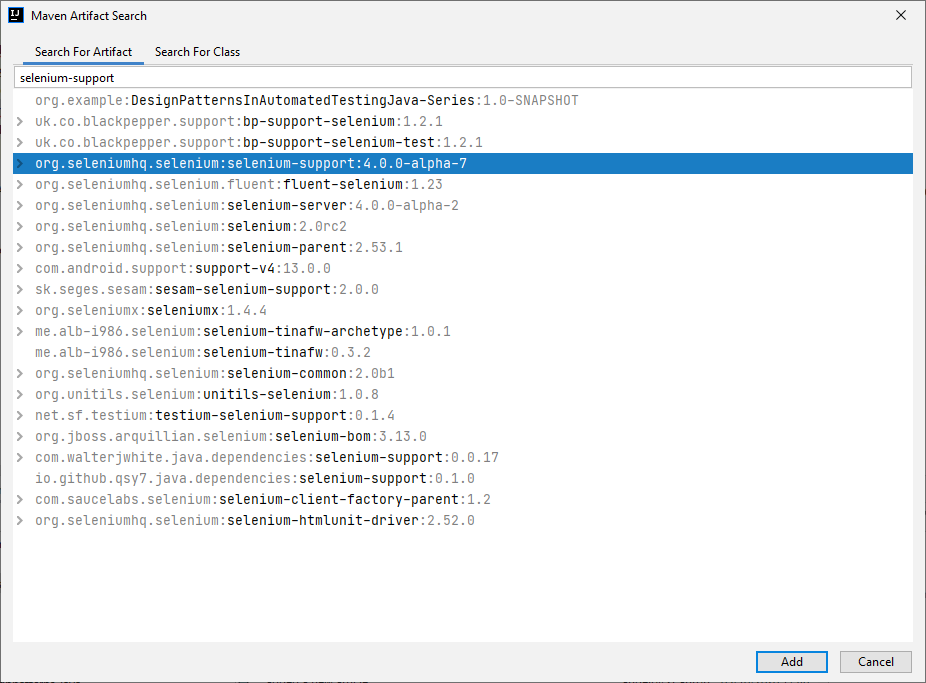
Note
Maven is a build automation tool used primarily for Java projects. Maven, created by Jason van Zyl, began as a sub-project of Apache Turbine in 2002. It is hosted by the Apache Software Foundation, where it was formerly part of the J****akarta Project. Maven addresses two aspects of building software: how software is built and its dependencies. An XML file describes the software project being built, its dependencies on other external modules and components, the build order, directories, and required plug-ins. It comes with pre-defined targets for performing specific, well-defined tasks such as compilation of code and its packaging. Maven dynamically downloads Java libraries and Maven plug-ins from one or more repositories, such as the Maven 2 Central Repository, and stores them in a local cache.
The automation test cases in the below examples will navigate to Bing, search for “Automate The Planet” and assert the returned results’ count. In this particular case, there is a need for only two classes – BingMainPage and the test class BingTests.
public class BingMainPage {

  private final WebDriver driver;
  private final String url = "http://www.bing.com/";

  @FindBy(id = "sb_form_q")
  private WebElement searchBox;

  @FindBy(xpath = "//label[@for='sb_form_go']")
  private WebElement goButton;

  @FindBy(id = "b_tween")
  private WebElement resultsCountDiv;

  public BingMainPage(WebDriver browser) {
    driver = browser;
    PageFactory.initElements(browser, this);
  }

  public void navigate() {
    driver.navigate().to(url);
  }

  public void search(String textToType) {
    searchBox.clear();
    searchBox.sendKeys(textToType);
    goButton.click();
  }

  public void assertResultsCount(String expectedCount) {
    Assert.assertTrue(
      resultsCountDiv.getText().contains(expectedCount),
      "The results DIV doesn't contain the specified text."
    );
  }
}
There are two important things to highlight in the above example.
@FindBy(id = "sb_form_q")
public WebElement searchBox;
Just add a property with the desired name and place the above attribute with the appropriate properties – the type of the locator (id, class, css) and the value of the locator.
public BingMainPage(WebDriver browser) {
  driver = browser;
  PageFactory.initElements(browser, this);
}
The static method initElements takes the responsibility to initialize all of the elements on the page the first time the driver navigates to it.
Usage in Tests
public class BingTests {

  private WebDriver driver;
  private WebDriverWait wait;

  @BeforeClass
  public static void classInit() {
    WebDriverManager.firefoxdriver().setup();
  }

  @BeforeMethod
  public void testInit() {
    driver = new FirefoxDriver();
    wait = new WebDriverWait(driver, 30);
  }

  @AfterMethod
  public void testCleanup() {
    driver.quit();
  }

  @Test
  public void searchTextInBing_UsingSeleniumPageFactory() {
    var bingMainPage = new BingMainPage(driver);
    bingMainPage.navigate();
    bingMainPage.search("Automate The Planet");
    bingMainPage.assertResultsCount(",000 Results");
  }
}
Note
To download the correct version of the selected browser’s driver, we use a library called WebDriverManager. I installed it through the Maven artifact/dependency webdrivermanager. You can find all installed packages in the project’s or modules’ pom.xml files.
The Page Object Pattern’s main pros are the readability and that it follows the DRY (Don’t–Repeat–Yourself) and Single Responsibility SOLID Principles. It helps you to build an easy to maintain tests that do not use element locators directly.
It is untrue that this way of creating page object models is deprecated. Even in the .NET world, many people think that it was obsolete, but this isn’t true either. It was just moved to another GitHub project and NuGet package. However, as I am going to mention at the end of the article, I don’t recommend using it because there are ways to control more precisely how the elements are found and make the tests more readable, and continue reading. Even Simon Stewart, Selenium project lead and creator of the PageFactory, recommends against using the built-in page PageFactory because of the lack of Java annotations’ extensibility. You can listen to his statement at the 2017 Selenium Conference here, talking about PageFactory from 25:19 to 29:30.
Page Object Model Design Pattern without PageFactory
While ago we were working on the first version of the BELLATRIX test automation framework, I did this research so that we can find the most convenient way for creating page objects.
UML Class Diagram
classDiagram
    BingMainPage o-- BingMainPageAssertions
    BingMainPage o-- BingMainPageElements
    BingTests --> BingMainPage
    class BingMainPageAssertions {
        #elements()
        +resultsCount()
    }
    class BingMainPageElements {
        +searchBox()
        +goButton()
        +resultsCountDiv()
    }
    class BingMainPage {
        #elements()
        +navigate()
        +search()
        +assertResultsCount()
    }
    class BingTests {
        +searchTextInBing_WithoutSeleniumPageFactory()
    }
Participants
The classes and objects participating in this pattern are:
-
Page Object Elements
Contains all element properties and their location logic.
-
Page Object Assertions
Consists of the assertions that will be performed on the page.
-
Page Object (BingMainPage)
Holds the actions that can be performed on the page like search and navigate. Exposes easy access to the page assertions through the assertions() method. The best implementations of the pattern hide the element map’s usage, wrapping it through all action methods.
-
UI Tests (BingTests)
This class contains a group of tests related to the above page; it can hold only a single instance of the page object.
Page Object Pattern Java Code
Using this approach, we don’t need the selenium-support Maven dependency anymore.
Paste all elements of the page in a new elements class.
public class BingMainPageElements {

  private final WebDriver browser;

  public BingMainPageElements(WebDriver browser) {
    this.browser = browser;
  }

  public WebElement searchBox() {
    return browser.findElement(By.id("sb_form_q"));
  }

  public WebElement goButton() {
    return browser.findElement(By.xpath("//label[@for='sb_form_go']"));
  }

  public WebElement resultsCountDiv() {
    return browser.findElement(By.id("b_tween"));
  }
}
Put all the assertions in a separate class.
public class BingMainPageAssertions {

  private final WebDriver browser;

  public BingMainPageAssertions(WebDriver browser) {
    this.browser = browser;
  }

  protected BingMainPageElements elements() {
    return new BingMainPageElements(browser);
  }

  public void resultsCount(String expectedCount) {
    Assert.assertTrue(
      elements().resultsCountDiv().getText().contains(expectedCount),
      "The results DIV doesn't contain the specified text."
    );
  }
}
At last, place all classes together in the main page object.
public class BingMainPage {

  private final WebDriver browser;
  private final String url = "http://www.bing.com/";

  public BingMainPage(WebDriver browser) {
    this.browser = browser;
  }

  protected BingMainPageElements elements() {
    return new BingMainPageElements(browser);
  }

  public BingMainPageAssertions assertions() {
    return new BingMainPageAssertions(browser);
  }

  public void navigate() {
    browser.navigate().to(url);
  }

  public void search(String textToType) {
    elements().searchBox().clear();
    elements().searchBox().sendKeys(textToType);
    elements().goButton().click();
  }
}
Usage in Tests
public class BingTests {

  private WebDriver driver;
  public WebDriverWait wait;

  @BeforeClass
  public static void classInit() {
    WebDriverManager.firefoxdriver().setup();
  }

  @BeforeMethod
  public void testInit() {
    driver = new FirefoxDriver();
    wait = new WebDriverWait(driver, 30);
  }

  @AfterMethod
  public void testCleanup() {
    driver.quit();
  }

  @Test
  public void searchTextInBing_WithoutSeleniumPageFactory() {
    var bingMainPage = new BingMainPage(driver);
    bingMainPage.navigate();
    bingMainPage.search("Automate The Planet");
    bingMainPage.assertions().resultsCount(",000 Results");
  }
}
Summary
As you can see, the second type of page object pattern structure usage is identical to the previous one. Regardless, I like the second solution more because it follows the SOLID Principles more strictly. The different classes used in it have a stronger Cohesion.
For more detailed overview and usage of many more design patterns and best practices in automated testing, check my book “Design Patterns for High-Quality Automated Tests, Java Edition, Clean Code for Bulletproof Tests”. (+ with the book you will get an access to more than 20000+ lines of real-world code examples and video explanations to solidify your knowledge)
