

In the previous article, I showed you how to automate complex custom-tuned controls like a grid. In my article Automate Telerik Kendo Grid with WebDriver and JavaScript, you can read about it. However, this is just the beginning. The hardest part is figuring out how to design proper automated tests for every grid’s column. It is even more challenging if you want your tests to run against an empty DB. In this publication, I will share my opinion about writing decent grid control automated tests. In the first part of this mini-series, I will talk about how to automate ID and text columns.
Examples Explained
In the code examples, I will automate one of the demos of the Kendo Grid Control. To create proper automation of controls like this, you need an API that enables you to perform basic CRUD operations against the DB (table) that the grid gets its data. For simplicity, I will use dummy wrapper methods in the examples. In a real-world project, you will need to replace the dummy code with a DB repository or a web service to get/insert/update/delete entities.
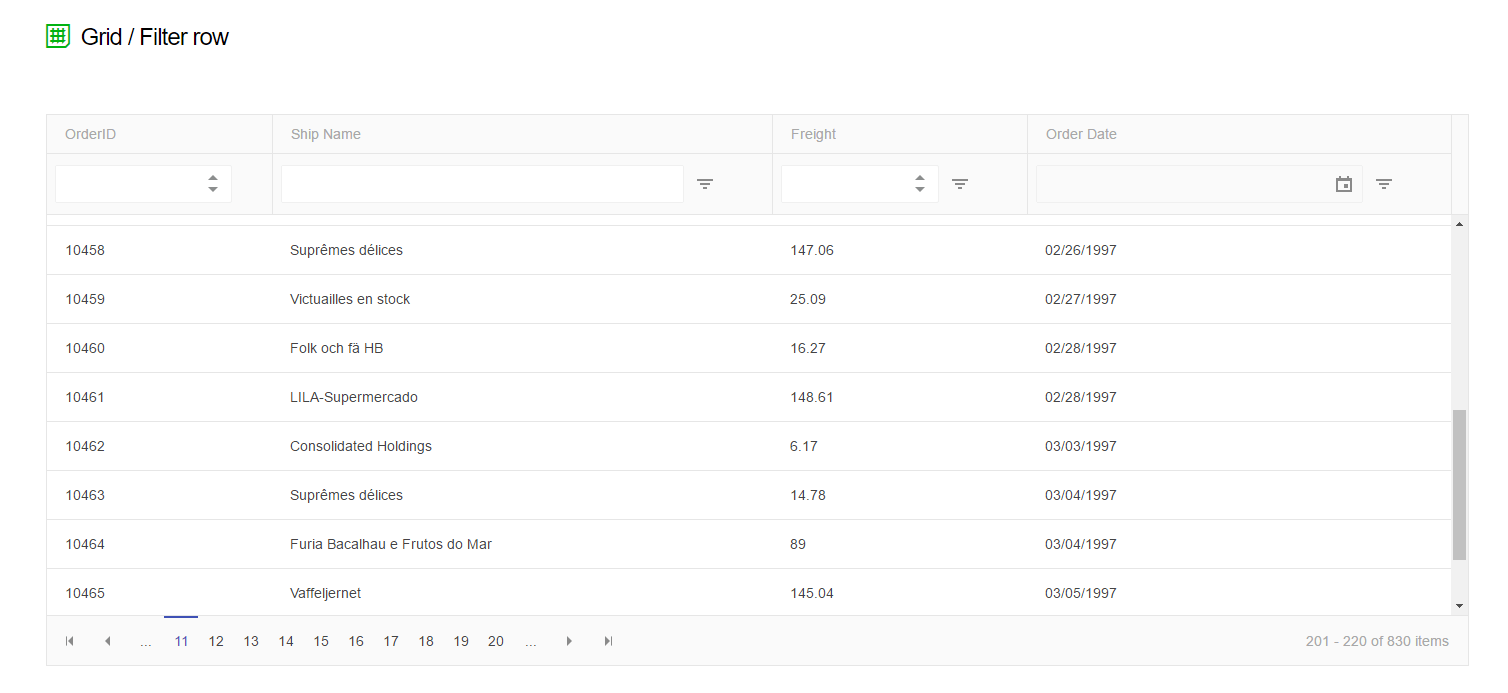
As you will notice in the examples, I will use the so-called KendoGrid element and all of its methods. I suggest you read all about it in my article- Automate Telerik Kendo Grid with WebDriver and JavaScript. Additionally, we will need a couple of additional methods to run the tests properly.
private void waitForGridToLoad(int expectedCount, KendoGrid grid) {
  wait.until(x -> {
    List < GridItem > items = grid.getItems();
    return expectedCount == items.stream().count();
  });
}
private void waitForGridToLoadAtLeast(int expectedCount, KendoGrid grid) {
  wait.until(x -> {
    List < GridItem > items = grid.getItems();
    return items.stream().count() >= expectedCount;
  });
}
We use until a method that comes from the WebDriverWait class. It will wait a specified amount of time and try again after a couple of milliseconds. For example, we will use the waitForGridToLoad function after applying a JavaScript filter. It will wait for a specific number of items on the grid. waitForGridToLoadAtLeast does almost the same thing, except the number of loaded items can be greater than specified.
Design Tests- Unique Identifier ‘ID’ Column
Six filters need to be automated- EQUAL_TO, NOT_EQUAL_TO, GREATER_THAN, GREATER_THAN_OR_EQUAL_TO, LESS_THAN, and LESS_THAN_OR_EQUAL_TO. Also, an additional test should be added to verify that the clear filter functionality is working as expected.
Order ID EQUAL_TO Filter
@Test
public void orderIdEqualToFilter() throws Exception {
  var newItem = CreateNewItemInDb();
  kendoGrid.filter(OrderIdColumnName, FilterOperator.EQUAL_TO, newItem.getOrderId());
  waitForGridToLoad(1, kendoGrid);
  List < GridItem > items = kendoGrid.getItems();
  Assert.assertEquals(items.stream().count(), 1);
}
First, we create a new item in the DB. As the order ID is unique, we can filter directly on it, and we expect only one object to be displayed. After the filtration, we wait for the grid to load a single item, get all the elements, and assert that only one item is present.
Order ID NOT_EQUAL_TO Filter
@Test
public void orderIdNotEqualToFilter() throws Exception {
  // Create new item with unique ship name;
  var newItem = CreateNewItemInDb();
  // Create second new item with the same unique shipping name
  var secondNewItem = CreateNewItemInDb(newItem.getShipName());
  // Filter by the larger orderId but also by the second unique column in this case shipping name
  kendoGrid.filter(
    new GridFilter(OrderIdColumnName, FilterOperator.NOT_EQUAL_TO, secondNewItem.getOrderId()),
    new GridFilter(ShipNameColumnName, FilterOperator.EQUAL_TO, secondNewItem.getShipName()));
  waitForGridToLoadAtLeast(1, kendoGrid);
  List < Order > results = kendoGrid.getItems();
  Assert.assertEquals(results.stream().filter(x -> x.getShipName() == newItem.getShipName()).findFirst().get().getOrderId(), newItem.getOrderId());
  Assert.assertTrue(results.stream().count() == 1);
}
This test has a little bit trickier arrange phase. First, we create two new items. We assign them a unique shipping name that is the same for both. Then we apply two filters, one by the shipping name. This way, only these two items should be displayed. After that, we filter by NOT_EQUAL_TO OrderId. Only the first item should be shown on the grid.
Order ID GREATER_THAN_OR_EQUAL_TO Filter
@Test
public void orderIdGreaterThanOrEqualToFilter() throws Exception {
  // Create new item with unique ship name;
  var newItem = CreateNewItemInDb();
  // Create second new item with the same unique shipping name
  var secondNewItem = CreateNewItemInDb(newItem.getShipName());
  // When we filter by the second unique column ShippingName, only one item will be displayed.
  // Once we apply the second not equal to filter the grid should be empty.
  kendoGrid.filter(
    new GridFilter(OrderIdColumnName, FilterOperator.GREATER_THAN_OR_EQUAL_TO, newItem.getOrderId()),
    new GridFilter(ShipNameColumnName, FilterOperator.EQUAL_TO, newItem.getShipName()));
  waitForGridToLoadAtLeast(2, kendoGrid);
  List < Order > results = kendoGrid.getItems();
  Assert.assertEquals(results.stream().filter(
    x -> x.getShipName() == secondNewItem.getShipName()).findFirst().get().getOrderId(), secondNewItem.getOrderId());
  Assert.assertEquals(results.stream().filter(
    x -> x.getShipName() == newItem.getShipName()).findFirst().get().getOrderId(), newItem.getOrderId());
  Assert.assertTrue(results.stream().count() == 2);
}
Again we create two items with an identical shipping name. Usually, the unique identifiers are incremental, meaning that the new IDs will be bigger than the previous ones. So we apply two filters again. First, we filter by shipping name, displaying only the two items. After that, we use the GREATER_THAN_OR_EQUAL_TO filter by OrderId. Furthermore, we assume that nothing will change, and these two elements will still be visible in the grid.
Order ID GREATER_THAN Filter
@Test
public void orderIdGreaterThanFilter() throws Exception {
  // Create new item with unique ship name;
  var newItem = CreateNewItemInDb();
  // Create second new item with the same unique shipping name
  var secondNewItem = CreateNewItemInDb(newItem.getShipName());
  // Filter by the smaller orderId but also by the second unique column in this case shipping name
  kendoGrid.filter(
    new GridFilter(OrderIdColumnName, FilterOperator.GREATER_THAN, newItem.getOrderId()),
    new GridFilter(ShipNameColumnName, FilterOperator.EQUAL_TO, newItem.getShipName()));
  waitForGridToLoadAtLeast(1, kendoGrid);
  List < Order > results = kendoGrid.getItems();
  Assert.assertEquals(results.stream().filter(
    x -> x.getShipName() == secondNewItem.getShipName()).findFirst().get().getOrderId(), secondNewItem.getOrderId());
  Assert.assertTrue(results.stream().count() == 1);
}
Almost identical to the previous example, except, in the end, we verify that a single item is present in the grid, the one with the bigger ID.
Order ID LESS_THAN_OR_EQUAL_TO Filter
@Test
public void orderIdLessThanOrEqualToFilter() throws Exception {
  // Create new item with unique ship name;
  var newItem = CreateNewItemInDb();
  // Create second new item with the same unique shipping name
  var secondNewItem = CreateNewItemInDb(newItem.getShipName());
  // Filter by the larger orderId but also by the second unique column in this case shipping name
  kendoGrid.filter(
    new GridFilter(OrderIdColumnName, FilterOperator.LESS_THAN_OR_EQUAL_TO, secondNewItem.getOrderId()),
    new GridFilter(ShipNameColumnName, FilterOperator.EQUAL_TO, newItem.getShipName()));
  waitForGridToLoadAtLeast(2, kendoGrid);
  List < Order > results = kendoGrid.getItems();
  Assert.assertEquals(results.stream().filter(
    x -> x.getShipName() == newItem.getShipName()).findFirst().get().getOrderId(), newItem.getOrderId());
  Assert.assertEquals(results.stream().filter(
      x -> x.getShipName() == secondNewItem.getShipName()).skip(results.stream().count() - 1)
    .findFirst().get().getOrderId(), secondNewItem.getOrderId());
  Assert.assertTrue(results.stream().count() == 2);
}
It is almost the same as the test for the GREATER_THAN_OR_EQUAL_TO filter, except this time we filter by the OrderId of the second item, which is bigger. In the end, two items should be displayed in the grid.
Order ID LESS_THAN Filter
@Test
public void orderIdLessThanFilter() throws Exception {
  // Create new item with unique ship name;
  var newItem = CreateNewItemInDb();
  // Create second new item with the same unique shipping name
  var secondNewItem = CreateNewItemInDb(newItem.getShipName());
  // Filter by the larger orderId but also by the second unique column in this case shipping name
  kendoGrid.filter(
    new GridFilter(OrderIdColumnName, FilterOperator.LESS_THAN, secondNewItem.getOrderId()),
    new GridFilter(ShipNameColumnName, FilterOperator.EQUAL_TO, secondNewItem.getShipName()));
  waitForGridToLoadAtLeast(1, kendoGrid);
  List < Order > results = kendoGrid.getItems();
  Assert.assertEquals(results.stream().filter(
    x -> x.getShipName() == newItem.getShipName()).findFirst().get().getOrderId(), newItem.getOrderId());
  Assert.assertTrue(results.stream().count() == 1);
}
The difference is that we change the type of the filter, and only a single element should be visible on the grid.
Order ID Clear Filter
@Test
public void orderIdClearFilter() throws Exception {
  // Create new item with unique ship name;
  var newItem = CreateNewItemInDb();
  // Make sure that we have at least 2 items if the grid is empty. The tests are designed to run against empty DB.
  var secondNewItem = CreateNewItemInDb(newItem.getShipName());
  kendoGrid.filter(OrderIdColumnName, FilterOperator.EQUAL_TO, newItem.getOrderId());
  waitForGridToLoad(1, kendoGrid);
  kendoGrid.removeFilters();
  waitForGridToLoadAtLeast(1, kendoGrid);
  List < Order > results = kendoGrid.getItems();
  Assert.assertTrue(results.stream().count() > 1);
}
The first part of the test is identical to the EQUAL_TO filter. After a single item is displayed, we remove all filters and expect more items to be shown. As the test should be run against an empty DB, we create a second object beforehand.
Design Tests- Shipping Name ‘Text’ Column
Six filters must be automated- EQUAL_TO, NOT_EQUAL_TO, CONTAINS, NOT_CONTAINS, STARTS_WITH, and ENDS_WITH. Also, an additional test should be added to verify that the clear filter functionality is working as expected.
Shipping Name EQUAL_TO Filter
@Test
public void shipNameEqualToFilter() throws Exception {
  var newItem = createNewItemInDb();
  kendoGrid.filter(GridColumns.SHIP_NAME, FilterOperator.EQUAL_TO, newItem.getShipName());
  waitForGridToLoad(1, kendoGrid);
  List < GridItem > items = kendoGrid.getItems();
  Assert.assertEquals(items.stream().count(), 1);
}
Create a new item with a unique shipping name. After we filter by it, only a single element should be displayed.
Shipping Name NOT_EQUAL_TO Filter
@Test
public void shipNameNotEqualToFilter() throws Exception {
  // Apply combined filter. First filter by ID and than by ship name (not equal filter).
  // After the first filter there is only one element when we apply the second we expect 0 elements.
  var newItem = createNewItemInDb();
  kendoGrid.filter(
    new GridFilter(GridColumns.SHIP_NAME, FilterOperator.NOT_EQUAL_TO, newItem.getShipName()),
    new GridFilter(GridColumns.ORDER_ID, FilterOperator.EQUAL_TO, newItem.getOrderId().toString()));
  waitForGridToLoad(0, kendoGrid);
  List < GridItem > items = kendoGrid.getItems();
  Assert.assertEquals(items.stream().count(), 0);
}
We apply two filters. The first filter by ID should leave only the newly created item. We set the second filter to NOT_EQUAL_TO shipping name to empty the grid.
Shipping Name CONTAINS Filter
@Test
public void shipNameContainsFilter() throws Exception {
  var shipName = UUID.randomUUID().toString();
  // Remove first and last letter
  shipName = removeLastChar(removeFirstChar(shipName));
  var newItem = createNewItemInDb(shipName);
  kendoGrid.filter(GridColumns.SHIP_NAME, FilterOperator.CONTAINS, newItem.getShipName());
  waitForGridToLoad(1, kendoGrid);
  List < GridItem > items = kendoGrid.getItems();
  Assert.assertEquals(items.stream().count(), 1);
}
We trim the start and the end of the unique shipping name. If a single element is visible after the filter, this means that the filter works correctly.
Shipping Name NOT_CONTAINS Filter
@Test
public void shipNameNotContainsFilter() throws Exception {
  // Remove first and last letter
  var shipName = UUID.randomUUID().toString();
  shipName = removeLastChar(removeFirstChar(shipName));
  var newItem = createNewItemInDb(shipName);
  // Apply combined filter. First filter by ID and than by ship name (not equal filter).
  // After the first filter there is only one element when we apply the second we expect 0 elements.
  kendoGrid.filter(
    new GridFilter(GridColumns.SHIP_NAME, FilterOperator.NOT_CONTAINS, newItem.getShipName()),
    new GridFilter(GridColumns.ORDER_ID, FilterOperator.EQUAL_TO, newItem.getOrderId().toString()));
  waitForGridToLoad(0, kendoGrid);
  List < GridItem > items = kendoGrid.getItems();
  Assert.assertEquals(items.stream().count(), 0);
}
It is identical to the test for the EQUAL_TO filter, except we trim the start and the end of the shipping name.
Shipping Name STARTS_WITH Filter
@Test
public void shipNameStartsWithFilter() throws Exception {
  // Remove last letter
  var shipName = UUID.randomUUID().toString();
  shipName = removeFirstChar(shipName);
  var newItem = createNewItemInDb(shipName);
  kendoGrid.filter(GridColumns.SHIP_NAME, FilterOperator.STARTS_WITH, newItem.getShipName());
  waitForGridToLoad(1, kendoGrid);
  List < GridItem > items = kendoGrid.getItems();
  Assert.assertEquals(items.stream().count(), 1);
}
To ensure that the filter is different from the CONTAINS filter, we trim the end of the shipping name.
Shipping Name ENDS_WITH Filter
@Test
public void shipNameEndsWithFilter() throws Exception {
  // Remove first letter
  var shipName = UUID.randomUUID().toString();
  shipName = removeFirstChar(shipName);
  var newItem = createNewItemInDb(shipName);
  kendoGrid.filter(GridColumns.SHIP_NAME, FilterOperator.ENDS_WITH, newItem.getShipName());
  waitForGridToLoad(1, kendoGrid);
  List < GridItem > items = kendoGrid.getItems();
  Assert.assertEquals(items.stream().count(), 1);
}
To be ensure that the filter is different from the CONTAINS filter, we trim the start of the shipping name.
Shipping Name Clear Filter
@Test
public void shipNameClearFilter() throws Exception {
  createNewItemInDb();
  // Filter by GUID and we know we wait the grid to be empty
  kendoGrid.filter(GridColumns.SHIP_NAME, FilterOperator.STARTS_WITH, UUID.randomUUID().toString());
  waitForGridToLoad(0, kendoGrid);
  // Remove all filters and we expect that the grid will contain at least 1 item.
  kendoGrid.removeFilters();
  waitForGridToLoadAtLeast(1, kendoGrid);
}
We first apply a filter by some non-existing shipping name. After that, when we remove the filters, we expect more than one element to be displayed. To run the test against an empty DB, we create a new item at the beginning of the test.