
In the new Build Enterprise Automation Framework Series, we will look into detailed explanations on creating enterprise test automation frameworks. Many people starting a new position have this particular assignment, so I think it is crucial to understand how to follow all high-quality standards and practices properly. I am not a fan of reinventing the wheel, so I will encourage you to leverage other proven open-source solutions if they can be used and fit your needs instead of writing your own. Leverage the knowledge and expertise of proven experts in the field. If you follow this advice, this series will be highly useful to you again because you will understand how the test automation frameworks are designed, written, and maintained + how to work internally. The information about the subject will be invaluable to you choosing the right tool for your tests. The series can be even more useful to you if you decide to do everything from scratch.
Article by article, we will discuss different aspects and features of the enterprise test automation frameworks. At the end of the course, we will have a full-fledged enterprise test automation framework. The first article from the series will talk not so much about code but rather on how to define what we need (our requirements), how to do research properly- finding the right tools that we will base our framework, and lastly, creating a detailed list of desired characteristics for our solution grouping all of the various features that we will build in the next articles. In the course, I will use as a demo/example our open-source BELLATRIX test automation framework, which I believe is one of the most feature richest open-source frameworks out there.
In the first article from the series “Enterprise Test Automation Framework: Define Requirements and Characteristics”, we defined our future framework’s requirements and qualities/characteristics. This publication will continue with defining more precisely the various features grouped by the previously described characteristics. They will help us to prioritize and plan our work on the framework. We already looked into a few features in part 1 and part 2. Now we will extend the list further.
8. Unified Team Conventions Features
To unify and force all engineers to write in a unified manner, the framework can integrate static analysis modules to apply coding standards. Also, we can create item templates for generating standardized page objects.
Enforce Coding Standards and Naming Conventions
Coding standards define a programming style. A coding standard does not usually concern itself with wrong or right in a more abstract sense. It is merely a set of rules and guidelines for the formatting of source code.
Benefits:
Seamless code integration
Easy to debug and maintain
Readability
Minimizes communication
Minimizes performance pitfalls
Saves money due to fewer man-hours
Control the browser life cycle
I wrote a few articles about the two most popular technologies in the .NET world - StyleCop and .editorconfig. We can integrate both in our enterprise test automation framework.
High-Quality Automated Tests- Enforce Style and Consistency Rules Using StyleCop
High-Quality Automated Tests- Consistent Coding Styles Using EditorConfig
StyleCop is an open source static code analysis tool from Microsoft which checks C# code for conformance to StyleCop’s recommended coding styles, a subset of Microsoft’s .NET Framework Design Guidelines.
Static analysis integrates with all versions of Visual Studio. It contains a set of style and consistency rules. The code is checked on a build. If some of the rules are violated, warning messages are displayed. This way, you can quickly locate the problems and fix them.
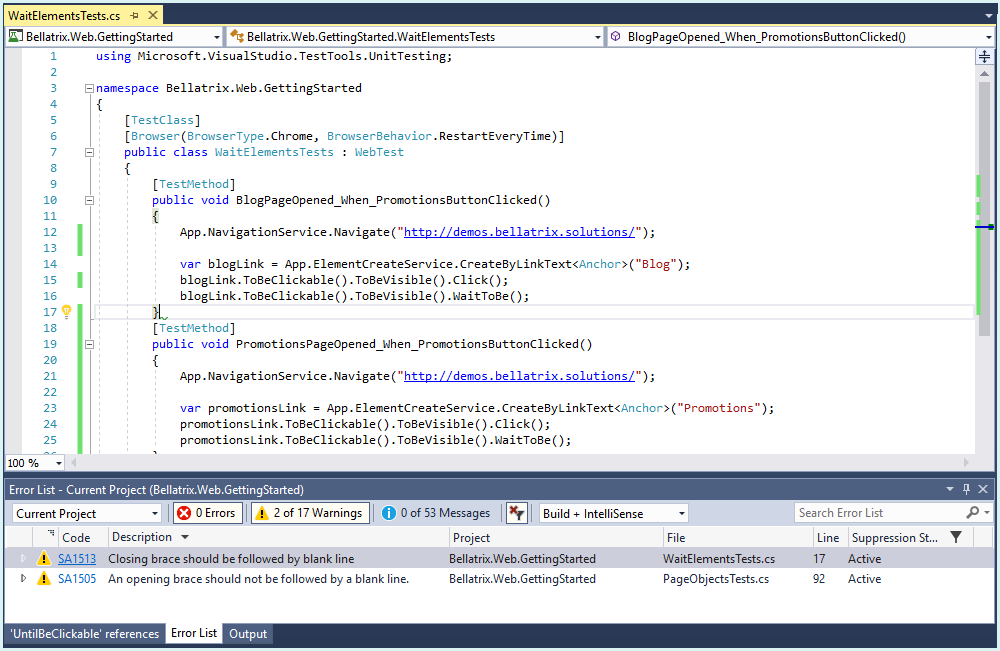
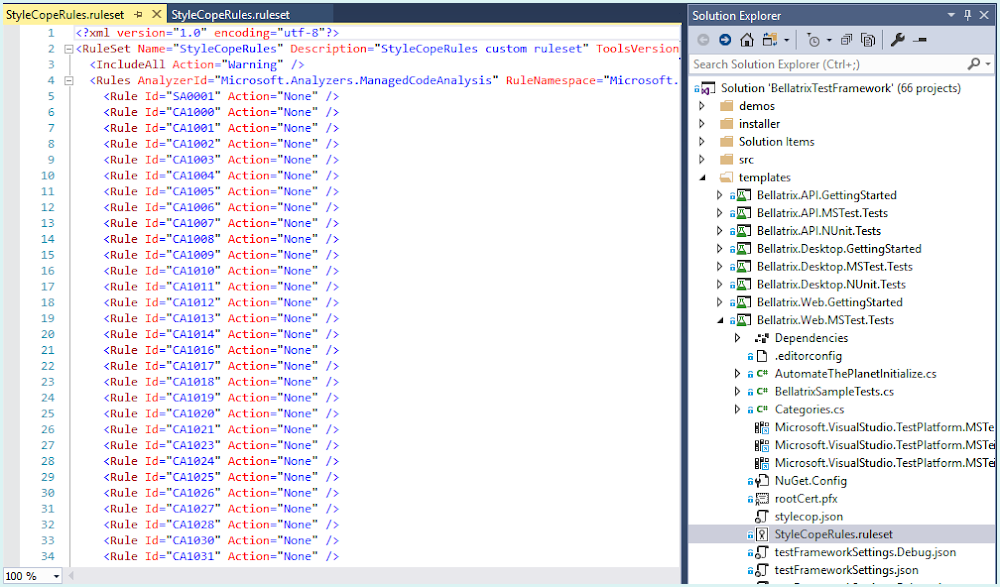
Our framework’s projects can come with predefined StyleCop and .editorconfig rules.
In the files, we will be able to enable and disable particular rules and configure the severity of violations reported by individual rules.
Structured Code Using Page Object Templates
Page objects as any design pattern can be created in various ways and can easily pollute your code if you don’t have a way to enforce all engineers to write them in a unified way. This is done in case each page object is created in a different way – such as one in a single file and another with partial classes or navigation properties – as this can make your code harder to navigate, read, and maintain.
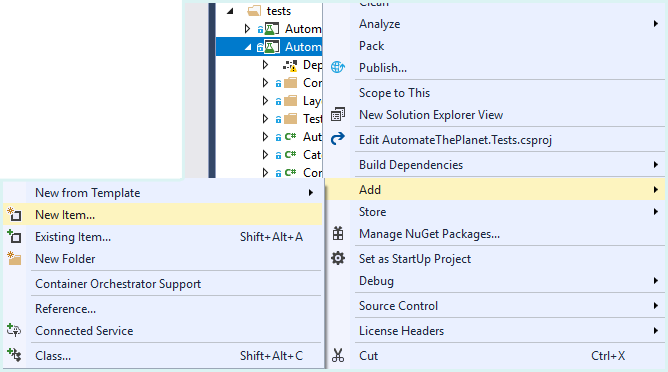
To solve this problem, our new framework can offer standardized page object item templates. I blogged while ago how to create such - Create Multiple Files Page Objects with Visual Studio Item Templates
9. Seamlessly Integration with Existing Tools and Processes Features
The framework needs to integrate with all of your existing tooling - generating test cases and bug reports automatically based on your tests. Publish the test results in all significant test result portals.
Dynamic Test Cases qTest
Dynamic test cases are a unique feature, where the framework automatically generates test cases in a popular test case management system based on your automated tests. It will populate the title, description, and other necessary properties automatically. Moreover, it will generate human-readable steps and expected results. The most significant benefit is that it will keep up to date your auto-generated test cases over time, no matter what you change in your tests. It is an excellent functionality to allow non-technical people of your company to see what your tests are doing.
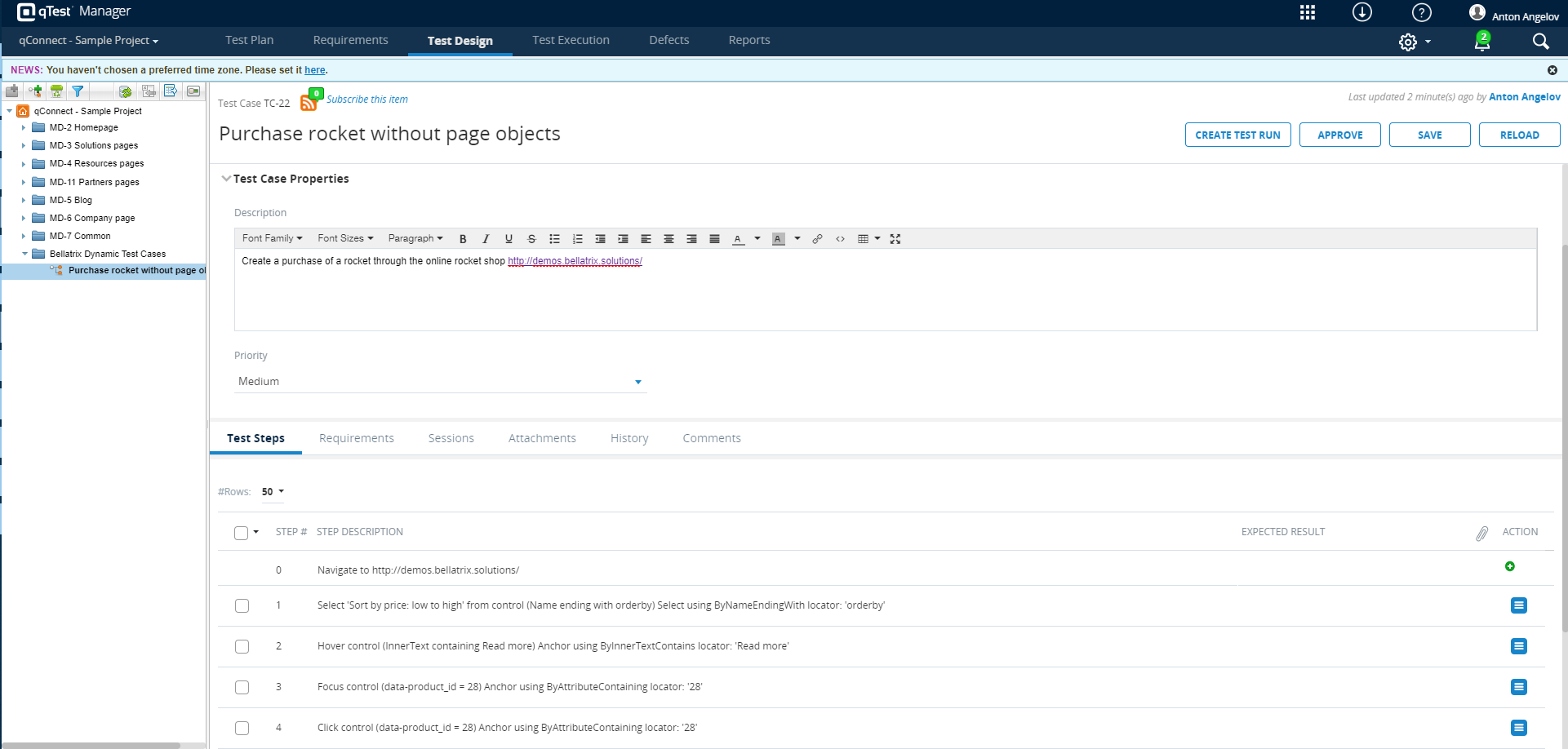
We can add a new DynamicTestCase attribute to turn-on the integration and supply the needed information.
[Browser(BrowserType.Chrome, BrowserBehavior.RestartEveryTime)]
[DynamicTestCase(SuiteId = "8260474")]
public class PageObjectsTests : WebTest
{

    [DynamicTestCase(
        TestCaseId = "4d001440-bf6c-4a8b-b3e6-796cbad361e1",
        Description = "Create a purchase of a rocket through the online rocket shop http://demos.bellatrix.solutions/")]
    public void PurchaseRocketWithPageObjects()
    {
        App.TestCases
            .AddPrecondition($"Navigate to http://demos.bellatrix.solutions/");
        var homePage = App.GoTo<HomePage>();
        homePage.FilterProducts(ProductFilter.Popularity);
        homePage.AddProductById(28);
        homePage.ViewCartButton.Click();
        var cartPage = App.Create<CartPage>();
        cartPage.ApplyCoupon("happybirthday");
        cartPage.ProceedToCheckout.Click();
        var billingInfo = new BillingInfo
        {
            FirstName = "In",
            LastName = "Deepthought",
            Company = "Automate The Planet Ltd.",
            Country = "Bulgaria",
            Address1 = "bul. Yerusalim 5",
            Address2 = "bul. Yerusalim 6",
            City = "Sofia",
            State = "Sofia-Grad",
            Zip = "1000",
            Phone = "+00359894646464",
            Email = "info@bellatrix.solutions",
            ShouldCreateAccount = true,
            OrderCommentsTextArea = "cool product",
        };

        var checkoutPage = App.Create<CheckoutPage>();
        checkoutPage.FillBillingInfo(billingInfo);
        checkoutPage.CheckPaymentsRadioButton.Click();
    }
}
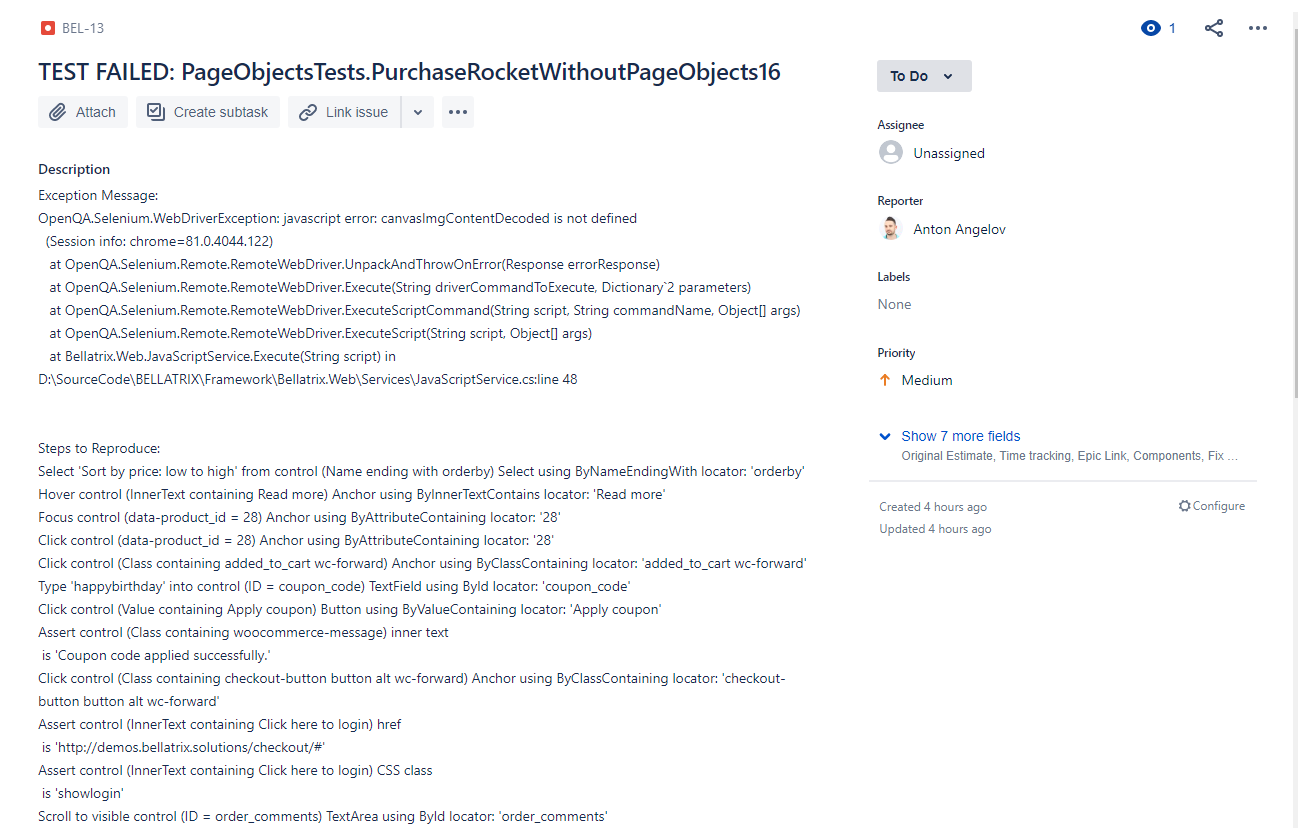
Automatic Bug Reporting Jira
The automatic bug reporting is a feature that will create a bug automatically in various bug tracking software if some of your tests fail. The plug-in will populate the description, attach a screenshot, video of the test. Moreover, it will generate human-readable steps to reproduce.
Allure Test Results
Allure Framework is a flexible lightweight multi-language test report tool that not only shows a very concise representation of what have been tested in a neat web report form. Allure reports shorten common defect lifecycle: test failures can be divided on bugs and broken tests, also logs, steps, fixtures, attachments, timings, history and integrations with TMS and bug-tracking systems. Also, provides a clear ‘big picture’ of what features have been covered.
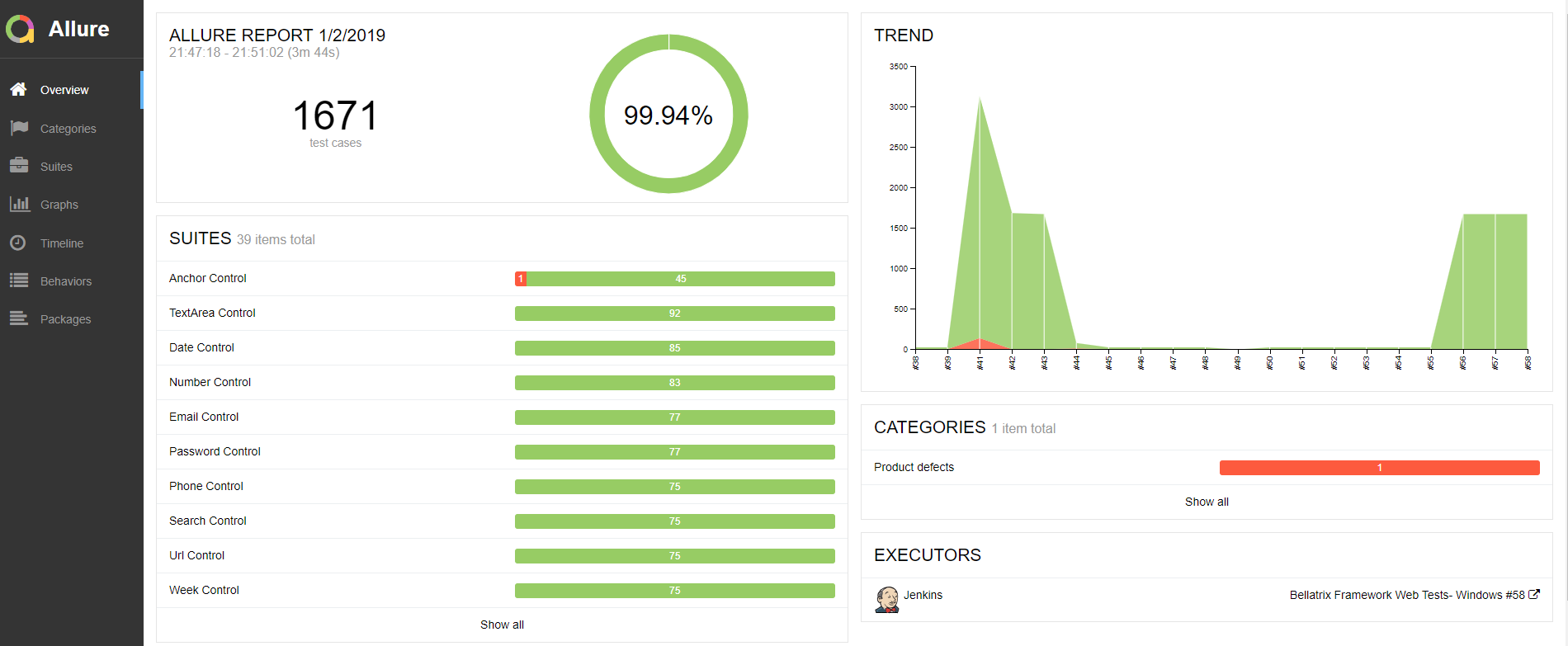
As we defined in the first article from the series when we defined our requirements, it will be great to support such visualization of our test results. You can read more about Allure in my article - Test Automation Reporting with Allure in .NET Projects
ReportPortal Test Results
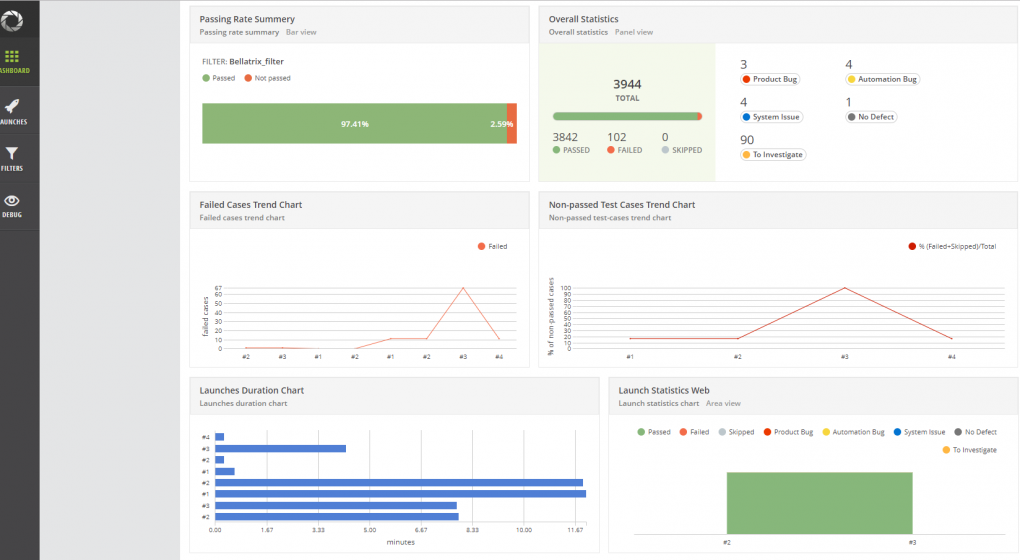
ReportPortal is a service, that provides increased capabilities to speed up results analysis and reporting through the use of built-in analytic features. ReportPortal is a great addition to the Continuous Integration and Continuous Testing process.
It is invaluable for creating test results dashboards so we want definitely to build such integration. We can use my research from Test Automation Reporting with ReportPortal in .NET Projects
Execute Tests in the Cloud
Our framework should have native support for executing the tests in the popular cloud platforms such as SauceLabs, BrowserStack, and CrossBrowserTesting. We can extend a bit the Browser attribute to support these integrations.
[SauceLabs(BrowserType.Chrome,
    "62",
    "Windows",
    BrowserBehavior.ReuseIfStarted,
    recordScreenshots: true,
    recordVideo: true)]
public class SauceLabsTests : WebTest
{

        public void PromotionsPageOpened_When_PromotionsButtonClicked()
        {
            App.NavigationService
                .Navigate("http://demos.bellatrix.solutions/");
            var promotionsLink = App.ElementCreateService
                                    .CreateByLinkText<Anchor>("Promotions");
            promotionsLink.Click();
        }
}
Execute Tests in Docker Containers
Using similar approach we can enable execution of tests in Docker containers through integration with Selenoid. You can check my article - Execute Tests in Docker Containers Using Selenoid
[Selenoid(BrowserType.Chrome, "77",
          BrowserBehavior.RestartEveryTime,
          recordVideo: true,
          enableVnc: true,
          saveSessionLogs: true)]
public class SeleniumGridTests : WebTest
{

    public void PromotionsPageOpened_When_PromotionsButtonClicked()
    {
        App.NavigationService
            .Navigate("http://demos.bellatrix.solutions/");
        var promotionsLink = App.ElementCreateService
                                .CreateByLinkText<Anchor>("Promotions");
        promotionsLink.Click();
    }
}
10. Advanced Scenarios Support Features
It needs to support advanced “hard-to-automate” scenarios such as asserting PDFs through image recognition with the help of machine learning, reusing web tests for load testing, automatic machine setup, and the possibility to perform responsive layout and style tests.
Image Recognition
The image recognition module will be used to verify hard-to-assert functionalities such as PDFs, charts, and similar. Or we can interact with everything on your screen. Perform clicks, set text, drag and drop, double click, and more. Our library will use a machine learning engine for comparing images of your screen. We will add screenshots to our project and embed them.
We will create a C# port of the image recognition tool SikuliX. You can find similar POC in GitHub, so I guess we will reuse one of them.
Screen.EnsureIsVisible("chrome-print-preview-grid", similarity: 0.7, timeoutInSeconds: 30);Check whether the provided image is part of the current screen with similarity, and we set the timeout.
Load Testing
A big problem of most load testing solutions is that your tests get outdated quite fast with each small update of your website. The usual fix is to rewrite all existing tests. To solve this problem, we will integrate some the framework’s features so that each time our web tests are executed, they will update the load tests as well. To mark a web test to be reused for load testing we only need to mark it with the LoadTest attribute and turn on the web requests recording.
[Browser(BrowserType.Chrome,
        BrowserBehavior.ReuseIfStarted,
        true)]
public class DemandPlanningTests : WebTest
{


    public void NavigateToDemandPlanning()
    {
        App.NavigationService
            .Navigate("http://demos.bellatrix.solutions/");
        Select sortDropDown = App.ElementCreateService
                .CreateByNameEndingWith<Select>("orderby");
        Anchor protonMReadMoreButton = App.ElementCreateService
                .CreateByInnerTextContaining<Anchor>("Read more");
        Anchor addToCartFalcon9 = App.ElementCreateService
                .CreateByAttributesContaining<Anchor>("data-product_id", "28")
                .ToBeClickable();
        Anchor viewCartButton = App.ElementCreateService
                .CreateByClassContaining<Anchor>("added_to_cart wc-forward")
                .ToBeClickable();
        sortDropDown.SelectByText("Sort by price: low to high");
        protonMReadMoreButton.Hover();
        addToCartFalcon9.Focus();
        addToCartFalcon9.Click();
        viewCartButton.Click();
    }
}
The load test library will smartly decide which response contains the HTML of the page. Based on the specified locators in your test, the assertion such as element is visible, some text is displayed or disabled.
The library will offer various configurations such as the number of execution processes, total time of execution, regex filters for filtering some requests, specifying what type of assertions to be made, etc. We will be able to change how the engine balances your test scenarios. It can execute them equal times or run some of them more often.
public class DemandPlanningTests : LoadTest
{

    public void NavigateToDemandPlanning()
    {
        LoadTestEngine.Settings.LoadTestType = LoadTestType.ExecuteForTime;
        LoadTestEngine.Settings.MixtureMode = MixtureMode.Equal;
        LoadTestEngine.Settings.NumberOfProcesses = 1;
        LoadTestEngine.Settings.PauseBetweenStartSeconds = 0;
        LoadTestEngine.Settings.SecondsToBeExecuted = 60;
        LoadTestEngine.Settings.ShouldExecuteRecordedRequestPauses = true;
        LoadTestEngine.Settings
                      .IgnoreUrlRequestsPatterns
                      .Add(".*theming.js.*");
        LoadTestEngine.Assertions.AssertAllRequestStatusesAreSuccessful();
        LoadTestEngine.Assertions.AssertAllRecordedEnsureAssertions();
        LoadTestEngine.Execute("loadTestResults.html");
    }
}
After the load test is executed the tool generates an informative HTML report.
Find here a recording demonstrating LIVE how to reuse WebDriver functional tests for load testing.
Software Machine Automation
Traditional tools are not built for modern automation and a DevOps approach, which can make achieving consistency and gaining insights across your environment difficult. There are a lot of different installer formats and multiple approaches to deploying software. Deploying software without package management can be complicated and time-consuming. Software management automation simplifies this through a simple, repeatable, and automated approach, by using a universal packaging format for managing all software. It doesn’t matter if you are using native installers, zips, scripts, binaries, or in-house developed applications and tools.
One for the best software management automation package managers for Windows is Chocolatey.
Chocolatey has the largest online registry of Windows packages. Chocolatey packages encapsulate everything required to manage a particular piece of software into one deployment artifact by wrapping installers, executables, zips, and/or scripts into a compiled package file. Chocolatey aims to automate the entire software lifecycle from install through upgrade and removal on Windows operating systems.
Package submissions go through a rigorous moderation review process, including automatic virus scanning. The community repository has a strict policy on malicious and pirated software. Read more.
I made a reach while ago how to build such a feature, so I think we can reuse it.
Software Management Automation in Automated Testing
public class SoftwareManagementAutomationTests
{
    private static readonly string AssemblyFolder =
        Path.GetDirectoryName(Assembly.GetExecutingAssembly().Location);
    private static IWebDriver _driver;


    public static void AssemblyInitialize(TestContext testContext)
    {
        SoftwareAutomationService.InstallRequiredSoftware();
    }
}
Layout Tests
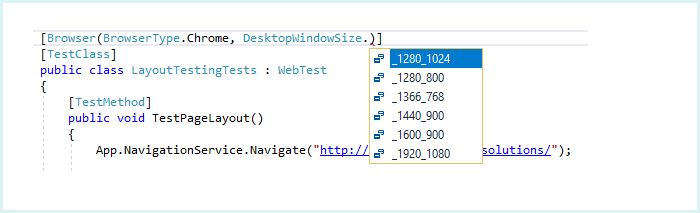
Test responsive layouts based on test location of objects relative to each other on the page. Our framework can resize the browser or app. It will then find the elements and make various calculations and assertions based on their coordinates and whether an element is above, below, left, right, etc. in relation to another.
[Browser(BrowserType.Chrome,
         DesktopWindowSize._1280_1024,
         BrowserBehavior.RestartEveryTime)]

public class LayoutTestingTests : WebTest
{

    public void TestPageLayout()
    {
        App.NavigationService
            .Navigate("http://demos.bellatrix.solutions/");
        Select sortDropDown = App.ElementCreateService
            .CreateByNameEndingWith<Select>("orderby");
        Anchor protonRocketAnchor =App.ElementCreateService
            .CreateByAttributesContaining<Anchor>("href", "/proton-rocket/");
        Div saturnVRating = saturnVAnchor
            .CreateByClassContaining<Div>("star-rating");
        sortDropDown.AssertAboveOf(protonRocketAnchor, 41);
        LayoutAssert.AssertAlignedHorizontallyAll(sortDropDown, protonRocketAnchor);
        saturnVRating.AssertInsideOf(saturnVAnchor);
        saturnVRating.AssertHeightLessThan(100);
        saturnVRating.AssertWidthBetween(50, 70);
    }
}
We will access the resolutions through DesktopWindowSize, MobileWindowSize, and TabletWindowSize enumerations. The Browser attribute gives you the option to resize your browser window to test the rearrangement of the web elements on your pages.
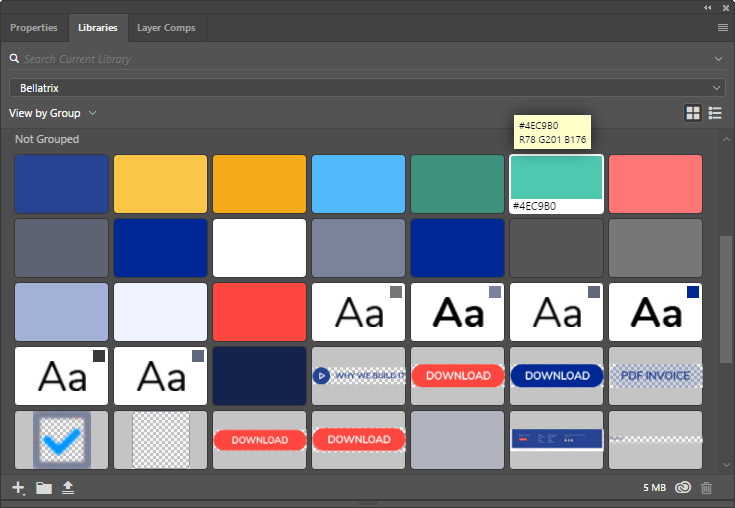
Style testing will be a module from our enterprise framework that will allow us to test your website’s CSS styles, such as background, border, other colors, font size, size, weight, and many others.
[TestCategory(Categories.CI)]
public void TestStyles()
{
    App.NavigationService.Navigate("http://demos.bellatrix.solutions/");
    Select sortDropDown = App.ElementCreateService.CreateByNameEndingWith<Select>("orderby");
    Anchor protonRocketAnchor = App.ElementCreateService.CreateByAttributesContaining<Anchor>("href", "/proton-rocket/");
    Anchor saturnVAnchor = App.ElementCreateService.CreateByAttributesContaining<Anchor>("href", "/saturn-v/");
    sortDropDown.AssertFontSize("14px");
    sortDropDown.AssertFontWeight("400");
    sortDropDown.AssertFontFamily("Source Sans Pro");
    protonRocketAnchor.AssertColor("rgba(150, 88, 138, 1)");
    protonRocketAnchor.AssertBackgroundColor("rgba(0, 0, 0, 0)");
    protonRocketAnchor.AssertBorderColor("rgb(150, 88, 138)");
    protonRocketAnchor.AssertTextAlign("center");
    protonRocketAnchor.AssertVerticalAlign("baseline");
}
In the next articles, we will start building piece by piece the different modules of our enterprise test automation framework. Also, you can download the full source code of open-source test automation BELLATRIX from the below button. It is one of the feature richest frameworks out there that are free. It supports web, mobile, API, desktop, and load testing. We will use it in all of the next articles as a showcase. So, I encourage you to download it, start playing with it, debugging, and looking into the code. We will implement similar features for the different technologies- API, web, desktop, Android, iOS.